Contents
ComfyUI API Tutorial: Automate Image Generation with Python
ComfyUI is an HTTP server, and every run from its interface is actually a call to its API. You can submit workflows with code to:
- Generate lots of images in batches (for example, generate one image for each of 100 products)
- Integrate ComfyUI into your website, chatbot, or n8n automation workflow
- Generate content automatically on a schedule
1. Export an API workflow
Workflow JSON saved from the interface includes layout information. The API needs a different, simplified format:
- Create and test your workflow in ComfyUI.
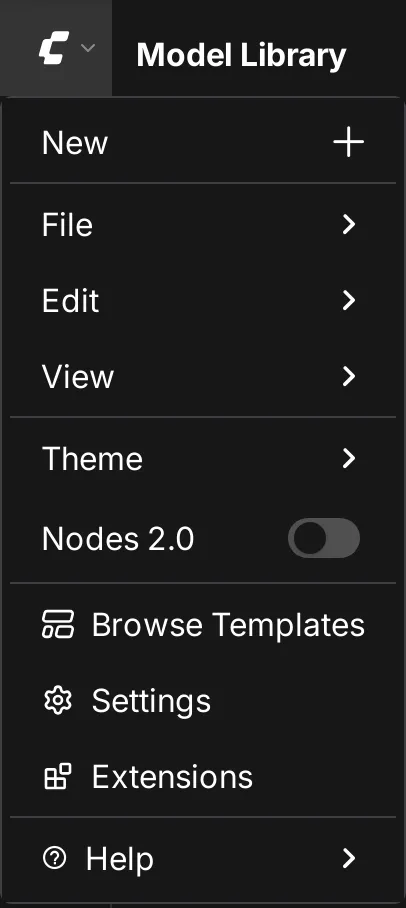
- Open the top-left menu → File → Export (API), and save it as
workflow_api.json.
The API format looks like this, with each node's ID as its key:
{
  "3": {
    "class_type": "KSampler",
    "inputs": {
      "seed": 123456,
      "steps": 25,
      "cfg": 6,
      "sampler_name": "dpmpp_2m",
      "scheduler": "karras",
      "denoise": 1,
      "model": ["4", 0],
      "positive": ["6", 0],
      "negative": ["7", 0],
      "latent_image": ["5", 0]
    }
  },
  "6": {
    "class_type": "CLIPTextEncode",
    "inputs": { "text": "a cat sitting on a windowsill", "clip": ["4", 1] }
  }
}
["4", 0] means “the 0th output of node 4.” Note the IDs of the nodes you want to modify (for example, the positive prompt is 6, and KSampler is 3).
2. Submit a job
curl -X POST http://127.0.0.1:8188/prompt \
  -H "Content-Type: application/json" \
  -d "{\"prompt\": $(cat workflow_api.json)}"
Use the prompt_id in the response to look up the result.
3. Complete Python example
import json
import random
import time
import urllib.parse
import urllib.request

SERVER = "http://127.0.0.1:8188"

def queue(workflow: dict) -> str:
    data = json.dumps({"prompt": workflow}).encode()
    req = urllib.request.Request(f"{SERVER}/prompt", data=data, headers={"Content-Type": "application/json"})
    return json.load(urllib.request.urlopen(req))["prompt_id"]

def wait_for(prompt_id: str) -> dict:
    while True:
        history = json.load(urllib.request.urlopen(f"{SERVER}/history/{prompt_id}"))
        if prompt_id in history:
            return history[prompt_id]
        time.sleep(1)

def download_images(result: dict, prefix: str):
    for node_output in result["outputs"].values():
        for i, img in enumerate(node_output.get("images", [])):
            query = urllib.parse.urlencode(
                {"filename": img["filename"], "subfolder": img["subfolder"], "type": img["type"]}
            )
            with urllib.request.urlopen(f"{SERVER}/view?{query}") as r, open(f"{prefix}_{i}.png", "wb") as f:
                f.write(r.read())

workflow = json.load(open("workflow_api.json", encoding="utf-8"))

subjects = ["a red bicycle", "a vintage camera", "a cup of bubble tea"]
for n, subject in enumerate(subjects):
    workflow["6"]["inputs"]["text"] = f"product photo of {subject}, white background, studio lighting"
    workflow["3"]["inputs"]["seed"] = random.randint(0, 2**32 - 1)
    pid = queue(workflow)
    print("Submitted", subject, pid)
    download_images(wait_for(pid), f"product_{n}")
    print("Complete", subject)
Replace "6" and "3" with the corresponding node IDs in your workflow.
Upload input images
When you need an input image for image-to-image or ControlNet, upload it first:
curl -X POST http://127.0.0.1:8188/upload/image -F "image=@./input.jpg"The response provides a filename. Enter it in the Load Image node's image field.
Live progress: WebSocket
Connect to ws://127.0.0.1:8188/ws?clientId=custom-ID (include the same client_id in the JSON when submitting the job) to receive the currently running node, progress percentage, and completion notification in real time. This is useful for building an interface with a progress bar.
Other useful endpoints
| Endpoint | Purpose |
|---|---|
GET /queue | Current queue |
POST /interrupt | Stop the current run |
GET /history | History |
GET /object_info | Definitions for all nodes (inputs, outputs, options) |
GET /system_stats | System and graphics card information |
Deployment notes
- The ComfyUI API has no authentication, so don't expose it directly to the internet. Call it from your own backend code, and implement authentication and usage limits on the backend.
- To call it from another computer, start ComfyUI with
--listenand restrict the source with a firewall. - For long batch generation runs, remember to clean out the
outputfolder regularly.
You can also integrate ComfyUI into n8n: use an HTTP Request node to submit the workflow, then use Wait and a loop to check for the result. See the n8n tutorial for how to use n8n.
Updated October 12, 2026