Contents
ComfyUI Flux and Qwen-Image Tutorial: Use New-Generation Image Models
After SD 1.5 and SDXL, a new generation of open-source image models—such as Black Forest Labs' Flux series, Alibaba's Qwen-Image series, and other models that continue to arrive—has made clear gains in image quality, prompt understanding, and text rendering. ComfyUI usually adds support soon after a model is released.
Key differences from SDXL
| SD 1.5 / SDXL | New-generation models (Flux, Qwen-Image, and others) | |
|---|---|---|
| Model size | 2–7 GB | Commonly 10–20 GB or more (compressed versions are also available) |
| Model files | One checkpoint | Diffusion model, text encoder, and VAE are often separate |
| Prompts | Mainly keywords | Understand full sentences and can render specified text |
| Negative prompts | Effective | Many models don't use them (CFG is 1) |
| GPU memory | 6–8 GB works | 12 GB or more recommended, or use a quantized version |
The easiest way to get started: official templates
New models use different node combinations and parameters. The most reliable approach is to use the templates built into ComfyUI:
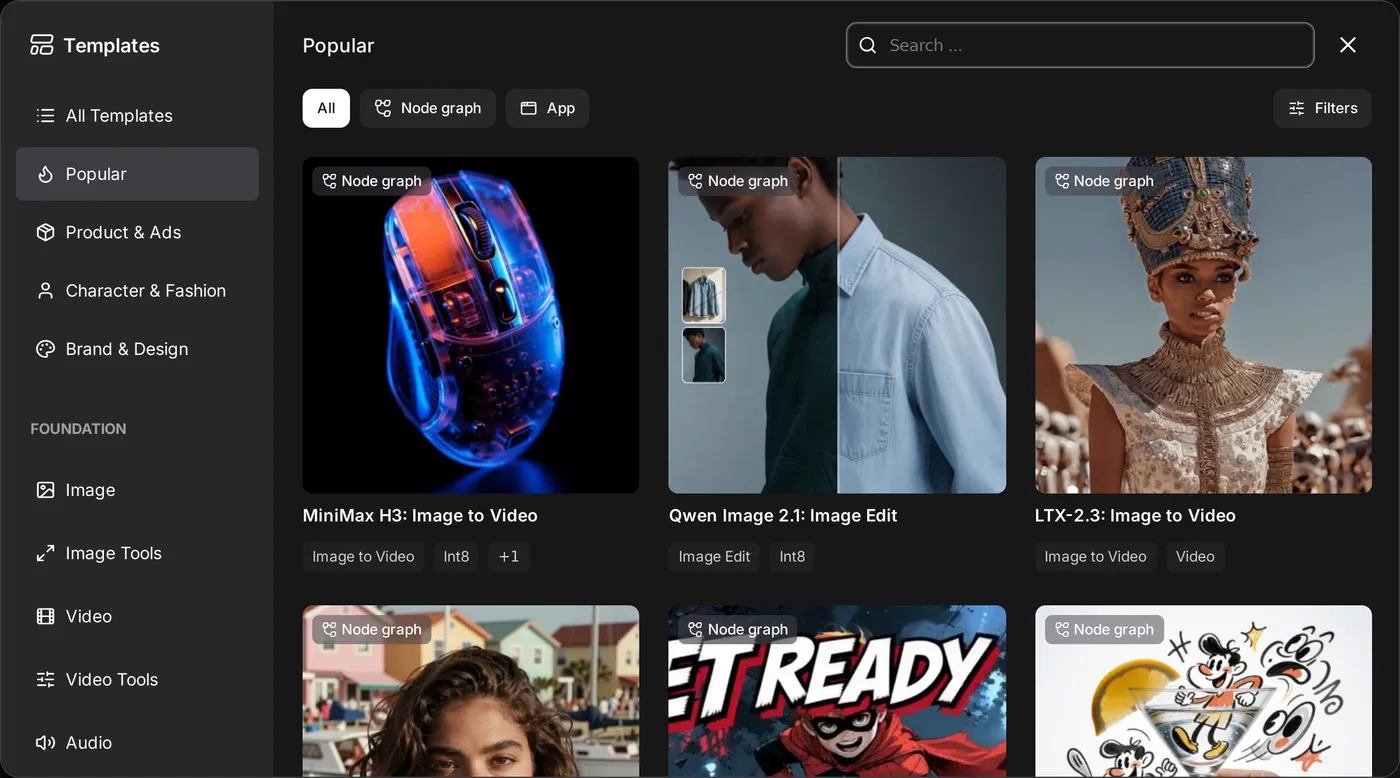
- Menu → Browse Templates.
- Find the model category you want, such as Flux or Qwen-Image, and select a text-to-image template.
- After loading it, if any models are missing, ComfyUI usually shows a list of files to download and download links. It may even let you download them directly to the correct folders.
- Make sure each loader node has the correct file selected, then click Run.
The parameters in the template (steps, sampler, guidance) are the settings recommended by the developers. Generate with them first, then adjust once you're familiar with the model.
Where to place model files
Separate model files usually go in these folders:
models/
├── diffusion_models/   main model for flux or qwen-image
├── text_encoders/      text encoders (such as clip_l, t5xxl, qwen, depending on the model)
└── vae/                VAE for the model
Use these corresponding nodes:
| File | Node |
|---|---|
| Main model | Load Diffusion Model (UNETLoader) |
| Text encoder | Load CLIP, DualCLIPLoader, etc.; choose the matching model under type |
| VAE | Load VAE |
Different models use different text encoders and VAEs, so you can't mix and match them. Download the files listed in the template or on the model page.
When you don't have enough GPU memory
| Version | Description |
|---|---|
| FP8 | About half the original file size, with little quality loss. You can also select fp8 for weight_dtype in Load Diffusion Model. |
| GGUF quantized (Q8, Q6, Q5, Q4…) | Smaller; requires the ComfyUI-GGUF custom nodes. Use its loader nodes in place of Load Diffusion Model / Load CLIP. |
| Distilled / accelerated versions | Require fewer steps (for example, 4–8) and run much faster. |
ComfyUI automatically offloads parts that don't fit to system memory (which is slower). So even if you have slightly too little GPU memory, you can usually still run the model, but it will be slower. At least 32 GB of system memory is recommended.
Writing prompts
New-generation models understand natural language, so describe the image in complete sentences:
A cozy bookstore in an old Taipei alley at dusk. A hand-painted wooden sign above the
door says "Corner Books" in neat white letters. Warm light spills onto the wet street,
and a black cat sits by the doorway. Shot on a 35mm film camera.- To include text in an image, put the text in quotation marks.
- Describing composition, lighting, and camera works better than piling on words like “masterpiece, best quality.”
- Some models, such as Qwen-Image, also support Chinese prompts and rendering Chinese characters well.
Image editing models
In addition to text-to-image models, the new generation includes dedicated editing models (such as Flux Kontext and Qwen-Image-Edit). Give one an image and an instruction, for example:
Change the background to a snowy street, and keep the person unchanged.You can change the background, recolor clothes, remove objects, or edit text in an image without drawing a mask by hand. Search for Edit or Kontext in the templates to find the corresponding workflow.
LoRA and ControlNet
New models also have their own LoRA and ControlNet versions, but they must be trained for that model. An SDXL LoRA won't work with Flux. When loading a LoRA for a new model, you usually use the LoraLoaderModelOnly node.
Licensing
Licenses vary widely across new-generation models: some allow commercial use, some are limited to noncommercial use (such as certain Flux versions), and others require an additional license. Be sure to check the model's license terms before using it commercially.
Updated October 12, 2026