Contents
n8n Expressions Tutorial: $json, $('Node'), Dates, and Common Functions
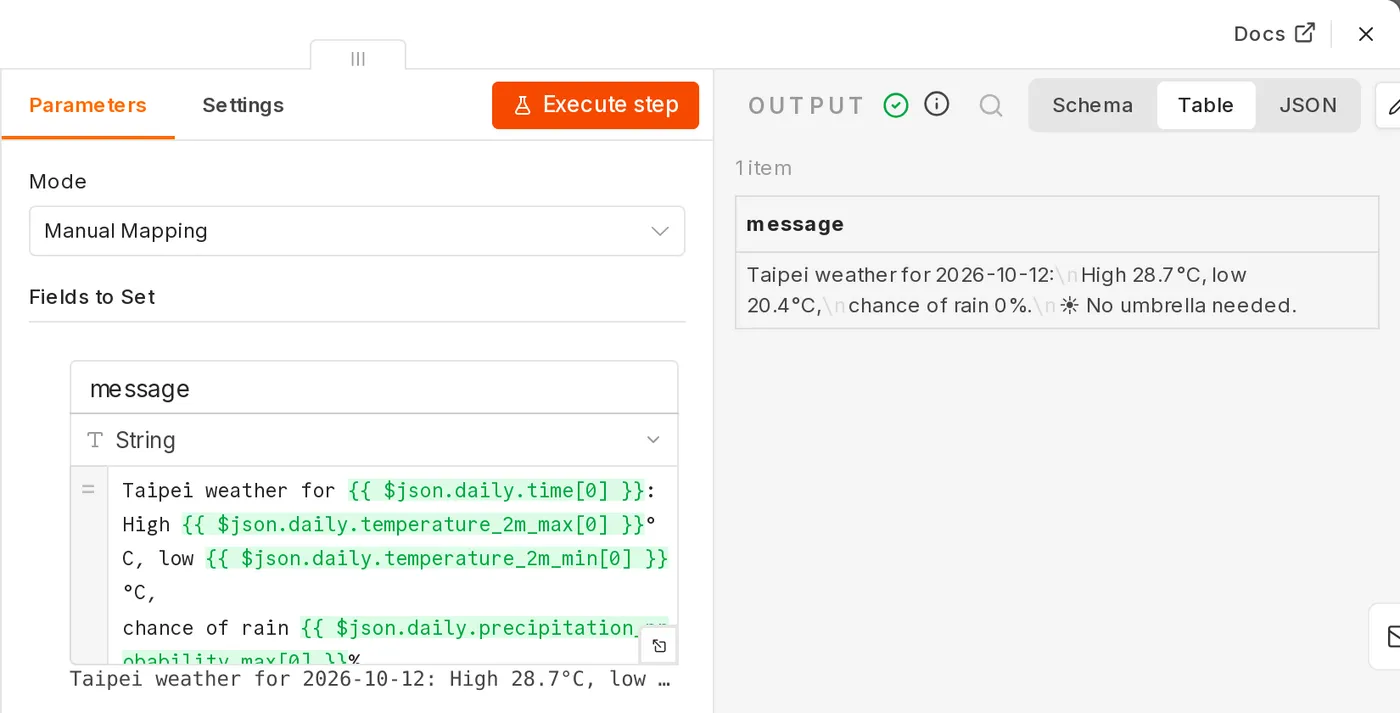
Expressions let node parameters change dynamically based on data. You can switch any parameter field to Expression mode (using the Fixed / Expression toggle next to the field, or by typing {{).
Inside {{ }}, you write JavaScript, so you can use JavaScript syntax and methods.
Read the current item: $json
{{ $json.name }}
{{ $json.address.city }}
{{ $json.tags[0] }}
{{ $json["field name"] }}
When a field name has spaces or special characters, use brackets [...].
The easiest way is to drag a field from the INPUT panel on the left into a parameter. n8n will generate the correct expression automatically.
Read data from another node: $('Node Name')
$json can only read the output of the previous node. To read from an earlier node:
{{ $('Google Sheets').item.json.email }}| Syntax | Meaning |
|---|---|
$('Node').item | The item corresponding to the current item (most common) |
$('Node').first() | The first item output by that node |
$('Node').last() | The last item |
$('Node').all() | All items (array) |
{{ $('Webhook').item.json.body.customer_id }}
{{ $('Get settings').first().json.api_url }}
{{ $('Orders').all().length }} orders
If you rename a node, n8n automatically updates its name in expressions.
String handling
{{ $json.name.trim() }}
{{ $json.email.toLowerCase() }}
{{ $json.title.slice(0, 50) }}…
{{ $json.text.replaceAll('\n', ' ') }}
{{ `Hello ${$json.name}, your order ${$json.order_id} has shipped.` }}
{{ $json.tags.join('、') }}
n8n also provides some additional methods:
{{ $json.email.isEmail() }}
{{ $json.content.extractUrl() }}
{{ $json.title.toTitleCase() }}
Numbers
{{ $json.price * 1.05 }}
{{ Math.round($json.score * 10) / 10 }}
{{ Number($json.amount).toLocaleString('zh-TW') }}
{{ ($json.done / $json.total * 100).toFixed(1) }}%
Numbers returned by an API are sometimes strings. Convert them with Number() before calculating.
Conditionals
{{ $json.amount > 1000 ? 'VIP' : 'Regular' }}
{{ $json.nickname || $json.name }}
{{ $json.phone ?? 'Not provided' }}
To route a workflow differently based on a condition, use an If or Switch node instead of handling it in an expression.
Arrays
{{ $json.items.length }}
{{ $json.items.map(i => i.name).join(', ') }}
{{ $json.items.filter(i => i.stock === 0).length }}
{{ $json.scores.reduce((a, b) => a + b, 0) }}
Dates and times
n8n includes the Luxon date library. $now is the current time, and $today is today at midnight:
{{ $now.toFormat('yyyy-MM-dd HH:mm') }}
{{ $today.minus({ days: 1 }).toFormat('yyyy/MM/dd') }}
{{ $now.plus({ hours: 2 }).toISO() }}
{{ $now.setZone('Asia/Taipei').toFormat('MM/dd HH:mm') }}
{{ $now.weekday }}                      // 1 = Monday … 7 = Sunday
To parse a date string in your data:
{{ DateTime.fromISO($json.created_at).toFormat('yyyy-MM-dd') }}
{{ DateTime.fromFormat($json.date, 'yyyy/MM/dd').plus({ days: 7 }).toISODate() }}
{{ $json.created_at.toDateTime().diffTo($now, 'days') }}
The time zone follows the n8n or workflow time zone setting. Remember to set it to Asia/Taipei.
Common built-in variables
| Variable | Contents |
|---|---|
$json | The current item |
$binary | Files attached to the current item |
$input.all() | All items received by this node |
$now, $today | Current time, today |
$execution.id | ID of this execution |
$execution.mode | test (manual test) or production |
$workflow.name | Workflow name |
$vars.name | Custom variable (available on some plans) |
$runIndex | The number of times the node has run in this execution |
Multiple lines and complex logic
You can write an immediately invoked function in an expression:
{{ (() => {
  const total = $json.items.reduce((s, i) => s + i.price * i.qty, 0);
  return total >= 1000 ? total : total + 60;
})() }}
Once the logic takes more than a few lines, consider using a Code node instead. It is easier to read and debug.
Debugging tips
- The preview result appears immediately below an expression field. Red indicates an error.
- The preview uses data from the last execution. Run the preceding nodes first to see a preview.
Cannot read properties of undefinedmeans a level in the path does not exist. Use?.to avoid the error:{{ $json.address?.city }}.- To view the entire item:
{{ JSON.stringify($json) }}.
Updated October 12, 2026