Contents
n8n AI Agent Tutorial: Build an AI Assistant That Uses Tools
n8n includes a full set of AI features. The most powerful is the AI Agent node: it does more than answer questions. It can decide for itself which tools to use as needed, such as looking up information, calling APIs, or calculating, and then answer based on the results.
AI Agent components
The AI Agent node has several slots underneath it for connecting "sub-nodes":
                    [When chat message received]
                               │
                               ▼
                         [ AI Agent ]
                     ┌────────┼────────┐
               Chat Model   Memory    Tool(s)
                   │          │        │
[OpenAI Chat Model] [Simple Memory] [Calculator] [HTTP Request Tool] …| Slot | Purpose | Common choices |
|---|---|---|
| Chat Model | The language model that thinks and responds (required) | OpenAI, Anthropic, Google Gemini, Ollama, and others |
| Memory | Remembers conversation history | Simple Memory, Postgres Chat Memory, Redis Chat Memory |
| Tool | Tools the Agent can use | Calculator, HTTP Request Tool, Google Sheets, Code Tool, other workflows |
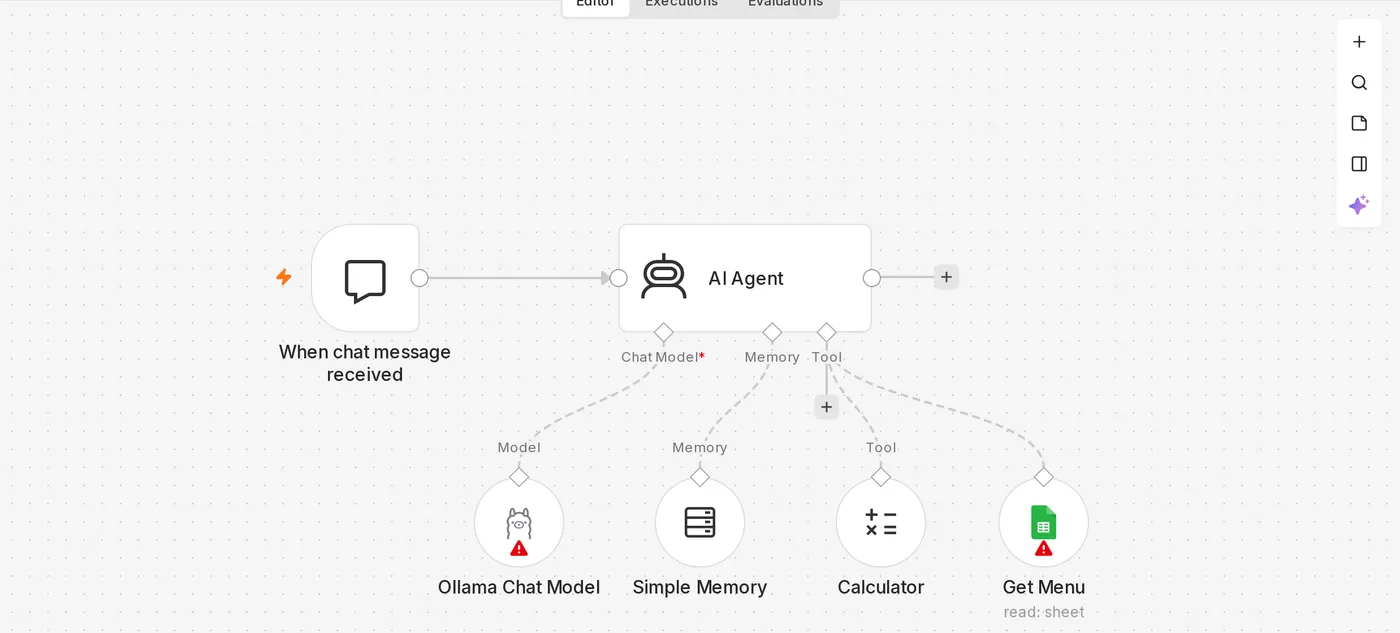
Build a chat assistant
1. Add a chat trigger
Create a workflow and choose When chat message received (Chat Trigger) as the first node. An Open chat button appears at the bottom of the editor so you can test the conversation directly in n8n.
2. Add an AI Agent
Add an AI Agent node after Chat Trigger.
3. Connect a chat model
Click + under Chat Model on the AI Agent and choose a model, such as OpenAI Chat Model:
- Create an OpenAI credential and paste in your API key.
- Choose a model.
To use a free local model, see Connect n8n to Ollama.
4. Connect memory
Click + under Memory and choose Simple Memory. Context Window Length determines how many recent conversation turns to remember, such as 10.
Without memory, every message to the Agent starts a new conversation, so it won't remember what you just said.
Simple Memory is stored in n8n's memory and disappears when n8n restarts. It is also unsuitable for environments with multiple n8n instances. For production, switch to Postgres or Redis Chat Memory.
5. Set the system message
In the AI Agent's Options → System Message, write the Agent's role and rules:
You are the online customer service assistant for "Good Coffee" coffee shop.
- Always use friendly, concise language in Traditional Chinese as commonly used in Taiwan.
- Answer questions about the menu and prices only with results from the "Look up menu" tool. Do not make anything up.
- For complaints or questions you can't handle, ask the customer to leave their contact information and let them know a staff member will follow up.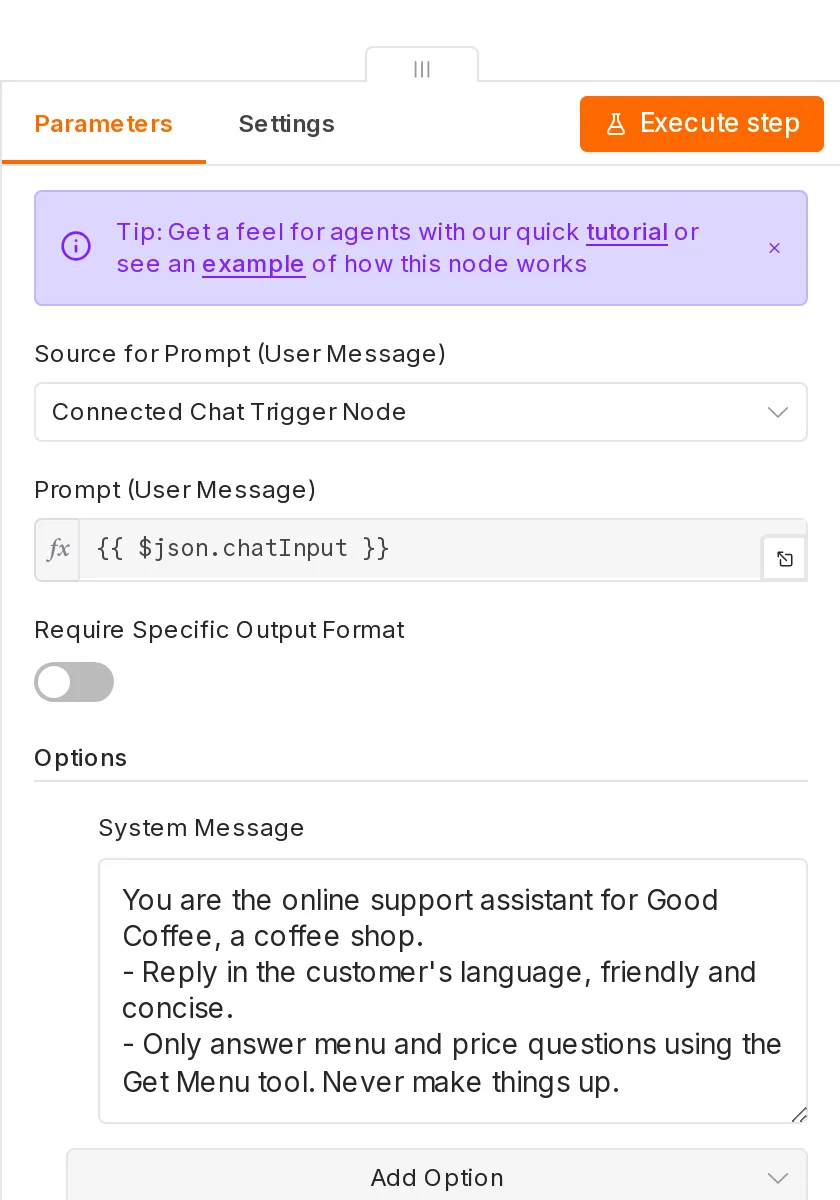
6. Test
Click Open chat and enter "Hello, what time do you open?" In the AI Agent node's output (Logs), you can see each step of the model's reasoning and its tool calls.
Add tools
Tools let the Agent get real-time information or take action. Click + under Tool to add multiple tools.
Calculator
Let the Agent perform precise calculations. Language models often make mistakes when calculating numbers directly, so a calculator tool makes the results much more reliable.
Google Sheets tool: look up the menu
- Prepare a spreadsheet with the columns "Item, Price, Description."
- Add a Google Sheets tool and choose Get Rows as the operation.
- Describe its purpose in the tool's Description:
Look up the coffee shop menu. Use this when customers ask about items, prices, or recommendations.The Agent uses this description to decide when to use the tool. The quality of the tool description directly affects the Agent's performance.
Let AI fill in parameters
There is a ✨ button (Let the model define this parameter) next to a tool's parameter fields. When enabled, the Agent fills them in automatically based on the conversation. For example, for the city parameter in HTTP Request Tool, the Agent extracts "Taichung" from "Will it rain in Taichung today?"
You can also use $fromAI() in an expression:
{{ $fromAI('city', 'Name of the city to check the weather for', 'string') }}Call another workflow as a tool
Call n8n Workflow Tool can turn any workflow into an Agent tool. For example, package the full "Create order" workflow (write to a database, send a confirmation email, and notify staff) as a tool for the Agent to use.
Public chat interface
In Chat Trigger's settings, enable Make Chat Publicly Available. After publishing the workflow, you'll get a URL for a chat webpage. You can also embed it on your own site using the package provided by n8n. Be sure to set up authentication to prevent abuse and unexpectedly high API costs.
Different trigger types
The AI Agent doesn't have to use Chat Trigger. You can use any trigger:
- Telegram Trigger → AI Agent → Telegram reply: a Telegram chatbot (see Telegram bot)
- Gmail Trigger → AI Agent → draft a reply
- Webhook → AI Agent → Respond to Webhook: create an AI API
In this case, change Source for Prompt to a custom value, such as {{ $json.message.text }}.
Frequently asked questions
The Agent doesn't use tools
- Confirm that the selected model supports tool calling.
- Improve the tool description and clearly explain when to use it.
- Explicitly require it in the system message: "Always use the Look up menu tool before answering questions about prices."
Responses are slow or expensive
Each tool call adds another model request. Remove unnecessary tools, shorten the memory length, or choose a faster model.
It doesn't remember earlier messages
Confirm that Memory is connected and that you're using the same Session ID (Chat Trigger handles this automatically; with other triggers, set the user ID as the Session Key).
The next section explains how to make the AI Agent use a free local model.
Updated October 12, 2026