Contents
Docker Build Cache Tutorial: Optimize Build Time and Image Size
With the same Dockerfile, build time can range from less than a second to several minutes depending on how you write it, and image size can vary significantly too. This section uses experiments to explain cache rules and ways to reduce image size.
How the cache works
docker build processes each instruction in order. For each line, Docker checks: Is this instruction, along with all the layers before it, the same as in the previous build?
- Same: Docker uses the cache directly, and the output shows
CACHED. - Different: Docker runs this instruction again, and every subsequent instruction also stops using the cache.
| Instruction | What Docker checks |
|---|---|
RUN | Whether the instruction string is identical (it does not check whether packages online have been updated) |
COPY / ADD | Whether the contents of the copied files are identical |
| Other | Whether the instruction and its arguments are identical |
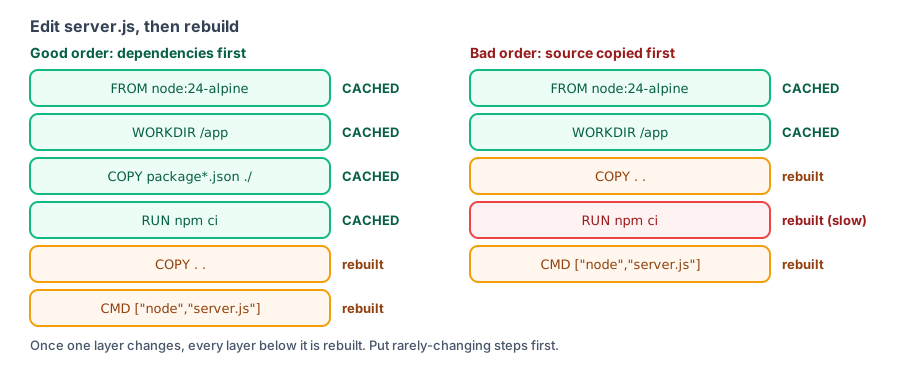
Experiment: How instruction order matters
Use a small project that uses Express (the package.json file includes the express package) to compare two Dockerfiles.
Incorrect order (Dockerfile.bad):
FROM node:24-alpine
WORKDIR /app
COPY . .
RUN npm install
CMD ["node", "server.js"]
Correct order (Dockerfile.good):
FROM node:24-alpine
WORKDIR /app
COPY package.json ./
RUN npm install
COPY . .
CMD ["node", "server.js"]
Incorrect order: change one line of code
Build once, change one word in server.js, then build again:
$ docker build -f Dockerfile.bad -t cache-bad .

[+] Building 6.9s (9/9) FINISHED                                                     docker:default
 => [internal] load build definition from Dockerfile.bad                                       0.0s
 => => transferring dockerfile: 125B                                                           0.0s
 => [internal] load metadata for docker.io/library/node:24-alpine                              0.2s
 => [internal] load .dockerignore                                                              0.0s
 => => transferring context: 65B                                                               0.0s
 => [1/4] FROM docker.io/library/node:24-alpine@sha256:ebfe2f90462722a7a4de65e91990e97fe0d401  0.0s
 => => resolve docker.io/library/node:24-alpine@sha256:ebfe2f90462722a7a4de65e91990e97fe0d401  0.0s
 => [internal] load build context                                                              0.0s
 => => transferring context: 280B                                                              0.0s
 => CACHED [2/4] WORKDIR /app                                                                  0.0s
 => [3/4] COPY . .                                                                             0.1s
 => [4/4] RUN npm install                                                                      5.4s
 => exporting to image                                                                         1.0s
 => => exporting layers                                                                        0.5s
 => => exporting manifest sha256:d27475f082a53018e303541bc1c0691ac25526e87761300e2aa8ec76d73e  0.0s
 => => exporting config sha256:19f2024df4329a5f2af23e50d8c18826f073d425e18133e9571c393999d913  0.0s
 => => exporting attestation manifest sha256:58b4730e9566f2ec7e8222cd41c14ea971d87272b6b0c190  0.0s
 => => exporting manifest list sha256:58b8fc79124f2fe21270801d5e40f09839c06ba5203304423125270  0.0s
 => => naming to docker.io/library/cache-bad:latest                                            0.0s
 => => unpacking to docker.io/library/cache-bad:latest                                         0.4s
[3/4] COPY . . runs again because server.js changed. The subsequent [4/4] RUN npm install runs again too, taking 5.4 seconds to download and install all packages again.
Correct order: change one line of code
First build (npm install has to run):
$ docker build -f Dockerfile.good -t cache-good .

[+] Building 5.7s (10/10) FINISHED                                                   docker:default
 => [internal] load build definition from Dockerfile.good                                      0.0s
 => => transferring dockerfile: 147B                                                           0.0s
 => [internal] load metadata for docker.io/library/node:24-alpine                              0.1s
 => [internal] load .dockerignore                                                              0.0s
 => => transferring context: 65B                                                               0.0s
 => [1/5] FROM docker.io/library/node:24-alpine@sha256:ebfe2f90462722a7a4de65e91990e97fe0d401  0.0s
 => => resolve docker.io/library/node:24-alpine@sha256:ebfe2f90462722a7a4de65e91990e97fe0d401  0.0s
 => [internal] load build context                                                              0.0s
 => => transferring context: 95B                                                               0.0s
 => CACHED [2/5] WORKDIR /app                                                                  0.0s
 => [3/5] COPY package.json ./                                                                 0.0s
 => [4/5] RUN npm install                                                                      4.4s
 => [5/5] COPY . .                                                                             0.1s
 => exporting to image                                                                         0.9s
 => => exporting layers                                                                        0.5s
 => => exporting manifest sha256:4b36d92a774b02cc1a188193e178a445b90f330b19f2dcc741d631e246e8  0.0s
 => => exporting config sha256:4a597aa667d9ba52eab36c4483f7507bbcae158b1b22af5ca6e4ac5b7020fa  0.0s
 => => exporting attestation manifest sha256:efea2ef65e2672718391b6419b9f5f2be50396163032a29e  0.0s
 => => exporting manifest list sha256:236918100fd2092d0388da5c03b32dfa3abaa2e62304abb3e3dd335  0.0s
 => => naming to docker.io/library/cache-good:latest                                           0.0s
 => => unpacking to docker.io/library/cache-good:latest                                        0.4s
Build again after changing server.js:
$ docker build -f Dockerfile.good -t cache-good .

[+] Building 0.4s (10/10) FINISHED                                                   docker:default
 => [internal] load build definition from Dockerfile.good                                      0.0s
 => => transferring dockerfile: 147B                                                           0.0s
 => [internal] load metadata for docker.io/library/node:24-alpine                              0.1s
 => [internal] load .dockerignore                                                              0.0s
 => => transferring context: 65B                                                               0.0s
 => [1/5] FROM docker.io/library/node:24-alpine@sha256:ebfe2f90462722a7a4de65e91990e97fe0d401  0.0s
 => => resolve docker.io/library/node:24-alpine@sha256:ebfe2f90462722a7a4de65e91990e97fe0d401  0.0s
 => [internal] load build context                                                              0.0s
 => => transferring context: 280B                                                              0.0s
 => CACHED [2/5] WORKDIR /app                                                                  0.0s
 => CACHED [3/5] COPY package.json ./                                                          0.0s
 => CACHED [4/5] RUN npm install                                                               0.0s
 => [5/5] COPY . .                                                                             0.0s
 => exporting to image                                                                         0.1s
 => => exporting layers                                                                        0.0s
 => => exporting manifest sha256:6cd8c2671a295aab85724aefe72f8dc749f4d332224f5d534fff5e4e57fa  0.0s
 => => exporting config sha256:7df3d574ae91f98ea3634c4dcede63e64ce8018c902643c2db08c2b4dee4c3  0.0s
 => => exporting attestation manifest sha256:fc9ff7e57f4187c04b74446f5dd96e46ef9c7f0ea88372a6  0.0s
 => => exporting manifest list sha256:79e8a6d76ff2382f02bcadc183a44670959d1d0a30467a27b9d619e  0.0s
 => => naming to docker.io/library/cache-good:latest                                           0.0s
 => => unpacking to docker.io/library/cache-good:latest                                        0.0s
The whole build took just 0.4 seconds: COPY package.json and RUN npm install were both CACHED; only the final COPY . . ran again. This project has only one package. Real projects often have hundreds, and npm install can take several minutes, making the difference even greater.
The same principle applies to every language:
| Language | Copy first | Install or download next |
|---|---|---|
| Node.js | package.json, package-lock.json | npm ci |
| Python | requirements.txt or pyproject.toml | pip install |
| Go | go.mod, go.sum | go mod download |
| Java (Maven) | pom.xml | mvn dependency:go-offline |
| PHP | composer.json, composer.lock | composer install |
Experiment: Clean up temporary files in the same layer
Each layer builds on the previous one. Deleting files in a later RUN does not reduce the size of the earlier layer. Compare two ways to install curl:
Dockerfile.separate:
FROM debian:trixie-slim
RUN apt-get update
RUN apt-get install -y --no-install-recommends curl
RUN rm -rf /var/lib/apt/lists/*Dockerfile.same:
FROM debian:trixie-slim
RUN apt-get update \
    && apt-get install -y --no-install-recommends curl \
    && rm -rf /var/lib/apt/lists/*
Compare the sizes after building:
$ docker images --filter reference=apt-separate --filter reference=apt-same --filter reference=debian:trixie-slim
IMAGE                 ID             DISK USAGE   CONTENT SIZE   EXTRA
apt-same:latest       5357e9775c1e        136MB         34.9MB
apt-separate:latest   ad6c0a37d9ea        174MB         51.7MB
The contents are identical (both have curl installed and the package lists removed), but apt-separate is 38 MB larger. Use docker history to see why:
$ docker history apt-separate
IMAGE          CREATED          CREATED BY                                      SIZE      COMMENT
ad6c0a37d9ea   11 seconds ago   RUN /bin/sh -c rm -rf /var/lib/apt/lists/* #…   20.5kB    buildkit.dockerfile.v0
<missing>      11 seconds ago   RUN /bin/sh -c apt-get install -y --no-insta…   13.4MB    buildkit.dockerfile.v0
<missing>      16 seconds ago   RUN /bin/sh -c apt-get update # buildkit        21.6MB    buildkit.dockerfile.v0
<missing>      8 days ago       # debian.sh --arch 'amd64' out/ 'trixie' '@1…   87.7MB    debuerreotype 0.17

$ docker history apt-same
IMAGE          CREATED        CREATED BY                                      SIZE      COMMENT
5357e9775c1e   1 second ago   RUN /bin/sh -c apt-get update     && apt-get…   13.4MB    buildkit.dockerfile.v0
<missing>      8 days ago     # debian.sh --arch 'amd64' out/ 'trixie' '@1…   87.7MB    debuerreotype 0.17
The apt-get update layer in apt-separate is 21.6 MB (the downloaded package lists). The later rm -rf only marks them as deleted in a new layer; the original 21.6 MB remains in the image. When these commands are in the same RUN, the package lists are deleted before the layer is complete and are never saved in any layer.
Common ways to avoid keeping temporary files in different languages:
RUN pip install --no-cache-dir -r requirements.txt
RUN npm ci && npm cache clean --force
RUN apk add --no-cache curl
.dockerignore
At the start of a build, Docker sends the entire build context (usually the current directory) to the build engine. Without excluding node_modules, the example in Dockerfile basics sends 30 MB; excluding it reduces that to 159 B. Example .dockerignore:
.git
node_modules
dist
*.log
.env
.env.*
Dockerfile*
.dockerignore
This speeds up builds, prevents changes to these files from invalidating the COPY . . cache, and keeps .env files and private keys out of the image.
Choose a smaller base image
Measured sizes for the Python 3.14 images in the Images section:
| Base image | Disk space |
|---|---|
python:3.14 | 1.63 GB |
python:3.14-slim | 180 MB |
python:3.14-alpine | 82.6 MB |
Multi-stage builds
Build tools and development packages are needed only during the build and should not remain in the final image. Multi-stage builds are the most effective way to reduce image size.
Cache mounts: speed up package downloads
BuildKit supports cache mounts, which preserve package manager download caches across builds. Even if the cache for the RUN npm ci layer is invalidated, you do not have to download all the packages from the network again:
# syntax=docker/dockerfile:1
FROM node:24-alpine
WORKDIR /app
COPY package.json package-lock.json ./
RUN --mount=type=cache,target=/root/.npm \
    npm ci
RUN --mount=type=cache,target=/root/.cache/pip \
pip install -r requirements.txtCache mount contents are not included in the image, so they do not increase its size.
Force a build without the cache
When you need the latest package versions or suspect a problem with the cache:
$ docker build --no-cache -f Dockerfile.good -t cache-good .

[+] Building 6.6s (10/10) FINISHED                                                   docker:default
 => [internal] load build definition from Dockerfile.good                                      0.0s
 => => transferring dockerfile: 147B                                                           0.0s
 => [internal] load metadata for docker.io/library/node:24-alpine                              0.3s
 => [internal] load .dockerignore                                                              0.0s
 => => transferring context: 65B                                                               0.0s
 => [1/5] FROM docker.io/library/node:24-alpine@sha256:ebfe2f90462722a7a4de65e91990e97fe0d401  0.0s
 => => resolve docker.io/library/node:24-alpine@sha256:ebfe2f90462722a7a4de65e91990e97fe0d401  0.0s
 => [internal] load build context                                                              0.0s
 => => transferring context: 280B                                                              0.0s
 => CACHED [2/5] WORKDIR /app                                                                  0.0s
 => [3/5] COPY package.json ./                                                                 0.0s
 => [4/5] RUN npm install                                                                      5.1s
 => [5/5] COPY . .                                                                             0.1s
 => exporting to image                                                                         1.0s
 => => exporting layers                                                                        0.4s
 => => exporting manifest sha256:30688d5c22069d97e9db0bd32d5939e8e99fda0c6a0c4af1f32fb5baacc9  0.0s
 => => exporting config sha256:e8e75108925e8f145e7367b8e36350a8175c3776154f560fb47a9fb287fe21  0.0s
 => => exporting attestation manifest sha256:adbbb2fc6683c9a35c67bb9237cf3afcfd24c39dd9aa4b55  0.0s
 => => exporting manifest list sha256:6b92b5704d4fa7a3f11cfda5ffde00e6516bdbf358e23dbece712a2  0.0s
 => => naming to docker.io/library/cache-good:latest                                           0.0s
 => => unpacking to docker.io/library/cache-good:latest                                        0.5s
--no-cache reruns every step (none show CACHED). Add --pull to check for a newer base image too.
View and clear the build cache
The build cache accumulates over time:
$ docker builder du
ID                           RECLAIMABLE   SIZE       LAST ACCESSED
mr6xd3ylof28pr8obxiet3fo8    true          403B       3 minutes ago
l34l5occgcgh8bscivg2iusrn    true          626B       3 minutes ago
... (output trimmed)
Shared:		488.2MB
Private:	118.5MB
Reclaimable:	606.7MB
Total:		606.7MB
$ docker builder prune -f
ID RECLAIMABLE SIZE LAST ACCESSED
xqb9jtg0kmq0mdzb0vrmod68j true 20.67kB 3 minutes ago
u1pbndrekyh1q91qbb4n9e3fy* true 8.192kB 5 minutes ago
... (output trimmed)
Total: 118.5MBdocker builder prune deletes only the build cache; it does not affect images or containers. See Freeing disk space for how to clean up all Docker data.
Recap
- When a layer changes, all layers after it must be rebuilt.
- Put steps that change less often (installing packages) first, and frequently changing steps (copying code) later.
- Download, install, and clean up temporary files in the same
RUNso they are not left in the image. RUN --mount=type=cachelets multiple builds share package downloads.
Exercises
Exercise 1: Which of these Dockerfile snippets produces a smaller image, and why?
# A
RUN apt-get update
RUN apt-get install -y curl
RUN rm -rf /var/lib/apt/lists/*
# B
RUN apt-get update && apt-get install -y curl && rm -rf /var/lib/apt/lists/*Answer
B is smaller. In A, rm runs in a new layer, so the package lists remain in the earlier layer. B downloads and deletes them in the same layer, so the lists are never saved.
Exercise 2: Build the same project once with docker build --no-cache and once without the option. Compare the total time shown by [+] Building.
Hint
Without the option, most steps show CACHED, and the build usually takes a fraction of a second. --no-cache reruns every step, and the time depends on how quickly packages install.
FAQ
RUN apt-get update is cached, so how do I avoid installing outdated packages?
The cache only compares the instruction string; it does not check whether packages online have been updated. Put apt-get update and apt-get install in the same RUN, and use docker build --no-cache to force a rebuild when needed.
Does the build cache take up a lot of disk space?
Use docker builder du to inspect it and docker builder prune to clear it. See [Freeing disk space](/docker/cleanup/) for measured results.
Is it slow when CI builds from scratch every time?
Use an external cache, such as cache-from: type=gha in GitHub Actions. See [Automated builds with GitHub Actions](/docker/ci-cd/).
Updated October 14, 2026