Contents
Docker Multi-Stage Builds Tutorial: Create Smaller, More Secure Images
Many programs need compilers, development packages, and build tools during build, but only need the compiled output at runtime. If you put everything in one image, the final image carries a lot of things it doesn't need.
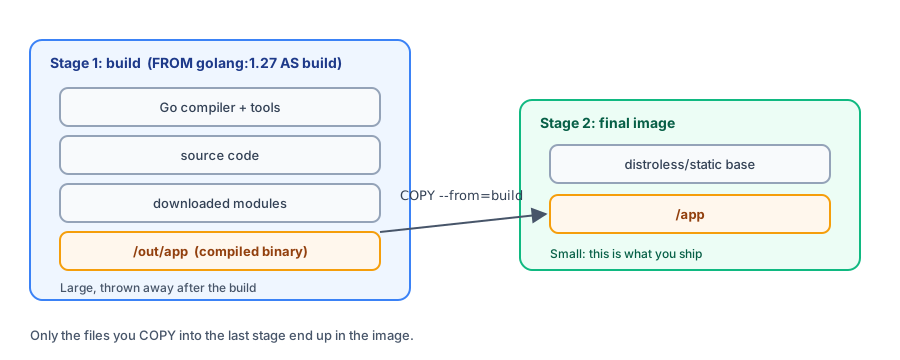
Multi-stage builds let you use multiple FROM instructions in one Dockerfile, with each FROM starting a stage. Only the contents of the last stage are kept in the final image; earlier stages are used only to produce files.
Experiment: single-stage vs. multi-stage
Compare the results using a simple Go web app (main.go):
package main

import (
	"fmt"
	"net/http"
)

func main() {
	http.HandleFunc("/", func(w http.ResponseWriter, r *http.Request) {
		fmt.Fprintln(w, "Hello from a distroless container!")
	})
	fmt.Println("Listening on :8080")
	http.ListenAndServe(":8080", nil)
}
Single-stage (Dockerfile.single): compile in the official Go image and use it to run the app too:
FROM golang:1.27
WORKDIR /src
COPY . .
RUN CGO_ENABLED=0 go build -o /server .
CMD ["/server"]
Multi-stage (Dockerfile):
# Stage one: build
FROM golang:1.27 AS builder
WORKDIR /src
COPY go.mod ./
RUN go mod download
COPY . .
RUN CGO_ENABLED=0 go build -o /out/server .

# Stage two: run
FROM gcr.io/distroless/static-debian13
COPY --from=builder /out/server /server
USER nonroot
ENTRYPOINT ["/server"]
AS buildernames the first stage.COPY --from=buildercopies files from that stage.gcr.io/distroless/static-debian13is a minimal image maintained by Google. It has no shell or package manager, only the files needed to run static programs.
Build the multi-stage version:
$ docker build -t go-multi .

[+] Building 51.7s (14/14) FINISHED                                                  docker:default
 => [internal] load build definition from Dockerfile                                           0.0s
 => => transferring dockerfile: 326B                                                           0.0s
 => [internal] load metadata for gcr.io/distroless/static-debian13:latest                      2.1s
 => [internal] load metadata for docker.io/library/golang:1.27                                 0.4s
 => [internal] load .dockerignore                                                              0.0s
 => => transferring context: 2B                                                                0.0s
 => [builder 1/6] FROM docker.io/library/golang:1.27@sha256:e432b43af23a9328d56a7c499be047681  0.0s
 => => resolve docker.io/library/golang:1.27@sha256:e432b43af23a9328d56a7c499be0476810aa344ac  0.0s
 => [stage-1 1/2] FROM gcr.io/distroless/static-debian13:latest@sha256:58133991db06659feaabe0  3.4s
 => => resolve gcr.io/distroless/static-debian13:latest@sha256:58133991db06659feaabe0f4e97a35  0.0s
 => => … (download and extract layers, output trimmed)
 => [internal] load build context                                                              0.0s
 => => transferring context: 120B                                                              0.0s
 => CACHED [builder 2/6] WORKDIR /src                                                          0.0s
 => [builder 3/6] COPY go.mod ./                                                               0.0s
 => [builder 4/6] RUN go mod download                                                          0.5s
 => [builder 5/6] COPY . .                                                                     0.0s
 => [builder 6/6] RUN CGO_ENABLED=0 go build -o /out/server .                                 47.6s
 => [stage-1 2/2] COPY --from=builder /out/server /server                                      0.0s
 => exporting to image                                                                         1.1s
 => => exporting layers                                                                        0.6s
 => => exporting manifest sha256:8b506df2e51c2cbf7df7b452669cde4652ac2d83d924e8e5b67ed8f37b6a  0.0s
 => => exporting config sha256:f1efccd3fdd70ffd1054b9ed0ff4154e3be0d93324c196bd46438e12a4b372  0.0s
 => => exporting attestation manifest sha256:4cf5049d1a21697ca953ccd67da3874da40c466c9db43ac9  0.0s
 => => exporting manifest list sha256:463874676a48cc064e399fd1968bcd5e301d77f20909360c40fff1c  0.0s
 => => naming to docker.io/library/go-multi:latest                                             0.0s
 => => unpacking to docker.io/library/go-multi:latest                                          0.4s
You can see that the steps for the two stages are labeled [builder …] and [stage-1 …]. BuildKit downloads the base images needed by both stages at the same time. Compare the sizes of the two images:
$ docker images --filter reference=go-single --filter reference=go-multi
IMAGE              ID             DISK USAGE   CONTENT SIZE   EXTRA
go-multi:latest    463874676a48       20.2MB         5.77MB
go-single:latest   c6c844f9076e       1.43GB          343MB
It's the same program: 1.43 GB for single-stage, 20.2 MB for multi-stage, a 70-fold difference. The single-stage image carries the entire Go compiler and Debian system; the final multi-stage image contains only the compiled executable and the distroless base files.
Smaller images download and deploy faster, and contain fewer packages that could have vulnerabilities. Try running it:
$ docker run -d --name goapp -p 8080:8080 go-multi
d474e2de30d65e21a1f6395aac76c185fcfc8d4d6caa1240ab6ef3ebd7406e25

$ curl -s http://localhost:8080
Hello from a distroless container!

$ docker exec goapp sh
OCI runtime exec failed: exec failed: unable to start container process: exec: "sh": executable file not found in $PATH

$ docker rm -f goapp
goapp
The distroless image doesn't even contain sh (executable file not found). Even if an attacker breaks into the program, it is difficult to do much inside the container. The tradeoff is less convenient debugging; when needed, you can use the :debug version, which includes debugging tools.
Multi-stage examples for other languages
Node.js frontend: hand off the build to Nginx
Frontend projects such as React, Vue, and Astro only need static files after the build, not a Node.js runtime:
FROM node:24-alpine AS build
WORKDIR /app
COPY package.json package-lock.json ./
RUN npm ci
COPY . .
RUN npm run build

FROM nginx:1.30-alpine
COPY --from=build /app/dist /usr/share/nginx/html
EXPOSE 80
The build tools and all of node_modules are left out of the final image.
Node.js backend: keep only production packages
FROM node:24-alpine AS deps
WORKDIR /app
COPY package.json package-lock.json ./
RUN npm ci --omit=dev

FROM node:24-alpine AS build
WORKDIR /app
COPY package.json package-lock.json ./
RUN npm ci
COPY . .
RUN npm run build

FROM node:24-alpine
WORKDIR /app
ENV NODE_ENV=production
COPY --from=deps /app/node_modules ./node_modules
COPY --from=build /app/dist ./dist
COPY package.json .
USER node
CMD ["node", "dist/index.js"]
The deps and build stages are independent, so BuildKit builds them in parallel.
Java: compile with the JDK, run with the JRE
FROM maven:3.9-eclipse-temurin-25 AS build
WORKDIR /app
COPY pom.xml .
RUN mvn -q dependency:go-offline
COPY src ./src
RUN mvn -q package -DskipTests

FROM eclipse-temurin:25-jre
WORKDIR /app
COPY --from=build /app/target/*.jar app.jar
EXPOSE 8080
CMD ["java", "-jar", "app.jar"]
Build only a specific stage: --target
You can use stages to create development and production versions in the same Dockerfile:
FROM node:24-alpine AS base
WORKDIR /app
COPY package.json ./

FROM base AS dev
ENV NODE_ENV=development
COPY . .
CMD ["npm", "run", "dev"]

FROM base AS prod
ENV NODE_ENV=production
COPY . .
CMD ["node", "server.js"]
$ docker build -q --target dev -t target-demo:dev .
sha256:3d0fdd2a77233426c90dfbc575aafaef652a1393cb2730d066e627362860ec09
$ docker build -q --target prod -t target-demo:prod .
sha256:9e14e3363d26d46ed628e49b4cd806a29e9699a5be2e6e4078976bd380632568
$ docker inspect --format '{{.Config.Env}} {{.Config.Cmd}}' target-demo:dev
[PATH=/usr/local/sbin:/usr/local/bin:/usr/sbin:/usr/bin:/sbin:/bin NODE_VERSION=24.21.0 YARN_VERSION=1.22.22 NODE_ENV=development] [npm run dev]
$ docker inspect --format '{{.Config.Env}} {{.Config.Cmd}}' target-demo:prod
[PATH=/usr/local/sbin:/usr/local/bin:/usr/sbin:/usr/bin:/sbin:/bin NODE_VERSION=24.21.0 YARN_VERSION=1.22.22 NODE_ENV=production] [node server.js]--target dev builds only up to the dev stage, while --target prod skips dev. The environment variables and startup commands differ between the two images. -q makes docker build print only the image ID.
Copy from an external image
COPY --from can also specify any image directly; it doesn't have to be a stage in this Dockerfile:
COPY --from=nginx:1.30-alpine /etc/nginx/nginx.conf /etc/nginx/nginx.conf
COPY --from=ghcr.io/astral-sh/uv:latest /uv /usr/local/bin/uv
The second line is a common use case: copy the executable directly from the official uv image without installing it separately. See Python applications.
Recap
- Each
FROMstarts a new stage. Name it withAS name. - The last stage is the output image and contains only the files copied into it with
COPY --from. - Keep build tools, source code, and development packages in earlier stages to make the image dozens of times smaller.
--targetbuilds only up to the specified stage, such as a test stage.
Exercises
Exercise 1: Add a FROM base AS test stage to a multi-stage Dockerfile to run tests. How can you run only the tests in CI without building the final image?
Exercise 2: Use docker history to compare the single-stage and multi-stage Go images in this chapter. Is there a Go compiler layer in the final image?
Hint
The final multi-stage image contains only the distroless base layer and the COPY --from=build layer. You won't see a Go toolchain layer.
FAQ
Do multi-stage builds make builds slower?
No. BuildKit builds independent stages in parallel and builds only the stages needed for the final stage. See the TypeScript example in [Node.js applications](/docker/nodejs/).
Are intermediate-stage images left on my computer?
Intermediate stages don't produce named images, but their layers remain in the build cache. You can remove them with docker builder prune.
Can I use another image with COPY --from?
Yes. For example, COPY --from=nginx:1.30-alpine /etc/nginx/nginx.conf . copies a file directly from an external image. This chapter includes an example.
Updated October 14, 2026