Contents
Docker Internals Tutorial: How Namespaces, cgroups, and overlayfs Work
What is Docker? explained containers with an analogy. Here, we'll look directly at a Docker host to see what a container really is in Linux. The answer is one sentence:
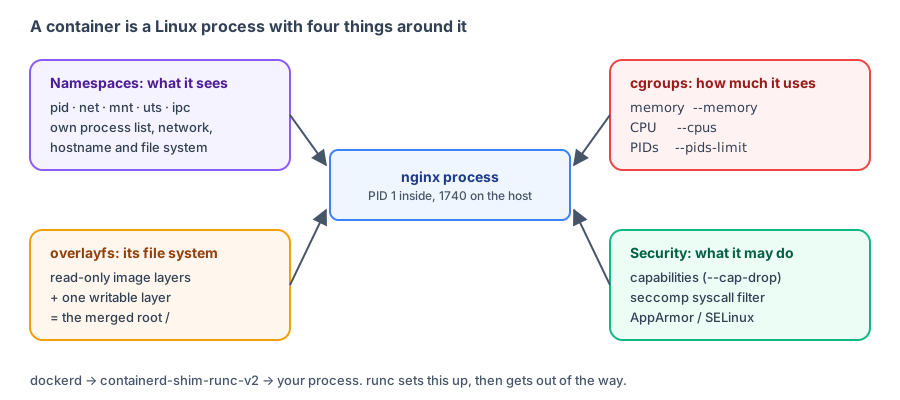
A container is an ordinary Linux process limited by namespaces in what it can "see," by cgroups in how many resources it can use, and given a root directory made from overlayfs. Capabilities and seccomp then limit what it can do.
"Host" below means the Docker test environment for this tutorial (Linux 5.4 kernel, cgroup v1). IDs and paths will differ on your computer. Systems using cgroup v2 also have different file names, which are noted below. Docker Desktop users can enter the Docker Desktop Linux virtual machine to inspect it with
docker run -it --rm --privileged --pid=host alpine:3.23 nsenter -t 1 -m -u -i -n sh.
A container is a process on the host
Start an nginx container and limit it to 256 MB of memory and 0.5 CPU:
$ docker run -d --name demo --memory 256m --cpus 0.5 nginx:1.30-alpine
WARNING: Your kernel does not support swap limit capabilities or the cgroup is not mounted. Memory limited without swap.
57dcd17505d4e7c71e57df55edef3e137c18249e6ad402c7e7b3f215341c47b4

$ docker exec demo ps
PID   USER     TIME  COMMAND
    1 root      0:00 nginx: master process nginx -g daemon off;
   29 nginx     0:00 nginx: worker process
   30 root      0:00 ps

$ docker inspect -f "{{.State.Pid}}" demo
12458- Inside the container, the nginx master process has PID 1, and you can see only its own processes.
docker inspect's.State.Pidis its PID on the host: 12458.
List processes on the host:
$ ps -o pid,ppid,args | grep -v -E 'ps -o|grep|cut' | cut -c1-110
PID   PPID  COMMAND
    1     0 docker-init -- dockerd --host=unix:///var/run/docker.sock --host=tcp://0.0.0.0:2375 --registry-mir
   19     1 dockerd --host=unix:///var/run/docker.sock --host=tcp://0.0.0.0:2375 --registry-mirror=https://mir
12434     1 /usr/local/bin/containerd-shim-runc-v2 -namespace moby -id 57dcd17505d4e7c71e57df55edef3e137c18249
12458 12434 nginx: master process nginx -g daemon off;
12495 12458 nginx: worker process
On the host, you can see the full process tree: dockerd → containerd-shim-runc-v2 → nginx: master process (12458) → nginx: worker process.
- containerd-shim-runc-v2: One per container, it watches over the container's processes. Containers don't stop when dockerd restarts because the shim remains running.
- runc: The program that actually creates the container. It sets up namespaces, cgroups, and the root directory, then starts nginx and exits. That's why you don't see it in the process tree.
The same process is PID 1 inside the container and PID 12458 on the host. That's the effect of a PID namespace.
Namespaces: What a container can see
lsns lists the namespaces a process belongs to:
$ lsns -p 12458 -o NS,TYPE,PID,COMMAND
        NS TYPE     PID COMMAND
4026531835 cgroup     1 docker-init -- dockerd --host=unix:///var/run/docker.sock --host=tcp://0.0.0.0:2375 --registry-mirror=https://mirror.gcr.io --dns=1.1.1.1 --dns=8.8.8.8
4026531837 user       1 docker-init -- dockerd --host=unix:///var/run/docker.sock --host=tcp://0.0.0.0:2375 --registry-mirror=https://mirror.gcr.io --dns=1.1.1.1 --dns=8.8.8.8
4026533161 mnt    12458 nginx: master process nginx -g daemon off;
4026533162 uts    12458 nginx: master process nginx -g daemon off;
4026533163 ipc    12458 nginx: master process nginx -g daemon off;
4026533164 pid    12458 nginx: master process nginx -g daemon off;
4026533166 net    12458 nginx: master process nginx -g daemon off;
The nginx process has 5 namespaces of its own (with IDs different from the host). It shares 2 others (cgroup and user) with host PID 1:
| namespace | What it isolates | Effect in the container |
|---|---|---|
pid | Process IDs | You see only the container's processes; the main process is PID 1 |
net | Network interfaces, IP addresses, ports, and routes | The container has its own eth0 and IP address and can listen on port 80 independently |
mnt | Mount points | The container has its own root directory / |
uts | Hostname | The container's hostname is its container ID |
ipc | Shared memory and semaphores | Containers can't interfere with each other through IPC |
user | User ID mappings | Not isolated by default: root in the container is root on the host; Rootless mode uses it |
cgroup | View of the cgroup directory | Not isolated in this environment (cgroup v1); systems with cgroup v2 isolate it by default |
The effect of the uts and net namespaces:
$ docker exec demo hostname
57dcd17505d4

$ docker exec demo ip -4 addr show eth0
2: eth0@if130: <BROADCAST,MULTICAST,UP,LOWER_UP,M-DOWN> mtu 1500 qdisc noqueue state UP
    inet 172.18.0.2/16 brd 172.18.255.255 scope global eth0
       valid_lft forever preferred_lft forever
The container's hostname is the first 12 characters of its ID. Its eth0 has its own IP address (172.18.0.2), assigned by Docker networking. See Networking and container communication for details.
cgroups: How much a container can use
--memory 256m --cpus 0.5 isn't calculated by Docker itself; it's written to the Linux kernel's cgroup settings. Read those settings from inside the container:
$ docker info --format "Cgroup Version: {{.CgroupVersion}}"
Cgroup Version: 1

$ docker exec demo cat /sys/fs/cgroup/memory/memory.limit_in_bytes
268435456

$ docker exec demo cat /sys/fs/cgroup/memory/memory.usage_in_bytes
10842112

$ docker exec demo cat /sys/fs/cgroup/cpu/cpu.cfs_quota_us /sys/fs/cgroup/cpu/cpu.cfs_period_us
50000
100000

$ docker stats --no-stream --format "{{.Name}}  {{.MemUsage}}  {{.CPUPerc}}" demo
demo 5.613MiB / 256MiB 0.00%| Value | Meaning |
|---|---|
memory.limit_in_bytes = 268435456 | 268435456 bytes = 256 MiB, which is --memory 256m |
memory.usage_in_bytes = 10842112 | About 10 MB in use now (kernel statistics include file cache, so this is larger than the value shown by docker stats) |
cpu.cfs_quota_us = 50000, cpu.cfs_period_us = 100000 | At most 50 ms of CPU time per 100 ms, or 0.5 CPU |
The 256MiB limit shown by docker stats also comes from cgroups. If a process uses more memory than the limit, the kernel terminates it (OOM), with exit code 137.
On cgroup v2 systems (recent Ubuntu, Debian, Fedora, and Docker Desktop), the file names differ: the memory limit is in
/sys/fs/cgroup/memory.max, and the CPU quota is in/sys/fs/cgroup/cpu.max(contents:50000 100000).
overlayfs: The container filesystem
Image layers
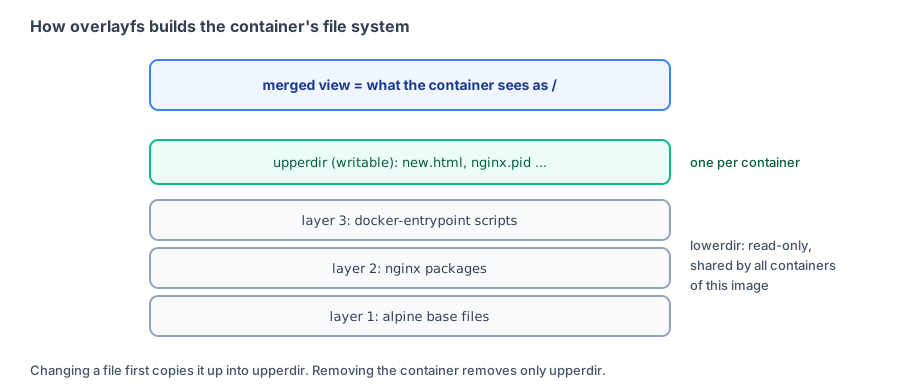
An image is made up of multiple read-only layers:
$ docker image inspect -f "{{range .RootFS.Layers}}{{println .}}{{end}}" nginx:1.30-alpine
sha256:74d97c428c51a828f9051a7a40a53ff1fc99e54fc30323ce36760701b0b7f711
sha256:2d3fbe0ca19dd389108f7e9a1d89ec5c1f1d7dc3c11fb2123bc425fed39c5f22
sha256:ed752e851ebe79a0e72be1fd48e90474d36ae2bb2ddccff2475f8e050c20a804
sha256:ec2b9a359ab960e2254545e79e9bca77edaeefb652d97b26855217fb8a9c80b3
sha256:267e83adf4c4e342b08cbe40814662493e030c88311c720fbce2f0d7c809f3f4
sha256:8fb5da5ad6fa936ba8c24999da33095b2b6c5fd2bcf4aa22acbf299b0e7294df
sha256:0d250d8db7c20b3c0bd3059b3431dd47f130cb81e7a4c7820950139daafb91d6
sha256:e46f4042ccf5f36d1605617ef6912bdaac437fa0bca12530e77529b191eb02fa


$ docker history --format "{{.Size}}\t{{.CreatedBy}}" nginx:1.30-alpine | cut -c1-90
51.9MB	RUN /bin/sh -c set -x     && apkArch="$(cat …
0B	ENV ACME_VERSION=0.4.1
0B	ENV NJS_RELEASE=1
0B	ENV NJS_VERSION=1.0.1
0B	CMD ["nginx" "-g" "daemon off;"]
0B	STOPSIGNAL SIGQUIT
0B	EXPOSE map[80/tcp:{}]
0B	ENTRYPOINT ["/docker-entrypoint.sh"]
16.4kB	COPY 30-tune-worker-processes.sh /docker-ent…
12.3kB	COPY 20-envsubst-on-templates.sh /docker-ent…
12.3kB	COPY 15-local-resolvers.envsh /docker-entryp…
12.3kB	COPY 10-listen-on-ipv6-by-default.sh /docker…
8.19kB	COPY docker-entrypoint.sh / # buildkit
5.62MB	RUN /bin/sh -c set -x     && addgroup -g 101…
0B	ENV DYNPKG_RELEASE=1
0B	ENV PKG_RELEASE=1
0B	ENV NGINX_VERSION=1.30.5
0B	LABEL maintainer=NGINX Docker Maintainers <d…
0B	CMD ["/bin/sh"]
9.08MB ADD alpine-minirootfs-3.24.2-x86_64.tar.gz /…RootFS.Layerslists the hashes of 8 layers.docker historylists the Dockerfile instruction that created each layer. Entries with size0B(ENV,CMD,EXPOSE) only change configuration and create no files, so they have no corresponding layer. The bottomADD alpine-minirootfs...is the Alpine base image.
Stacked into a root directory
When a container starts, Docker stacks these layers with overlayfs and adds a writable layer. On the host, inspect this container's mount information:
$ grep overlay /proc/mounts | grep $(docker inspect -f '{{.Id}}' demo) | tr ',' '\n' | sed 's#/var/lib/docker/containerd/daemon/io.containerd.snapshotter.v1.overlayfs/snapshots#…/snapshots#g'
overlay /var/lib/docker/rootfs/overlayfs/57dcd17505d4e7c71e57df55edef3e137c18249e6ad402c7e7b3f215341c47b4 overlay rw
relatime
lowerdir=…/snapshots/260/fs:…/snapshots/21/fs:…/snapshots/20/fs:…/snapshots/19/fs:…/snapshots/18/fs:…/snapshots/17/fs:…/snapshots/16/fs:…/snapshots/15/fs:…/snapshots/1/fs
upperdir=…/snapshots/261/fs
workdir=…/snapshots/261/work
xino=off 0 0
(The path is long, so … replaces /var/lib/docker/containerd/daemon/io.containerd.snapshotter.v1.overlayfs.)
| Item | Meaning |
|---|---|
lowerdir | Read-only image layers stacked from top to bottom and shared by all containers using this image |
upperdir | The writable layer for this container |
workdir | A temporary directory used internally by overlayfs |
Mount point /var/lib/docker/rootfs/overlayfs/CONTAINER_ID | The merged result—the / the container sees |
Where files written by a container go
Create a file inside the container, then find it in the host's upperdir:
$ docker exec demo sh -c "echo hello > /usr/share/nginx/html/new.html"

$ find /var/lib/docker/containerd/daemon/io.containerd.snapshotter.v1.overlayfs/snapshots/261/fs -type f | sed 's#.*/fs/#upperdir/#'
upperdir/usr/share/nginx/html/new.html
upperdir/run/nginx.pid
upperdir/etc/nginx/conf.d/default.conf

$ docker diff demo
C /etc
C /etc/nginx
C /etc/nginx/conf.d
C /etc/nginx/conf.d/default.conf
C /usr
C /usr/share
C /usr/share/nginx
C /usr/share/nginx/html
A /usr/share/nginx/html/new.html
C /run
A /run/nginx.pid
C /var
C /var/cache
C /var/cache/nginx
A /var/cache/nginx/client_temp
A /var/cache/nginx/fastcgi_temp
A /var/cache/nginx/proxy_temp
A /var/cache/nginx/scgi_temp
A /var/cache/nginx/uwsgi_temp- The new
new.htmlappears in upperdir. - nginx writes
nginx.pidwhen it starts. The image's startup script modifieddefault.conf(adding IPv6 settings). When overlayfs modifies an existing file from the image, it first copies it to upperdir and then modifies it (copy-up). docker difflists the contents of upperdir:Ameans added,Cmeans changed (including parent directories), andDmeans deleted.
So:
- Deleting a container deletes its upperdir, so data written inside the container disappears. That's why you should put data in a Volume: a Volume is a directly mounted directory that bypasses overlayfs.
- If you start 100 containers from one image, the image layers are stored only once.
- In a Dockerfile, "COPY then RUN rm" doesn't make the image smaller because the file remains in a lower read-only layer. Security best practices even lists this as something to avoid.
Capabilities and seccomp: What a container can do
$ docker info --format "{{.Driver}} {{json .SecurityOptions}}"
overlayfs ["name=apparmor,profile=default","name=seccomp,profile=builtin"]

$ docker exec demo grep CapEff /proc/1/status
CapEff:	00000000a80425fb

$ docker run --rm --cap-drop ALL alpine:3.23 grep CapEff /proc/1/status
CapEff:	0000000000000000
docker infoshows that this environment enables the default AppArmor and seccomp settings. seccomp blocks the container from making some dangerous system calls (such as loading kernel modules).CapEffis the process's current capabilities, represented as bits. By default, root inside a container has only some privileges (a80425fb), not full root privileges; after--cap-drop ALL, they are all zero. See Security best practices for the practical effects.--privilegedgives a container all capabilities and disables seccomp and AppArmor, removing this layer of protection.
Comparing containers and virtual machines
| Container | Virtual machine | |
|---|---|---|
| Kernel | Shares the host's Linux kernel | Each virtual machine has its own kernel |
| Isolation | Kernel features such as namespaces, cgroups, and seccomp | Hardware virtualization |
| Startup | Starts one process, usually in under 1 second | Boots in seconds to tens of seconds |
| Overhead | Almost none | Requires memory and CPU allocation for each virtual machine |
| Isolation strength | Weaker; a kernel vulnerability can affect all containers | Stronger |
This also explains a few common observations:
- On a Linux host,
psshows container processes. Windows and macOS can't see them because containers run inside the Docker Desktop virtual machine. - A container can't run an operating system with a different kernel. For example, a Linux host can't directly run a Windows container.
- The
exec format errorfor multi-platform images occurs because a container has no separate CPU; its program must be in a format the host CPU can run.
Recap
- A container is a Linux process on the host, created by runc and watched over by containerd-shim.
- Namespaces isolate processes, networking, mounts, hostnames, and other things the container can see; users aren't isolated by default.
- cgroups implement
--memory,--cpus, and--pids-limit. You can read the settings directly from cgroup files. - overlayfs combines read-only image layers with a writable upperdir to make the container's root directory. Deleting the container deletes its upperdir.
- Capabilities, seccomp, and AppArmor limit what root inside a container can do.
--privilegedremoves all of these controls.
Exercises
Exercise 1: Run docker run -d --name t1 --pids-limit 50 alpine:3.23 sleep 600, then read the PID limit from inside the container.
Answer
cgroup v1:
docker exec t1 cat /sys/fs/cgroup/pids/pids.maxcgroup v2:
docker exec t1 cat /sys/fs/cgroup/pids.maxBoth should show 50. Use docker info --format "{{.CgroupVersion}}" to check which version your system uses.
Exercise 2: Delete a file that already exists in the image from inside the container (for example, docker exec t1 rm /etc/motd), then run docker diff t1. What do you see? Was the file actually deleted from the image?
Answer
docker diff shows D /etc/motd. The image layers are read-only, so the file wasn't actually deleted: overlayfs put a "deletion marker" (whiteout) in upperdir so the merged view hides it. Start a new container from the same image and /etc/motd is still there.
Exercise 3: Start two nginx:1.30-alpine containers at the same time and compare their lowerdir and upperdir.
Hint
Run grep overlay /proc/mounts on a Linux host. The two containers have identical lowerdir values (they share the image layers), but different upperdir values.
FAQ
What is the most fundamental difference between a container and a virtual machine?
A virtual machine emulates an entire computer and runs its own operating system kernel. A container has no kernel of its own: all containers use the host's Linux kernel directly and are isolated by namespaces and cgroups. That's why starting a container only requires starting a process and takes almost no time.
Why can Windows and macOS run Linux containers too?
Docker Desktop starts a small Linux virtual machine in the background (WSL 2 on Windows). Containers actually run on that virtual machine's Linux kernel.
What's the difference between cgroup v1 and v2?
Both are Linux kernel mechanisms for limiting resources. Version 2 is newer and uses a unified directory structure. File names differ: for example, the memory limit is memory.limit_in_bytes in v1 and memory.max in v2; the CPU quota is cpu.max in v2. Recent distributions and Docker Desktop use v2 by default. docker info shows the version in Cgroup Version.
Does starting 100 containers from one image use 100 times the space?
No. Image layers are read-only lowerdirs shared by all containers. Each container adds only its own upperdir to store files it writes or modifies.
Updated October 14, 2026