Contents
Dockerfile Instructions Tutorial: Learn FROM, RUN, COPY, CMD, and ENTRYPOINT
The previous section used a small example to create your first Dockerfile. This section explains each instruction and uses small experiments to compare the pairs that are easiest to confuse.
Basic rules
- Instructions are not case-sensitive, but convention uses uppercase to distinguish them from arguments.
- Instructions run from top to bottom. The first instruction (except
ARGand comments) must beFROM. - Lines starting with
#are comments. - If a line is too long, you can continue it with
\.
FROM: base image
FROM python:3.14-slim
FROM --platform=linux/amd64 node:24-alpine
FROM scratch                     # Completely empty image for statically compiled programs
FROM golang:1.27 AS builder      # Names a stage in a multi-stage build
RUN: run commands at build time
# Shell form: runs through /bin/sh -c and supports && and pipes
RUN apt-get update && apt-get install -y --no-install-recommends curl \
    && rm -rf /var/lib/apt/lists/*

# Exec form: does not use a shell
RUN ["pip", "install", "--no-cache-dir", "flask"]
Each RUN creates a layer. Put apt-get update and apt-get install in the same RUN; otherwise, the cached update layer may become stale and install an older package version. Cleaning up the package lists at the end (rm -rf /var/lib/apt/lists/*) makes the image smaller. See Build cache and optimization for how much difference it makes.
COPY and ADD: copy files
COPY package.json package-lock.json ./
COPY src/ ./src/
COPY --chown=app:app . .
COPY --from=builder /app/dist ./dist     # Copies from another build stage
ADD is similar to COPY, but behaves differently with tar archives. Experiment: prepare a files.tar.gz containing files/a.txt and files/b.txt, then copy it with each instruction:
FROM alpine:3.23
COPY files.tar.gz /copy/
ADD files.tar.gz /add/
CMD ["sh", "-c", "echo '--- COPY:'; ls -R /copy; echo '--- ADD:'; ls -R /add"]
$ docker build -q -t add-demo .
sha256:2466246e51b76cd547fa913fce223fccc227ae19b9e53006b9ce203e1afc8ec4
$ docker run --rm add-demo
--- COPY:
/copy:
files.tar.gz
--- ADD:
/add:
files
/add/files:
a.txt
b.txtCOPYcopiedfiles.tar.gzas-is.ADDautomatically extracted the archive, so/adddirectly containsfiles/a.txtandfiles/b.txt.
ADD can also take a URL as its source (and download it automatically). These automatic behaviors can be surprising, so Docker recommends using COPY in general and using ADD only when you need archive extraction.
WORKDIR: working directory
WORKDIR /appSubsequent instructions such as RUN, COPY, and CMD run in this directory, which is created automatically if it does not exist. Use WORKDIR instead of writing RUN cd /app: each RUN uses a separate shell, so cd does not carry over to the next line.
ENV and ARG: variables
| ARG | ENV | |
|---|---|---|
| When it takes effect | At build time only | At build time and when the container runs |
| How to set it | docker build --build-arg NAME=value | In the Dockerfile or with docker run -e |
| Visible in the container? | No | Yes |
Experiment:
FROM alpine:3.23
ARG APP_VERSION=dev
ENV APP_ENV=production
RUN echo "building version $APP_VERSION" > /build-info.txt
CMD ["sh", "-c", "cat /build-info.txt; echo APP_ENV=$APP_ENV; echo APP_VERSION=${APP_VERSION:-<not set>}"]
$ docker build -q --build-arg APP_VERSION=1.2.0 -t args-demo .
sha256:3537c3e70baef148c3481f97bf325963b4809a15b806a2e38fed7e8eb5f50619
$ docker run --rm args-demo
building version 1.2.0
APP_ENV=production
APP_VERSION=<not set>
$ docker history --no-trunc --format "{{.CreatedBy}}" args-demo | head -n 3
CMD ["sh" "-c" "cat /build-info.txt; echo APP_ENV=$APP_ENV; echo APP_VERSION=${APP_VERSION:-<not set>}"]
RUN |1 APP_VERSION=1.2.0 /bin/sh -c echo "building version $APP_VERSION" > /build-info.txt # buildkit
ENV APP_ENV=production- The build-time value
APP_VERSION=1.2.0was used byRUN(written to/build-info.txt), but it is no longer visible when the container runs (<not set>). - The
APP_ENVset withENVis visible in the container. - Notice the second line of
docker history:RUN |1 APP_VERSION=1.2.0 .... The ARG value is recorded in the image history, where anyone with the image can see it.
So never use
ARGorENVto pass passwords or API keys. To use secrets at build time, useRUN --mount=type=secret. See Environment variables and .env files.
An ARG declared before FROM can only be used in FROM. To use it after FROM, declare it again with ARG name.
EXPOSE: document ports
EXPOSE 3000
EXPOSE 53/udp
EXPOSE is documentation only. It tells users which port the container uses; it does not actually publish the port. You still need docker run -p to publish it. Its only effect is when used with -P, which publishes every EXPOSE port on a random host port (the nginx image has EXPOSE 80):
$ docker run --rm -d --name exp -P nginx:1.30
857560427b1218d038314394f03cc0eb8edf950062304efaf2f5f3dc995f6ef6

$ docker port exp
80/tcp -> 0.0.0.0:32768
80/tcp -> [::]:32768

$ docker rm -f exp
exp
USER: run as a non-root user
By default, the container runs as root. Running as a regular user limits the impact if the program is compromised:
FROM alpine:3.23
RUN addgroup -S app && adduser -S -G app app
USER app
CMD ["sh", "-c", "whoami; id"]
$ docker build -q -t user-demo .
sha256:bdcaab4c6133a5446cdaaa1ca3353e01a690dc9fd0647458543abcec0d6041f1
$ docker run --rm user-demo
app
uid=100(app) gid=101(app) groups=101(app),101(app)
$ docker run --rm alpine:3.23 whoami
rootMany official images include a regular user already. For example, the node image has a node user, so you can use USER node directly.
VOLUME: declare a data directory
VOLUME /var/lib/dataThis declares that the directory should hold persistent data. If you do not mount it at runtime, Docker automatically creates an anonymous Volume (see the Volume section for a hands-on example). In practice, you usually specify a mount directly with docker run -v or in Compose, so your Dockerfile may not need a VOLUME instruction.
HEALTHCHECK: health checks
Docker periodically runs the health check command. An exit code of 0 means healthy; a nonzero code means unhealthy:
FROM nginx:1.30-alpine
HEALTHCHECK --interval=5s --timeout=3s --retries=3 \
  CMD wget -q --spider http://localhost/ || exit 1
Experiment: wait a few seconds after startup, then deliberately delete the home page to make nginx return an error:
$ docker run -d --name health health-demo
52bfa4cce8024630797ba6f33ba99dea44f80399fbadd617b2d04a8ac7f8e3b1

$ docker ps --filter name=health
CONTAINER ID   IMAGE         COMMAND                  CREATED        STATUS                                     PORTS     NAMES
52bfa4cce802   health-demo   "/docker-entrypoint.…"   1 second ago   Up Less than a second (health: starting)   80/tcp    health

$ docker ps --filter name=health
CONTAINER ID   IMAGE         COMMAND                  CREATED         STATUS                   PORTS     NAMES
52bfa4cce802   health-demo   "/docker-entrypoint.…"   9 seconds ago   Up 8 seconds (healthy)   80/tcp    health

$ docker exec health rm /usr/share/nginx/html/index.html

$ docker ps --filter name=health
CONTAINER ID   IMAGE         COMMAND                  CREATED          STATUS                      PORTS     NAMES
52bfa4cce802   health-demo   "/docker-entrypoint.…"   29 seconds ago   Up 28 seconds (unhealthy)   80/tcp    health

$ docker inspect --format '{{range .State.Health.Log}}{{.ExitCode}} {{.Output}}{{println}}{{end}}' health
0
1 wget: server returned error: HTTP/1.1 403 Forbidden
1 wget: server returned error: HTTP/1.1 403 Forbidden
1 wget: server returned error: HTTP/1.1 403 Forbidden
1 wget: server returned error: HTTP/1.1 403 Forbidden

$ docker rm -f health
health
The status changes from health: starting (just started) to healthy (check passed), then after deleting the home page and failing three times (--retries=3) to unhealthy. .State.Health.Log records each check's exit code and output.
- The image needs a tool such as
curlorwgetfor this to work (Alpine includeswget). - Compose can wait until a service is
healthybefore starting services that depend on it. See compose.yaml syntax.
CMD and ENTRYPOINT: startup commands
Both determine what runs when the container starts. The difference is whether they can be overridden and how they are combined.
CMD: can be replaced entirely
FROM alpine:3.23
CMD ["echo", "hello from CMD"]
$ docker build -q -t cmd-demo .
sha256:45b2af259ce828e227961bcc620b973758a1f757d948a7e23e056781afba324d
$ docker run --rm cmd-demo
hello from CMD
$ docker run --rm cmd-demo echo overridden
overriddenA command written after the image name in docker run replaces CMD entirely.
ENTRYPOINT: fixed main program
FROM alpine:3.23
ENTRYPOINT ["echo", "ENTRYPOINT says:"]
CMD ["default argument"]
$ docker build -q -t ep-demo .
sha256:32414489000b71c255d808cfd4cda73764b526525229dece3a8f1fd5487fc6d1
$ docker run --rm ep-demo
ENTRYPOINT says: default argument
$ docker run --rm ep-demo my argument
ENTRYPOINT says: my argument
$ docker run --rm --entrypoint date ep-demo
Mon Oct 12 23:59:17 UTC 2026- When both
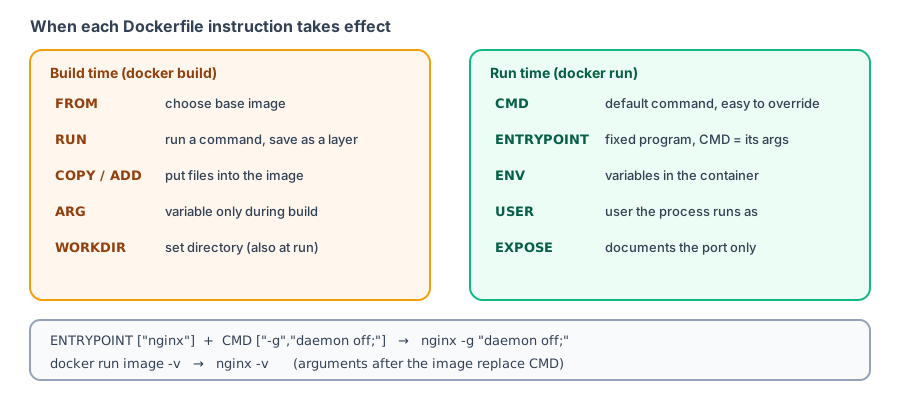
ENTRYPOINTandCMDare present, Docker runsENTRYPOINT + CMD. - Text after
docker runreplaces onlyCMDand becomes arguments toENTRYPOINT. - To replace
ENTRYPOINTitself, use--entrypoint.
| CMD | ENTRYPOINT | |
|---|---|---|
| Purpose | Default command or default arguments | The container's main executable |
docker run image xxx | xxx replaces CMD | xxx is appended to ENTRYPOINT |
| How to override | Write a command after the image name | --entrypoint |
How to choose:
- Regular applications: write only
CMD, so users can rundocker run -it myapp shto open a shell. - To use a container as “a command” (for example, a CLI tool): use
ENTRYPOINTto specify the program and put default arguments inCMD.
Exec form and shell form
CMD ["node", "server.js"]    # Exec form (JSON array)
CMD node server.js           # Shell form
Shell form actually runs /bin/sh -c "node server.js", so it supports environment variable expansion and shell syntax such as &&. Exec form runs the program directly without a shell. Exec form is generally recommended because its behavior is clearest.
PID 1 and why docker stop can take 10 seconds
Container lifecycle mentioned that docker stop sometimes waits the full 10 seconds. The example below uses the same Node.js program (server.js from the previous section, which does not handle SIGTERM) to compare four CMD forms. Use docker top to inspect the processes in each container, then time docker stop:
$ docker top shell-npm
PID                 USER                TIME                COMMAND
4155                root                0:00                npm start
4182                root                0:00                {MainThread} node server.js

$ time docker stop shell-npm
shell-npm
real	0m 0.66s
user	0m 0.00s
sys	0m 0.00s

$ docker top exec-npm
PID                 USER                TIME                COMMAND
4318                root                0:00                npm start
4347                root                0:00                {MainThread} node server.js

$ time docker stop exec-npm
exec-npm
real	0m 0.67s
user	0m 0.00s
sys	0m 0.00s

$ docker top shell-node
PID                 USER                TIME                COMMAND
4488                root                0:00                {MainThread} node server.js

$ time docker stop shell-node
shell-node
real	0m 10.14s
user	0m 0.01s
sys	0m 0.01s

$ docker top exec-node
PID                 USER                TIME                COMMAND
4660                root                0:00                {MainThread} node server.js

$ time docker stop exec-node
exec-node
real	0m 10.14s
user	0m 0.01s
sys 0m 0.00s| CMD form | PID 1 in the container | docker stop |
|---|---|---|
CMD npm start | npm | 0.66 seconds |
CMD ["npm", "start"] | npm | 0.67 seconds |
CMD node server.js | node | 10.14 seconds |
CMD ["node", "server.js"] | node | 10.14 seconds |
The key is not shell form versus exec form, but which process is PID 1:
- Linux treats PID 1 specially: if PID 1 does not handle SIGTERM itself, the signal is ignored. When node runs directly as PID 1 and the program does not handle SIGTERM,
docker stophas to wait 10 seconds before force-stopping it with SIGKILL. - When npm starts node, npm is PID 1 and forwards SIGTERM to node. Node is not PID 1, so it exits on SIGTERM according to its default behavior.
- The shell form in the first row does not add another
shprocess because Alpine'sshreplaces itself withnpmwhen there is only one command.
Choose one of these solutions:
- Handle SIGTERM in your program and shut down the server gracefully (best practice; see Node.js applications).
- Add
--initat runtime (or setinit: truein Compose) so a small init process runs as PID 1 and forwards signals.
Other instructions
| Instruction | Purpose |
|---|---|
LABEL | Add metadata, for example LABEL org.opencontainers.image.source="https://github.com/..." |
SHELL | Change the shell used by shell form, such as PowerShell in Windows containers |
STOPSIGNAL | Change the signal sent by docker stop (the nginx image sets this to SIGQUIT; see docker history in Images) |
ONBUILD | An instruction that runs only when another image uses this image as its base (rarely used) |
Complete example: Python website
FROM python:3.14-slim

ENV PYTHONDONTWRITEBYTECODE=1 \
    PYTHONUNBUFFERED=1

WORKDIR /app

COPY requirements.txt .
RUN pip install --no-cache-dir -r requirements.txt

COPY . .

RUN useradd --system app
USER app

EXPOSE 8000
CMD ["gunicorn", "--bind", "0.0.0.0:8000", "app:app"]
PYTHONUNBUFFERED=1 makes Python write output immediately, so you can see it in docker logs right away. See Deploy a Python application with Docker for the build and run process for this Dockerfile.
Recap
RUN,COPY, andARGtake effect at build time;CMD,ENTRYPOINT,USER, andENVaffect runtime.- The
xxxindocker run image xxxreplaces CMD or is appended to ENTRYPOINT. - Use exec form (JSON arrays) for
CMDandENTRYPOINT. - Do not pass passwords with
ARGorENV.
Exercises
Exercise 1: An image sets ENTRYPOINT ["ping"] and CMD ["-c", "3", "localhost"]. What does docker run image -c 1 example.com actually run?
Answer
ping -c 1 example.com. The runtime arguments replace CMD and are then appended to ENTRYPOINT.
Exercise 2: Why does ENV NODE_ENV production trigger a warning from docker build --check?
Answer
This is the old syntax. Write ENV NODE_ENV=production instead. The warning is named LegacyKeyValueFormat.
FAQ
Should I use COPY or ADD?
Prefer COPY in general. ADD automatically extracts tar files and can download URLs, which makes its behavior less obvious. Use it only when you need those features.
Should I use CMD or ENTRYPOINT?
Use CMD for most applications so users can override it easily. Use ENTRYPOINT when the image acts like a command-line tool that always runs the same program and only changes its arguments.
How can I check whether my Dockerfile has problems?
Run docker build --check . to see warnings such as JSONArgsRecommended and LegacyKeyValueFormat. See [docker init](/docker/docker-init/).
Updated October 14, 2026