Contents
Docker Environment Variables Tutorial: Configure Containers with -e, .env, and Secrets
The same image may need to connect to different databases and use different settings in development, test, and production. The most common approach is to put these settings in environment variables and pass them in when you run the container.
Set variables with -e
$ docker run --rm -e NODE_ENV=production -e PORT=8080 alpine:3.23 sh -c "echo \$NODE_ENV \$PORT"
production 8080

$ export API_KEY=abc123 && docker run --rm -e API_KEY alpine:3.23 sh -c "echo API_KEY=\$API_KEY"
API_KEY=abc123
-e NAME=valuesets a value directly.- Writing only
-e NAME(without a value) uses the host's current environment variable with the same name.
Read a file with --env-file
When you have many variables, managing them in a command is difficult. Put them in a file instead:
$ cat app.env
# app.env
NODE_ENV=production
PORT=8080
GREETING="hello world"
DATABASE_URL=postgres://app:secret@db:5432/app

$ docker run --rm --env-file app.env alpine:3.23 env
PATH=/usr/local/sbin:/usr/local/bin:/usr/sbin:/usr/bin:/sbin:/bin
HOSTNAME=e311730363f7
NODE_ENV=production
PORT=8080
GREETING="hello world"
DATABASE_URL=postgres://app:secret@db:5432/app
HOME=/root
Notice the GREETING line: it is written as "hello world" in the file, and the value the container receives includes the quotes. Here are the rules for docker run --env-file:
- Use one
KEY=VALUEper line; lines starting with#are comments. - Don't quote values; quotes are treated as part of the value.
- Variable expansion such as
$OTHER_VARisn't supported.
(As you'll see below, Compose removes the quotes when it reads the same file, so the two behave differently.)
Set defaults in a Dockerfile
ENV NODE_ENV=production \
    PORT=3000
ENV sets default values, which docker run -e can override. Use it for settings that "don't change often and aren't secrets."
Priority order
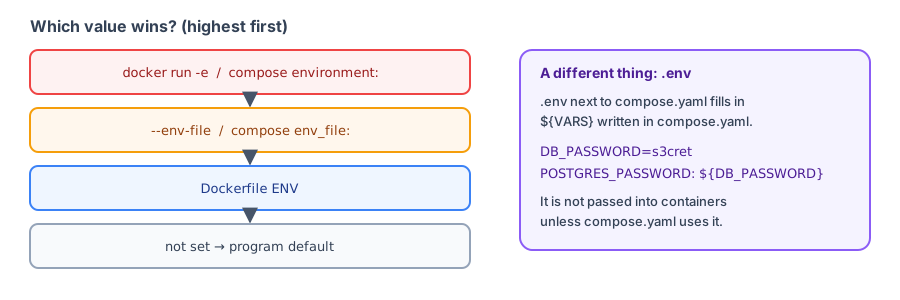
From highest to lowest:
docker run -edocker run --env-file- Dockerfile
ENV ENVin the base image
Can people see environment variables?
Environment variables are convenient, but they aren't secure. Anyone who can run docker inspect can see them:
$ docker run -d --name envdemo -e SECRET_TOKEN=abc123 alpine:3.23 sleep 60
431168d97dc8187ec79e420638155b2f53fd78a9d82f8a6d13eb6bd9aec09bcb

$ docker inspect --format '{{json .Config.Env}}' envdemo
["SECRET_TOKEN=abc123","PATH=/usr/local/sbin:/usr/local/bin:/usr/sbin:/usr/bin:/sbin:/bin"]

$ docker rm -f envdemo
envdemo
Also, a program may print environment variables to logs when it fails, and child processes inherit them. For passwords and API keys, follow the recommendations below in "Handling secrets."
Environment variables in Docker Compose
Compose has two kinds of "environment variables" that are easy to confuse. Here's an example. compose.yaml:
services:
  app:
    image: alpine:3.23
    command: ["sh", "-c", "env | sort | grep -E 'APP_|DATABASE|NODE_ENV|PORT|GREETING'"]
    environment:
      APP_VERSION: ${APP_VERSION}
      DATABASE_PASSWORD: ${DB_PASSWORD}
    env_file:
      - app.env
1. Variables passed to the container: environment and env_file
Write environment directly in compose.yaml; env_file reads a file (in this case, the app.env file from above).
2. Variables used to substitute values in compose.yaml: .env
Compose automatically reads the .env file in the project directory and uses it to substitute ${...} in compose.yaml. Use docker compose config to see the final configuration after substitution:
$ cat .env
APP_VERSION=1.4.2
DB_PASSWORD=change-me

$ docker compose config app
name: ch15
services:
  app:
    command:
      - sh
      - -c
      - env | sort | grep -E 'APP_|DATABASE|NODE_ENV|PORT|GREETING'
    environment:
      APP_VERSION: 1.4.2
      DATABASE_PASSWORD: change-me
      DATABASE_URL: postgres://app:secret@db:5432/app
      GREETING: hello world
      NODE_ENV: production
      PORT: "8080"
    image: alpine:3.23
    networks:
      default: null
networks:
  default:
    name: ch15_default

$ docker compose run --rm app
[+] run 1/1
 ✔ Network ch15_default Created                                                                 0.0s
Container ch15-app-run-dfbcf95b7271 Creating
Container ch15-app-run-dfbcf95b7271 Created
APP_VERSION=1.4.2
DATABASE_PASSWORD=change-me
DATABASE_URL=postgres://app:secret@db:5432/app
GREETING=hello world
NODE_ENV=production
PORT=8080${APP_VERSION}and${DB_PASSWORD}are replaced with values from.env.- Compose reads
GREETING="hello world"inapp.envwithout the quotes, unlikedocker run --env-file. - Quotes around
PORT: "8080"indicate that it's a string (environment variables are always strings).
.env is not automatically passed into the container; it is only used to substitute values in compose.yaml. To pass a value into the container, reference it in environment (for example, APP_VERSION: ${APP_VERSION}) or use env_file: .env.
Default values and required variable checks
| Syntax | Meaning |
|---|---|
${VAR} | Substitute the value of VAR |
${VAR:-default} | Use the default value if unset or empty |
${VAR:?error message} | Report an error if unset or empty |
${VAR:?} works well for variables that must be set, such as passwords. If you forget to set one, Compose stops immediately instead of starting with an empty password:
services:
  db:
    image: postgres:18
    environment:
      POSTGRES_PASSWORD: ${MISSING_PASSWORD:?Please set MISSING_PASSWORD in .env}
$ docker compose -f compose.required.yaml config
error while interpolating services.db.environment.POSTGRES_PASSWORD: required variable MISSING_PASSWORD is missing a value: Please set MISSING_PASSWORD in .envHandling secrets
- Don't put passwords in Dockerfile
ENVorARG; they remain in the image (see the hands-on test in Dockerfile instructions). - Don't commit
.envto Git. Add.envto.gitignore, and provide an.env.examplewithout real values. - Add
.envto.dockerignoreto keepCOPY . .from including it in the image.
Pass secrets using files (Compose secrets)
Many official images support variables ending in _FILE to read passwords from files:
services:
  db:
    image: postgres:18
    environment:
      POSTGRES_PASSWORD_FILE: /run/secrets/db_password
    secrets:
      - db_password

secrets:
  db_password:
    file: ./secrets/db_password.txt
$ docker compose up -d db
[+] up 1/1
✔ Container ch15-db-1 Started 0.3s
$ docker compose exec db sh -c "ls -l /run/secrets; cat /run/secrets/db_password; echo; env | grep POSTGRES"
total 4
-rw-rw-r-- 1 1001 1001 16 Oct 12 14:25 db_password
s3cret-from-file
POSTGRES_PASSWORD_FILE=/run/secrets/db_password
$ docker compose down
[+] down 2/2
✔ Container ch15-db-1 Removed 0.1s
✔ Network ch15_default Removed 0.1sThe secret appears as a file in the container at /run/secrets/db_password. The environment variable contains only the file path, POSTGRES_PASSWORD_FILE, so docker inspect can't see the password itself.
Secrets needed during builds
For example, if you need a token to install a private package, mount it as a BuildKit secret:
# syntax=docker/dockerfile:1
RUN --mount=type=secret,id=npm_token \
    NPM_TOKEN=$(cat /run/secrets/npm_token) npm ci
docker build --secret id=npm_token,env=NPM_TOKEN -t myapp .The token exists only while this RUN executes; it won't remain in any layer.
Recap
- Priority:
-e/environment>--env-file/env_file> DockerfileENV. .envsubstitutes${VAR}in compose.yaml; it isn't automatically passed into the container.docker run --env-filekeeps quotes around values; Compose removes them.- Pass secrets using files (secrets); don't put them in the image.
Exercises
Exercise 1: An image has ENV MODE=prod. You run it with docker run -e MODE=dev. What is MODE inside the container?
Answer
dev. -e takes priority over Dockerfile ENV.
Exercise 2: In compose.yaml, you set POSTGRES_PASSWORD: ${DB_PASSWORD:?DB_PASSWORD is required}, but .env doesn't contain DB_PASSWORD. What happens when you run docker compose up?
Answer
Compose reports an error and stops, displaying DB_PASSWORD is required. It won't create the database with an empty password.
FAQ
Why didn't the container's environment variables change after I edited .env?
Environment variables are determined when a container is created. Recreate the container after making changes: with Compose, use docker compose up -d; restart won't apply them.
Can people see my password with docker inspect?
Yes. Values passed with -e appear in docker inspect. Pass sensitive data using files (secrets) instead.
What's the difference between ${VAR:-default} and ${VAR:?message}?
The first uses a default value when the variable is unset; the second reports an error and stops when it is unset. Use it for required passwords to avoid an empty string.
Updated October 14, 2026