Contents
Docker Node.js Deployment Tutorial: Express, TypeScript, and Next.js
Dockerfile basics used a very simple Node.js example. This chapter covers what to consider in a production project, with results from actually running each recommendation.
Express: project files
express-app/
├── package.json
├── package-lock.json
├── server.js
├── Dockerfile
├── .dockerignore
└── compose.yaml ← only used in developmentpackage.json:
{
  "name": "express-app",
  "version": "1.0.0",
  "scripts": { "start": "node server.js", "dev": "node --watch server.js" },
  "dependencies": { "express": "^5.1.0" }
}server.js:
const express = require("express");
const app = express();

app.get("/", (req, res) => res.json({ message: "Hello from Express", node: process.version }));

const server = app.listen(3000, () => console.log("Listening on port 3000"));

process.on("SIGTERM", () => {
  console.log("SIGTERM received, closing server");
  server.close(() => process.exit(0));
});
The last few lines handle SIGTERM: when the process receives a stop signal, it stops accepting new connections, waits for in-flight requests to finish, and then exits. You'll see why this is needed in a test later.
Generate package-lock.json without installing Node.js
npm ci requires package-lock.json. If Node.js isn't installed locally, you can generate it in a container:
$ docker run --rm -v "$(pwd):/app" -w /app node:24-alpine npm install --package-lock-only

up to date, audited 66 packages in 3s

28 packages are looking for funding
  run `npm fund` for details

found 0 vulnerabilities
Windows equivalents (select a tab to switch):
docker run --rm -v "$(pwd):/app" -w /app node:24-alpine npm install --package-lock-onlydocker run --rm -v "${PWD}:/app" -w /app node:24-alpine npm install --package-lock-onlydocker run --rm -v "%cd%:/app" -w /app node:24-alpine npm install --package-lock-only--package-lock-only generates only the lockfile; it doesn't create node_modules.
Express: production Dockerfile
FROM node:24-alpine

ENV NODE_ENV=production
WORKDIR /app

COPY package.json package-lock.json ./
RUN npm ci --omit=dev && npm cache clean --force

COPY --chown=node:node . .

USER node
EXPOSE 3000
CMD ["node", "server.js"]| Setting | Reason |
|---|---|
node:24-alpine | Node.js 24 is an LTS release, and the Alpine image is small. If a native module fails to compile on Alpine, use node:24-slim. |
NODE_ENV=production | Frameworks such as Express enable production optimizations. |
npm ci instead of npm install | Installs exactly from package-lock.json for repeatable builds; it fails if the lockfile and package.json don't match. |
--omit=dev | Doesn't install devDependencies. |
npm cache clean --force | Removes npm's download cache so it isn't stored in the image. |
COPY --chown=node:node | Sets the file owner to the node user. |
USER node | The official image includes a node user, so the app doesn't run as root. |
CMD ["node", "server.js"] | Runs node directly in exec form. |
.dockerignore:
node_modules
npm-debug.log
dist
.env
.git
Always exclude node_modules. The host's node_modules may contain native modules compiled for another operating system (Windows or macOS). Copying them into a Linux container can cause errors and overwrite the versions just installed by npm ci.
Build the image:
$ docker build -t express-app .

[+] Building 4.4s (10/10) FINISHED                                                                                                     docker:default
 => [internal] load build definition from Dockerfile                                                                                             0.0s
 => => transferring dockerfile: 263B                                                                                                             0.0s
 => [internal] load metadata for docker.io/library/node:24-alpine                                                                                0.0s
 => [internal] load .dockerignore                                                                                                                0.0s
 => => transferring context: 82B                                                                                                                 0.0s
 => [1/5] FROM docker.io/library/node:24-alpine@sha256:ebfe2f90462722a7a4de65e91990e97fe0d401c70e0e762c5b53302f905ec1c1                          0.0s
 => => resolve docker.io/library/node:24-alpine@sha256:ebfe2f90462722a7a4de65e91990e97fe0d401c70e0e762c5b53302f905ec1c1                          0.0s
 => [internal] load build context                                                                                                                0.0s
 => => transferring context: 31.48kB                                                                                                             0.0s
 => CACHED [2/5] WORKDIR /app                                                                                                                    0.0s
 => [3/5] COPY package.json package-lock.json ./                                                                                                 0.0s
 => [4/5] RUN npm ci --omit=dev && npm cache clean --force                                                                                       3.6s
 => [5/5] COPY --chown=node:node . .                                                                                                             0.1s
 => exporting to image                                                                                                                           0.5s
 => => exporting layers                                                                                                                          0.3s
 => => exporting manifest sha256:8917f79cf02c3ec90fb6b405b264d6947606b4483a1a54c9136d3d897c055cfe                                                0.0s
 => => exporting config sha256:38cb9b0da0deb6a0d8682ddb8bf8705ccccec4315c3e58075409bc2f4b07c82a                                                  0.0s
 => => exporting attestation manifest sha256:84686e085a4e55d8b9480ab770fb2b2e55b93126c779a2a58fd9647b434fb638                                    0.0s
 => => exporting manifest list sha256:b571835fa0e0ed6b89f34a1a725e847dd40b13a61bc13c9aadf30c405db340af                                           0.0s
 => => naming to docker.io/library/express-app:latest                                                                                            0.0s
 => => unpacking to docker.io/library/express-app:latest                                                                                         0.2s
Run it and verify:
$ docker run -d --name express -p 3000:3000 express-app
4d0122c37234c4396ed8cb924d4c206c77c07f2db19b9a9a89ea83eeb53831df

$ curl -s http://localhost:3000
{"message":"Hello from Express","node":"v24.21.0"}

$ docker exec express whoami
node

$ docker exec express ps
PID   USER     TIME  COMMAND
    1 node      0:00 {MainThread} node server.js
   18 node      0:00 ps

$ time docker stop express
express
real	0m 0.15s
user	0m 0.00s
sys	0m 0.01s

$ docker logs express
Listening on port 3000
SIGTERM received, closing serverwhoamireturnsnode, not root.psshows thatnode server.jshas PID 1.docker stoptakes only 0.15 seconds. The log showsSIGTERM received, closing server, confirming that the app received the signal and exited cleanly.
Test: why docker stop takes 10 seconds
Remove the lines that handle SIGTERM from server.js, save the file as server-nohandler.js, and run it with the same image:
$ docker run -d --name nohandler express-app node server-nohandler.js
9278a6a9ad9bab77e08edcb06b52baed2f372b0f98248ebf2bed344a96c4f4a3

$ time docker stop nohandler
nohandler
real	0m 10.13s
user	0m 0.01s
sys	0m 0.00s

$ docker inspect -f "{{.State.ExitCode}}" nohandler
137
This time, docker stop takes 10.13 seconds and the exit code is 137 (128 + 9, meaning it was forcibly terminated by SIGKILL).
This is due to Linux's special rule for PID 1: signals without a registered handler are ignored by PID 1. A normal process exits by default when it receives SIGTERM. But when node is PID 1 in a container, SIGTERM is ignored unless you add process.on("SIGTERM"). Docker waits 10 seconds, then sends SIGKILL to force termination, interrupting any in-flight requests.
There are two solutions:
- Handle SIGTERM in your app, as in the earlier
server.jsexample (recommended; this lets it shut down gracefully). - Add
--init(setinit: truein Compose). Docker's built-in lightweight init process becomes PID 1 and forwards signals:
$ docker run -d --name withinit --init express-app node server-nohandler.js
6adf48ca4dc8eeed68ebd49689f417001ae4282d14995dd6299b62aa39b9c0b6

$ docker exec withinit ps
PID   USER     TIME  COMMAND
    1 node      0:00 /sbin/docker-init -- docker-entrypoint.sh node server-nohandler.js
    7 node      0:00 {MainThread} node server-nohandler.js
   15 node      0:00 ps

$ time docker stop withinit
withinit
real	0m 0.22s
user	0m 0.00s
sys	0m 0.00s
ps shows that PID 1 is now /sbin/docker-init and node is PID 7. Since node is no longer PID 1, SIGTERM's default action of exiting applies again, and docker stop takes only 0.22 seconds.
What about npm start?
Dockerfile.npm is the same as before, except that the last line is CMD ["npm", "start"]:
$ docker build -q -f Dockerfile.npm -t express-npm .
sha256:b1de8acaa7f9b683dccff25420ff08edd33926938788525d304fa327c5ed5895

$ docker run -d --name npmstart express-npm
bf95495c7e1ea9f990a00980423d78d238a38acca6a653a858548b100a88d846

$ docker exec npmstart ps
PID   USER     TIME  COMMAND
    1 node      0:00 npm start
   18 node      0:00 {MainThread} node server.js
   25 node      0:00 ps

$ time docker stop npmstart
npmstart
real	0m 0.11s
user	0m 0.00s
sys	0m 0.01s

$ docker logs npmstart

> express-app@1.0.0 start
> node server.js

Listening on port 3000
SIGTERM received, closing server
npm notice
npm notice New major version of npm available! 11.19.0 -> 12.2.0
npm notice Changelog: https://github.com/npm/cli/releases/tag/v12.2.0
npm notice To update run: npm install -g npm@12.2.0
npm notice
npm is PID 1, and node is its child process (PID 18). In this test, npm 11 forwards SIGTERM to node, so it stops in 0.11 seconds. The log also shows SIGTERM received.
However, starting the app directly with node is still recommended:
- An extra npm process stays running and uses additional memory.
- npm messages appear in the logs (the final
npm noticeabove reports a new version). - Signal forwarding depends on npm's implementation and may not be reliable with older npm versions or a shell script wrapper.
TypeScript: multi-stage build
For projects that need compilation (TypeScript, Babel, or bundlers), use a multi-stage build: install all dependencies and compile in the first stage, then install only production dependencies in the second stage and copy the compiled output from the first stage.
Example project ts-app:
ts-app/
├── package.json
├── package-lock.json
├── tsconfig.json
├── src/
│   └── index.ts
├── Dockerfile
└── .dockerignorepackage.json:
{
  "name": "ts-app",
  "version": "1.0.0",
  "scripts": { "build": "tsc", "start": "node dist/index.js" },
  "dependencies": { "express": "^5.1.0" },
  "devDependencies": { "typescript": "^5.9.0", "@types/express": "^5.0.0", "@types/node": "^24.0.0" }
}tsconfig.json:
{
  "compilerOptions": {
    "target": "ES2023",
    "module": "commonjs",
    "outDir": "dist",
    "rootDir": "src",
    "strict": true,
    "esModuleInterop": true
  }
}src/index.ts:
import express, { Request, Response } from "express";

const app = express();
const port = Number(process.env.PORT ?? 3000);

app.get("/", (_req: Request, res: Response) => {
  res.json({ message: "Hello from TypeScript", node: process.version });
});

const server = app.listen(port, () => console.log(`Listening on port ${port}`));
process.on("SIGTERM", () => server.close(() => process.exit(0)));Dockerfile:
FROM node:24-alpine AS build
WORKDIR /app
COPY package.json package-lock.json ./
RUN npm ci
COPY . .
RUN npm run build

FROM node:24-alpine
ENV NODE_ENV=production
WORKDIR /app
COPY package.json package-lock.json ./
RUN npm ci --omit=dev && npm cache clean --force
COPY --from=build /app/dist ./dist
USER node
EXPOSE 3000
CMD ["node", "dist/index.js"]
In addition to node_modules, exclude dist in .dockerignore to avoid copying in old files compiled locally.
$ docker run --rm -v "$(pwd):/app" -w /app node:24-alpine npm install --package-lock-only --no-update-notifier

up to date, audited 78 packages in 5s

28 packages are looking for funding
  run `npm fund` for details

found 0 vulnerabilities

$ docker build -t ts-app .

[+] Building 16.7s (13/13) FINISHED                                                                                                    docker:default
 => [internal] load build definition from Dockerfile                                                                                             0.0s
 => => transferring dockerfile: 391B                                                                                                             0.0s
 => [internal] load metadata for docker.io/library/node:24-alpine                                                                                0.0s
 => [internal] load .dockerignore                                                                                                                0.0s
 => => transferring context: 68B                                                                                                                 0.0s
 => [build 1/6] FROM docker.io/library/node:24-alpine@sha256:ebfe2f90462722a7a4de65e91990e97fe0d401c70e0e762c5b53302f905ec1c1                    0.0s
 => => resolve docker.io/library/node:24-alpine@sha256:ebfe2f90462722a7a4de65e91990e97fe0d401c70e0e762c5b53302f905ec1c1                          0.0s
 => [internal] load build context                                                                                                                0.0s
 => => transferring context: 35.99kB                                                                                                             0.0s
 => CACHED [build 2/6] WORKDIR /app                                                                                                              0.0s
 => [build 3/6] COPY package.json package-lock.json ./                                                                                           0.0s
 => [stage-1 4/5] RUN npm ci --omit=dev && npm cache clean --force                                                                               7.0s
 => [build 4/6] RUN npm ci                                                                                                                       7.2s
 => [build 5/6] COPY . .                                                                                                                         0.1s
 => [build 6/6] RUN npm run build                                                                                                                8.3s
 => [stage-1 5/5] COPY --from=build /app/dist ./dist                                                                                             0.1s
 => exporting to image                                                                                                                           0.9s
 => => exporting layers                                                                                                                          0.6s
 => => exporting manifest sha256:58a91539ec3d0dbcee5d303babb4c767a09c85b53abe6c195a321e6fd2d80b2e                                                0.0s
 => => exporting config sha256:2213fe6fe167daa9912ceec2e6c55883f67baa9b637f7cefa4b6006741d51c7c                                                  0.0s
 => => exporting attestation manifest sha256:411a11454dc2f749351eb4f363d87425763a77331094da33f74e46fd273aeb88                                    0.0s
 => => exporting manifest list sha256:6ed92551a94607ebcbfbd4fa123342429cc46737266344add01c334b682ea897                                           0.0s
 => => naming to docker.io/library/ts-app:latest                                                                                                 0.0s
 => => unpacking to docker.io/library/ts-app:latest                                                                                              0.2s

$ docker run -d --name ts -p 3000:3000 ts-app
15ddc10ace29ece5e4cc013a30d2b990bba52b901b918154e64463d5ee581d46

$ curl -s http://localhost:3000
{"message":"Hello from TypeScript","node":"v24.21.0"}

$ docker exec ts ls
dist
node_modules
package-lock.json
package.json

$ docker exec ts ls node_modules | grep -c .
65

$ docker exec ts ls node_modules/typescript
ls: node_modules/typescript: No such file or directory

$ docker images --filter reference=ts-app
IMAGE           ID             DISK USAGE   CONTENT SIZE   EXTRA
ts-app:build    fcf8f6c88e74        297MB         73.9MB
ts-app:latest   6ed92551a946        250MB         62.8MB   U
Windows equivalents (select a tab to switch):
docker run --rm -v "$(pwd):/app" -w /app node:24-alpine npm install --package-lock-only --no-update-notifierdocker run --rm -v "${PWD}:/app" -w /app node:24-alpine npm install --package-lock-only --no-update-notifierdocker run --rm -v "%cd%:/app" -w /app node:24-alpine npm install --package-lock-only --no-update-notifierWhat to notice:
[build 4/6] RUN npm ciand[stage-1 4/5] RUN npm ci --omit=devrun almost at the same time. BuildKit sees that the stages don't depend on each other and builds them in parallel.- The final image contains only
dist,node_modules, and the two package files. It doesn't containsrcortsconfig.json. node_modules/typescriptis missing, which means devDependencies aren't in the final image.- Build the first stage separately with
--target buildfor comparison:ts-app:buildis 297 MB, while the finalts-app:latestis 250 MB.
Next.js: standalone output
Next.js has a large node_modules, but uses only a small portion at runtime. With standalone output enabled, next build analyzes the files the app actually uses and gathers them in .next/standalone, including a trimmed node_modules and a server.js file to start the app.
Example project next-app:
next-app/
├── app/
│   ├── layout.js
│   └── page.js
├── public/
├── next.config.mjs
├── package.json
├── package-lock.json
├── Dockerfile
└── .dockerignorenext.config.mjs:
/** @type {import('next').NextConfig} */
const nextConfig = {
  output: "standalone",
};

export default nextConfig;package.json:
{
  "name": "next-app",
  "version": "1.0.0",
  "private": true,
  "scripts": { "dev": "next dev", "build": "next build", "start": "next start" },
  "dependencies": { "next": "^16.4.0", "react": "^19.3.0", "react-dom": "^19.3.0" }
}
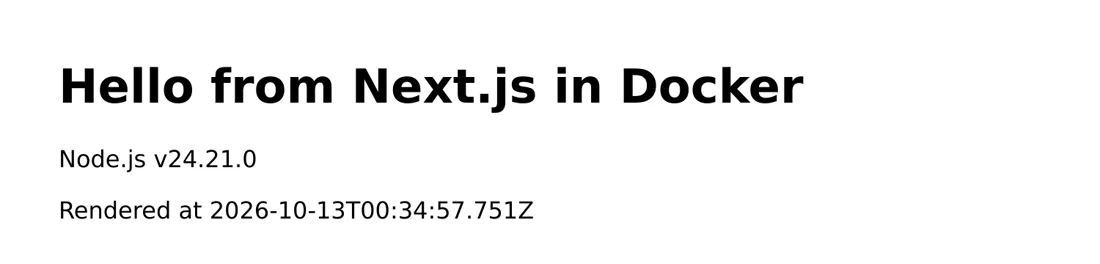
app/page.js (force-dynamic renders the page on the server for each request, which lets you verify that the Node.js server is running):
export const dynamic = "force-dynamic";

export default function Home() {
  return (
    <main>
      <h1>Hello from Next.js in Docker</h1>
      <p>Node.js {process.version}</p>
      <p>Rendered at {new Date().toISOString()}</p>
    </main>
  );
}Dockerfile:
FROM node:24-alpine AS build
WORKDIR /app
COPY package.json package-lock.json ./
RUN npm ci
COPY . .
RUN npm run build

FROM node:24-alpine
WORKDIR /app
ENV NODE_ENV=production
COPY --from=build --chown=node:node /app/public ./public
COPY --from=build --chown=node:node /app/.next/standalone ./
COPY --from=build --chown=node:node /app/.next/static ./.next/static
USER node
EXPOSE 3000
ENV HOSTNAME=0.0.0.0 PORT=3000
CMD ["node", "server.js"]
Note:
.next/standalonedoesn't includepublicor.next/static. You must copy them separately, or the page will be missing CSS, JavaScript, and images.HOSTNAME=0.0.0.0makes Next.js listen on all network interfaces. Otherwise, connections from outside the container can't reach it.- Exclude
.nextandnode_modulesin.dockerignore. - If the project doesn't have a
publicdirectory,COPY --from=build /app/publicwill fail. Create an emptypublicdirectory to fix this.
$ ls -a
.
..
.dockerignore
Dockerfile
app
next.config.mjs
package-lock.json
package.json
public

$ docker build -t next-app .

[+] Building 35.7s (14/14) FINISHED                                                                                                    docker:default
 => [internal] load build definition from Dockerfile                                                                                             0.0s
 => => transferring dockerfile: 482B                                                                                                             0.0s
 => [internal] load metadata for docker.io/library/node:24-alpine                                                                                0.0s
 => [internal] load .dockerignore                                                                                                                0.0s
 => => transferring context: 74B                                                                                                                 0.0s
 => [internal] load build context                                                                                                                0.0s
 => => transferring context: 33.45kB                                                                                                             0.0s
 => [build 1/6] FROM docker.io/library/node:24-alpine@sha256:ebfe2f90462722a7a4de65e91990e97fe0d401c70e0e762c5b53302f905ec1c1                    0.0s
 => => resolve docker.io/library/node:24-alpine@sha256:ebfe2f90462722a7a4de65e91990e97fe0d401c70e0e762c5b53302f905ec1c1                          0.0s
 => CACHED [build 2/6] WORKDIR /app                                                                                                              0.0s
 => [build 3/6] COPY package.json package-lock.json ./                                                                                           0.0s
 => [build 4/6] RUN npm ci                                                                                                                      14.3s
 => [build 5/6] COPY . .                                                                                                                         0.2s
 => [build 6/6] RUN npm run build                                                                                                               17.2s
 => [stage-1 3/5] COPY --from=build --chown=node:node /app/public ./public                                                                       0.2s
 => [stage-1 4/5] COPY --from=build --chown=node:node /app/.next/standalone ./                                                                   0.3s
 => [stage-1 5/5] COPY --from=build --chown=node:node /app/.next/static ./.next/static                                                           0.0s
 => exporting to image                                                                                                                           2.5s
 => => exporting layers                                                                                                                          1.6s
 => => exporting manifest sha256:c4c7e9e6017fcef276d48566c8abdef44faaef63030e3b7de7200dee31704008                                                0.0s
 => => exporting config sha256:01db87f2d8cbbf50e3bdb7f43bbee19b88ad6cde31600d80119a5e95a45e0411                                                  0.0s
 => => exporting attestation manifest sha256:6294f1b5a03f9b4eeabdbc13d9ba940f09b5985beae5d12a090884d7f1840a86                                    0.0s
 => => exporting manifest list sha256:9beae036b818492afcf23060792cd3d7931346272bc5ba7a207f16f8aaf07d1a                                           0.0s
 => => naming to docker.io/library/next-app:latest                                                                                               0.0s
 => => unpacking to docker.io/library/next-app:latest                                                                                            0.8s

$ docker run -d --name next -p 3000:3000 next-app
7f81f881182ce1789b49adf30c942a835204e411925b96db56ddaf3576c705e1

$ docker logs next
▲ Next.js 16.4.0
- Local:         http://localhost:3000
- Network:       http://0.0.0.0:3000
✓ Ready in 0ms
✓ Running next.config took 4ms

$ docker exec next ls -a
.
..
.next
node_modules
package.json
public
server.js

$ docker exec next du -sh node_modules
38.1M	node_modules

$ docker images --filter reference=next-app
IMAGE             ID             DISK USAGE   CONTENT SIZE   EXTRA
next-app:build    3d79e3a5a419        968MB          273MB
next-app:latest   9beae036b818        295MB         73.6MB   U
npm ciandnext buildtake 14 and 17 seconds, respectively, making them the longest build steps.- The container contains only
server.js,.next,public,package.json, and a trimmednode_modules(38.1 MB). - The first stage (with the full
node_modulesand source code) is 968 MB. The final image is only 295 MB, about 53 MB larger than thenode:24-alpinebase image (242 MB).
Open http://localhost:3000:
Development: automatically reload code changes
Method 1: mount the code directory
compose.yaml:
services:
  app:
    build: .
    command: ["npm", "run", "dev"]
    ports:
      - "3000:3000"
    volumes:
      - .:/app
      - /app/node_modules
    environment:
NODE_ENV: developmentcommandoverrides the Dockerfile'sCMDand runsnpm run dev, which runsnode --watch server.js(Node.js's built-in watch mode automatically restarts the process when files change)..:/appmounts the local directory at/appin the container.- /app/node_modulesis a common trick: an anonymous volume "covers"/app/node_modules. Otherwise,.:/appmakes the container see the local directory, wherenode_modulesmay be missing (or may be for another operating system), so the app can't find express.
$ docker compose up -d

[+] Building 0.2s (12/12) FINISHED
 => [internal] load local bake definitions                                                                                                       0.0s
 => => reading from stdin 482B                                                                                                                   0.0s
 => [internal] load build definition from Dockerfile                                                                                             0.0s
 => => transferring dockerfile: 263B                                                                                                             0.0s
 => [internal] load metadata for docker.io/library/node:24-alpine                                                                                0.0s
 => [internal] load .dockerignore                                                                                                                0.0s
 => => transferring context: 82B                                                                                                                 0.0s
 => [1/5] FROM docker.io/library/node:24-alpine@sha256:ebfe2f90462722a7a4de65e91990e97fe0d401c70e0e762c5b53302f905ec1c1                          0.0s
 => => resolve docker.io/library/node:24-alpine@sha256:ebfe2f90462722a7a4de65e91990e97fe0d401c70e0e762c5b53302f905ec1c1                          0.0s
 => [internal] load build context                                                                                                                0.0s
 => => transferring context: 31.48kB                                                                                                             0.0s
 => CACHED [2/5] WORKDIR /app                                                                                                                    0.0s
 => CACHED [3/5] COPY package.json package-lock.json ./                                                                                          0.0s
 => CACHED [4/5] RUN npm ci --omit=dev && npm cache clean --force                                                                                0.0s
 => CACHED [5/5] COPY --chown=node:node . .                                                                                                      0.0s
 => exporting to image                                                                                                                           0.0s
 => => exporting layers                                                                                                                          0.0s
 => => exporting manifest sha256:598eee33b39a29caaadb626ac5a43ae91fb56735f09794f8d8303f3373c9df1e                                                0.0s
 => => exporting config sha256:0acccf4eb17effd018f4e6c68845df68bd4d15b9659c4e0aeabea9d04682149a                                                  0.0s
 => => exporting attestation manifest sha256:a4c7af50552b6a58aeeafc3ad29e68921bf929ea4b331b85b9f8afa58a9184b0                                    0.0s
 => => exporting manifest list sha256:74dc3d863e3f716a52493ec5c98edd8170da21d1a11716ab93254b104f017bb0                                           0.0s
 => => naming to docker.io/library/express-app-app:latest                                                                                        0.0s
 => => unpacking to docker.io/library/express-app-app:latest                                                                                     0.0s
 => resolving provenance for metadata file                                                                                                       0.0s
[+] up 3/3
 ✔ Image express-app-app       Built                                                                                                              0.3s
 ✔ Network express-app_default Created                                                                                                            0.0s
 ✔ Container express-app-app-1 Started                                                                                                            0.7s

$ curl -s http://localhost:3000
{"message":"Hello from Express","node":"v24.21.0"}
In your editor, change the message in server.js to Hello after edit and save the file. You don't need to rebuild:
$ curl -s http://localhost:3000
{"message":"Hello after edit","node":"v24.21.0"}

$ docker compose logs app
app-1  |
app-1  | > express-app@1.0.0 dev
app-1  | > node --watch server.js
app-1  |
app-1  | Listening on port 3000
app-1  | Change detected in '/app/server.js'
app-1  | Restarting 'server.js'
app-1  | SIGTERM received, closing server
app-1  | Listening on port 3000

$ docker compose exec app ls node_modules | head -n 3
accepts
body-parser
bytes
The logs show Change detected in '/app/server.js', Restarting 'server.js', and our own SIGTERM received message in sequence. node --watch also uses SIGTERM to tell the old process to exit. The final ls node_modules confirms that the container uses the packages installed in the image.
If the project has devDependencies (such as nodemon or TypeScript), don't use --omit=dev in the development image. Add target: build under build to use the first stage of the multi-stage build.
Method 2: docker compose watch
Compose watch doesn't use mounts. It detects local file changes and either copies them into the container automatically (sync) or rebuilds the image (rebuild):
services:
  app:
    build: .
    command: ["node", "--watch", "server.js"]
    ports:
      - "3000:3000"
    develop:
      watch:
        - action: sync
          path: .
          target: /app
          ignore:
            - node_modules/
        - action: rebuild
path: package.json- Change code →
synccopies the files into the container, andnode --watchdetects the change and restarts. - Change
package.json→rebuildrebuilds the image (runningnpm ciagain) and recreates the container.
$ docker compose watch
... (build and startup output omitted)
 Container express-app-app-1 Started
Watch enabled
Syncing service "app" after 2 changes were detected
After you save, Compose displays Syncing service "app" after 2 changes were detected (saving in an editor often generates more than one file event). Make another request to see the updated content. Press Ctrl+C to stop watch.
Watch isn't affected by filesystem differences between the host and container, is more reliable on Windows and macOS, and doesn't require the /app/node_modules trick.
Troubleshooting
File changes aren't detected on macOS or Windows
With mounts, file-watching events may not reach the container in some environments. Use docker compose watch as above, or configure your development tool to poll by setting environment variables such as CHOKIDAR_USEPOLLING=true or WATCHPACK_POLLING=true. On Windows, you can also put the project in the WSL 2 filesystem.
npm ci is slow
Make sure .dockerignore excludes node_modules, and copy package*.json before installing. This lets the install layer use the cache when only code changes. You can also add a BuildKit cache mount to reuse npm downloads across builds:
RUN --mount=type=cache,target=/root/.npm npm cinpm notice appears in the logs
npm notice New major version of npm available! is an npm update notice and doesn't affect execution. Disable it by adding ENV NPM_CONFIG_UPDATE_NOTIFIER=false to the Dockerfile or --no-update-notifier to the command. Starting the app directly with node also avoids this message.
Recap
- Use
npm ci --omit=dev,USER node, and exec-formCMD ["node", ...]. - Handle SIGTERM yourself when node is PID 1, or use
--init. - Use multi-stage builds for TypeScript and Next.js, and put only runtime files in the final image.
- During development, use mounts with
node --watchor usedocker compose watch.
Exercises
Exercise 1: Start server-nohandler.js with docker run --init. How long does docker stop take, and why?
Answer
About 0.2 seconds. --init makes docker-init PID 1 and forwards signals. Since node is no longer PID 1, SIGTERM's default action of exiting applies again.
Exercise 2: What happens if the final Next.js standalone image is missing public and .next/static?
Answer
The page opens, but its CSS, JavaScript, and images fail to load. These directories aren't in .next/standalone, so you must COPY them separately.
FAQ
Should you use npm install or npm ci?
Use npm ci in your Dockerfile. It installs exactly from package-lock.json, so every build produces the same result.
Is your Next.js image too large?
Set output: "standalone". In this chapter, the image shrinks from 968 MB to 295 MB.
On Windows, does editing mounted code fail to trigger a reload?
Use docker compose watch or configure your development tool to poll (CHOKIDAR_USEPOLLING=true, WATCHPACK_POLLING=true).
Updated October 14, 2026