Contents
GitHub Actions Docker CI/CD Tutorial: Build and Push Images Automatically
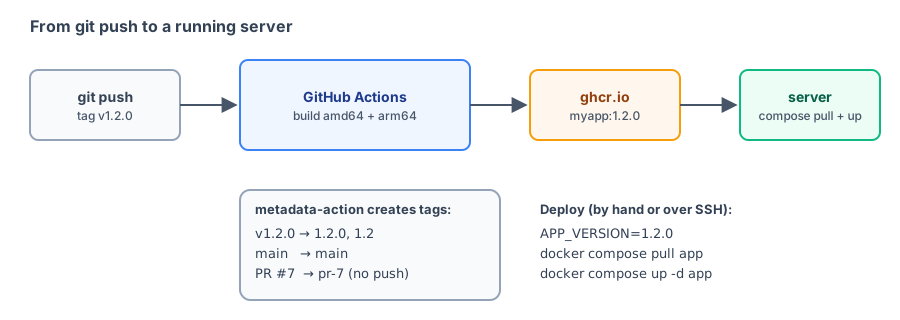
In Deploying to a cloud server, you manually build, push, and update the server. In this section, you'll automate that with GitHub Actions:
- Every push to
main: automatically build and push the image, taggedmain. - Create a version tag (for example,
v1.2.0): build amd64 + arm64 images, push tags such as1.2.0and1.2, then automatically SSH into the server and update it. - Pull requests: build without pushing to make sure the Dockerfile is valid.
Project structure
Use the Node.js project from Deploying to a cloud server and add a workflow file:
myapp/
├── .github/
│   └── workflows/
│       └── docker.yml
├── Dockerfile
├── package.json
├── package-lock.json
└── server.js
GitHub automatically runs all YAML files in .github/workflows/.
The complete workflow
.github/workflows/docker.yml:
name: Build and push image

on:
  push:
    branches: [main]
    tags: ["v*"]
  pull_request:

permissions:
  contents: read
  packages: write

jobs:
  build:
    runs-on: ubuntu-latest
    steps:
      - uses: actions/checkout@v7

      - name: Check Dockerfile
        run: docker build --check .

      - uses: docker/setup-qemu-action@v4

      - uses: docker/setup-buildx-action@v4

      - name: Log in to GitHub Container Registry
        if: github.event_name != 'pull_request'
        uses: docker/login-action@v4
        with:
          registry: ghcr.io
          username: ${{ github.actor }}
          password: ${{ secrets.GITHUB_TOKEN }}

      - name: Decide image tags
        id: meta
        uses: docker/metadata-action@v6
        with:
          images: ghcr.io/${{ github.repository }}
          tags: |
            type=ref,event=branch
            type=ref,event=pr
            type=semver,pattern={{version}}
            type=semver,pattern={{major}}.{{minor}}
            type=sha

      - name: Build and push
        uses: docker/build-push-action@v7
        with:
          context: .
          platforms: linux/amd64,linux/arm64
          push: ${{ github.event_name != 'pull_request' }}
          build-args: APP_VERSION=${{ github.ref_name }}
          tags: ${{ steps.meta.outputs.tags }}
          labels: ${{ steps.meta.outputs.labels }}
          cache-from: type=gha
          cache-to: type=gha,mode=max

  deploy:
    needs: build
    if: startsWith(github.ref, 'refs/tags/v')
    runs-on: ubuntu-latest
    steps:
      - name: Update the server
        uses: appleboy/ssh-action@v1
        with:
          host: ${{ secrets.DEPLOY_HOST }}
          username: ${{ secrets.DEPLOY_USER }}
          key: ${{ secrets.DEPLOY_SSH_KEY }}
          script: |
            cd /srv/myapp
            VERSION='${{ github.ref_name }}'
            sed -i "s/^APP_VERSION=.*/APP_VERSION=${VERSION#v}/" .env
            docker compose pull app
            docker compose up -d app
Explanation, step by step
Triggers and permissions
on:
  push:
    branches: [main]
    tags: ["v*"]
  pull_request:

permissions:
  contents: read
packages: write- Runs on pushes to the
mainbranch, pushes of tags starting withv, and pull requests. packages: writelets the automatically providedGITHUB_TOKENpush to ghcr.io. Granting only the permissions you need is a good practice.
Check before building
      - name: Check Dockerfile
        run: docker build --check .
GitHub's ubuntu-latest runner already has Docker installed. docker build --check checks Dockerfile syntax (see docker init for an introduction). Warnings won't fail the build, but they will appear in the logs. Here's the result of checking this project's Dockerfile locally:
$ docker build --check . 2>&1 | tail -n 1
Check complete, no warnings found.
QEMU and Buildx
      - uses: docker/setup-qemu-action@v4
      - uses: docker/setup-buildx-action@v4
GitHub's runner is amd64. To build an arm64 image when your Dockerfile has steps that need to run programs, such as RUN npm ci, you need QEMU emulation (see Multi-platform images for why). setup-buildx-action creates a builder that supports multiple platforms and cache exports.
Log in to the registry
      - name: Log in to GitHub Container Registry
        if: github.event_name != 'pull_request'
        uses: docker/login-action@v4
        with:
          registry: ghcr.io
          username: ${{ github.actor }}
          password: ${{ secrets.GITHUB_TOKEN }}
Pull requests don't push images, so they don't need to log in (external PRs also don't get push permissions). You don't need to create secrets.GITHUB_TOKEN yourself.
To push to Docker Hub instead, first create an Access Token on Docker Hub and save it in your GitHub repository under Settings → Secrets and variables → Actions, then use:
        with:
          username: ${{ secrets.DOCKERHUB_USERNAME }}
          password: ${{ secrets.DOCKERHUB_TOKEN }}
(Omitting registry selects Docker Hub.) Also change images in metadata-action to your-account/myapp.
Automatically choose image tags
docker/metadata-action generates tags based on the event that triggered the workflow:
| Trigger | Tags generated |
|---|---|
Push to main | main, sha-1a2b3c4 |
Push tag v1.2.0 | 1.2.0, 1.2, sha-1a2b3c4 |
| Pull request #7 | pr-7, sha-1a2b3c4 (build only, no push) |
type=semvergenerates tags only when the tag matches semantic versioning (such asv1.2.0); it removes the leadingv.type=shauses the first 7 characters of the commit hash, making it easy to trace which version of the code built the image.- It also generates OCI-standard labels (source repository, commit, and creation time), which build-push-action writes into the image.
Build and push
      - name: Build and push
        uses: docker/build-push-action@v7
        with:
          context: .
          platforms: linux/amd64,linux/arm64
          push: ${{ github.event_name != 'pull_request' }}
          build-args: APP_VERSION=${{ github.ref_name }}
          tags: ${{ steps.meta.outputs.tags }}
          labels: ${{ steps.meta.outputs.labels }}
          cache-from: type=gha
cache-to: type=gha,mode=max| Parameter | Description |
|---|---|
platforms | Build for two architectures; after pushing, they form one multi-platform image |
push | false for pull requests, so it only builds |
build-args | Matches ARG APP_VERSION in the Dockerfile so the app can display its own version |
tags / labels | Uses the output from the previous metadata-action step |
cache-from / cache-to: type=gha | Stores the build cache in GitHub Actions cache. mode=max also caches intermediate layers, so if you only change the code next time, the npm ci layer can be reused directly |
Automatic deployment
  deploy:
    needs: build
    if: startsWith(github.ref, 'refs/tags/v')
needs: build: runs only if the build succeeds.if: deploys only when you push a version tag. A push tomainwon't affect production.
appleboy/ssh-action logs in to the server over SSH and runs script. The script contains the steps you performed manually in Deploying to a cloud server: update APP_VERSION in .env, then run pull and up -d. ${{ github.ref_name }} is the tag name (v1.2.0), and ${VERSION#v} removes the leading v. Here's the result of testing that sed command locally:
$ VERSION='v1.2.0'; sed -i "s/^APP_VERSION=.*/APP_VERSION=${VERSION#v}/" .env; cat .env
APP_VERSION=1.2.0
DB_PASSWORD=secret
Set these three values in your GitHub repository's Secrets:
| Secret | Value |
|---|---|
DEPLOY_HOST | The server's IP address or domain |
DEPLOY_USER | SSH username |
DEPLOY_SSH_KEY | SSH private key dedicated to deployment (put the matching public key in the server's ~/.ssh/authorized_keys) |
Create a dedicated user and key for deployment. Don't use the key you use to log in to the server yourself.
Validate the workflow with actionlint
If a workflow is written incorrectly, you won't find out until you push it to GitHub, making revisions time-consuming. The open-source tool actionlint checks syntax and expressions locally. Run it in a container so you don't need to install it:
$ docker run --rm -v "$(pwd):/repo" -w /repo rhysd/actionlint:latest -color=false -verbose .github/workflows/docker.yml
verbose: Linting .github/workflows/docker.yml
verbose: Found 0 parse errors in 1 ms for .github/workflows/docker.yml
verbose: Found total 0 errors in 13 ms for .github/workflows/docker.yml
0 errors means there are no issues. Intentionally mistype github.ref_name as github.ref_nam:
$ docker run --rm -v "$(pwd):/repo" -w /repo rhysd/actionlint:latest -color=false .github/workflows/docker.yml
.github/workflows/docker.yml:52:39: property "ref_nam" is not defined in object type {action: string; action_path: string; action_ref: string; action_repository: string; action_status: string; actor: string; actor_id: string; api_url: string; artifact_cache_size_limit: number; base_ref: string; env: string; event: object; event_name: string; event_path: string; graphql_url: string; head_ref: string; job: string; output: string; path: string; ref: string; ref_name: string; ref_protected: bool; ref_type: string; repository: string; repository_id: string; repository_owner: string; repository_owner_id: string; repository_visibility: string; repositoryurl: string; retention_days: number; run_attempt: string; run_id: string; run_number: string; secret_source: string; server_url: string; sha: string; state: string; step_summary: string; token: string; triggering_actor: string; workflow: string; workflow_ref: string; workflow_sha: string; workspace: string} [expression]
   |
52 |           build-args: APP_VERSION=${{ github.ref_nam }}
   |                                       ^~~~~~~~~~~~~~
actionlint reports that ref_nam doesn't exist on line 52 and lists all available properties of the github object. GitHub might not report this kind of error; it may silently become an empty string.
The workflow in this chapter passed actionlint validation, but was not actually pushed to GitHub (that would create a package on ghcr.io and SSH into a real server). The first time you run it in your repository, check the logs for each step on the Actions page.
Server-side setup
In the server's compose.yaml, change the image to the ghcr.io address:
  app:
    image: ghcr.io/yourname/myapp:${APP_VERSION}
New ghcr.io packages are private by default, so log in on the server once (using a Personal Access Token with read:packages permission):
echo "your token" | docker login ghcr.io -u yourname --password-stdin--password-stdin reads the password from standard input, so it won't appear in command history.
Release a new version
Once setup is complete, publishing a new version takes only these commands:
git tag v1.2.0
git push origin v1.2.0
GitHub Actions will, in order: check the Dockerfile → build for amd64 and arm64 → push ghcr.io/yourname/myapp:1.2.0 and 1.2 → SSH into the server and set APP_VERSION to 1.2.0 → pull and recreate the app container.
To roll back, change APP_VERSION to the previous version on the server, then run docker compose up -d app. The old image is still available on ghcr.io.
Recap
- Put workflows in
.github/workflows/and useonto choose when they run. - The official Docker Actions are
setup-qemu,setup-buildx,login,metadata, andbuild-push. Together, they build and push multi-platform images. - Push to ghcr.io with the automatically provided
GITHUB_TOKEN; rememberpackages: write. metadata-actionautomatically generates image tags based on branches, version tags, and PRs.cache-from/to: type=ghaspeeds up repeat builds.- The deploy job runs only for version tags and uses SSH to update
.env, then runspullandup -d. - Use actionlint to check your workflow locally first.
Exercises
Exercise 1: Modify the workflow so a push to main builds only for amd64 (which is faster), while a version tag builds for both platforms.
Answer
You can also use an expression for platforms:
platforms: ${{ startsWith(github.ref, 'refs/tags/v') && 'linux/amd64,linux/arm64' || 'linux/amd64' }}After making the change, run actionlint to check it.
Exercise 2: What happens if you create a tag named release-1 (one that doesn't start with v)?
Answer
Nothing happens. on.push.tags matches only v*, so release-1 won't trigger the workflow. The if condition on the deploy job also accepts only tags starting with refs/tags/v.
Exercise 3: Use actionlint to check the workflow files in your own project and see whether there are any overlooked errors.
FAQ
Does GitHub Actions cost money?
GitHub-hosted runners are free for public repositories. Private repositories get a monthly free allowance, and you only pay for usage beyond it. See GitHub's official documentation for current allowances and pricing.
Why don't I need to create a separate password to push to ghcr.io?
GitHub automatically provides a temporary GITHUB_TOKEN every time a workflow runs. Add packages: write to the workflow's permissions to use it to push to ghcr.io under the same account or organization.
The server gets unauthorized when pulling an image from ghcr.io. What should I do?
New ghcr.io packages are private by default. On the server, run docker login ghcr.io with a Personal Access Token that has read:packages permission, or make the package public in its GitHub package settings.
What can I do if multi-platform builds are slow?
On GitHub's x86 runners, arm64 uses QEMU emulation, so steps that require compilation take much longer. You can build arm64 only when creating a version tag, use cache-from: type=gha, or build separately on arm64 runners. For cross-compilable languages such as Go and Rust, see [Multi-platform images](/docker/multi-platform/).
Updated October 13, 2026