Contents
Docker tutorial: What Docker is, images, and containers

- Developer
- Docker, Inc.
- First released
- 2013
- Programming language
- Go
- License
- Docker Engine is open source (Apache License 2.0); Docker Desktop is commercial software and is free for individuals and small businesses
- Official website
- www.docker.com
- Official documentation
- docs.docker.com
Docker was released in 2013 by Docker, Inc. (formerly dotCloud). Its core, Docker Engine, is an open source project written in Go. See the complete list of official websites, documentation, and source code in Official resources on the tutorial home page.
What problem does Docker solve?
Almost every programmer has run into this situation: a program works fine on your computer, but fails on a coworker's computer or a server. The cause is usually a different environment:
- The Python versions differ (you use 3.14, while the server still has 3.10)
- A system library is missing
- Configuration files, environment variables, or folder paths differ
- Two projects on the same server need different versions of the same package
The traditional approach is to write a long installation guide and follow it step by step on every machine. Someone always misses a step.
Docker's approach is to package your program together with its runtime environment. The package runs the same way on any machine with Docker installed. Installation instructions become a single command:
docker run -d -p 8080:80 nginx:1.30Whether you use a Windows, macOS, or Linux server, this command starts the same nginx web server.
Three core concepts
| Concept | What it is | Analogy |
|---|---|---|
| Image | A read-only template containing a program, libraries, and configuration | An installation disc |
| Container | A running instance started from an image | A program installed from a disc and running |
| Registry | A place to store and share images, such as Docker Hub | An app store |
Images and containers
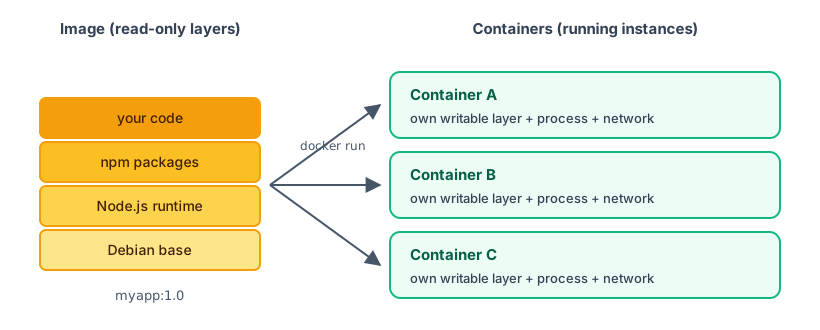
- One image can start many containers at the same time, and they do not interfere with one another.
- Files added or changed inside a container are written to that container's own writable layer and do not change the image.
- If you delete a container, the image remains, and you can start a new one whenever you want.
- Since a container's writable layer is deleted along with the container, data you need to keep (such as a database) must go in a Volume.
Images are built in layers
An image consists of multiple layers. Here is an example for a Node.js website (on the left in the image above):
- Base operating system layer (such as Debian)
- Node.js runtime layer
- Layer that installs packages (
npm install) - Layer containing your code
Different images can share the same lower layers. If ten images are based on Debian, the Debian layer is stored on disk only once and downloaded only once. This is also why the order of instructions matters when you write a Dockerfile. After installing Docker in the next section, you will see the layers download one by one when you download an image.
Registries
A registry is a server that stores images. The most commonly used one is Docker Hub (docker.io). When you run docker run nginx without specifying a URL, Docker downloads the image from Docker Hub. Other common registries include GitHub's ghcr.io and registries from cloud platforms. You can also push images you create there; see Push to Docker Hub.
Docker architecture
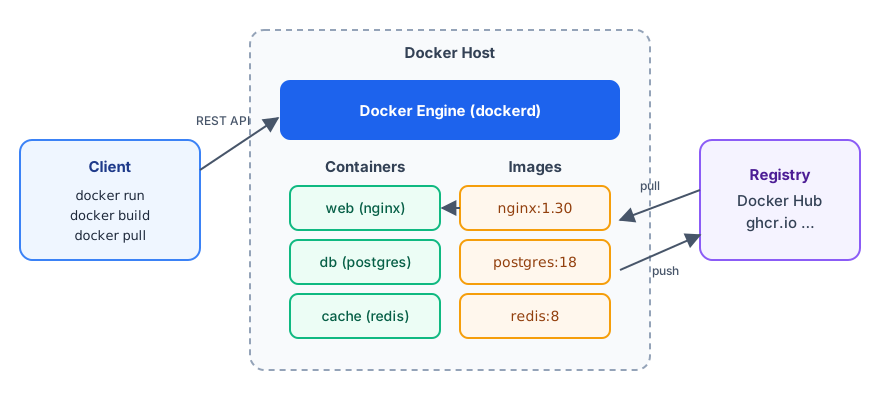
When you enter a docker command in a terminal, three roles are involved:
| Role | Description |
|---|---|
| Docker CLI (Client) | The command-line tool where you enter docker commands. It does not run containers itself; it sends requests to Engine. |
Docker Engine (dockerd) | A service running in the background that downloads images, creates containers, and manages networks and Volumes. |
| Registry | A place to store images. Engine downloads (pulls) images from here or uploads (pushes) them here. |
The CLI and Engine are separate, so you can use the docker command on your laptop to control Engine on a remote server (see Deploy to a cloud host). When you run docker version in the next section, you will see two sets of version information, Client and Server, for these two roles.
On Windows and macOS, Docker Engine needs a Linux environment to run. Docker Desktop automatically creates a lightweight Linux virtual machine to run Engine and installs tools such as the CLI and Compose. On Linux, you can install Docker Engine directly.
How are containers different from virtual machines?
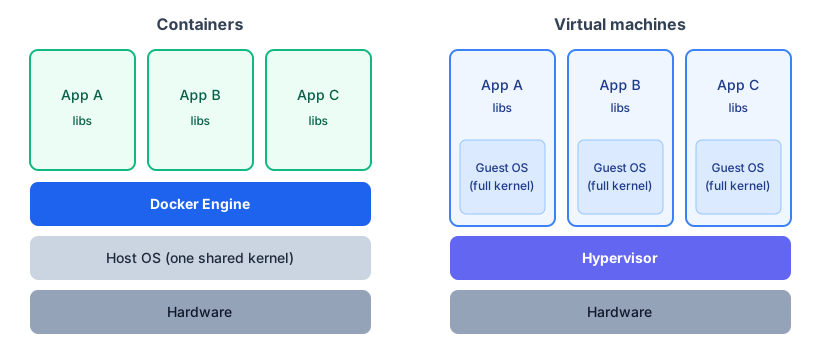
A virtual machine (VM) emulates a whole computer, and each VM has its own complete operating system. Containers share the host operating system kernel and isolate only the parts needed by the program (the file system, processes, and network).
| Container | Virtual machine | |
|---|---|---|
| Startup time | Usually under 1 second | Usually tens of seconds to several minutes |
| Size | A few MB to hundreds of MB | Usually several GB |
| Isolation | Process level; shares the kernel | Complete operating system; strongest isolation |
| How many can run on one host | Many | Fewer |
| Can it run a different operating system? | Only a system with the same kernel as the host (Linux containers need a Linux kernel) | Yes, such as Windows on a Linux host |
Containers are not meant to replace virtual machines. Many cloud services actually run containers inside virtual machines, and the two are often used together.
What is Docker useful for?
- Development environments: Start services such as databases and caches with one command, without installing lots of software on your computer.
- Consistent environments: Team members, test environments, and production environments all use the same image.
- Deployment: Package a program as an image and run
docker runon any server to launch it. To roll back, switch to an older image. - Trying software: To try a database or tool, run a container. Delete it when you are done, and keep your computer clean.
Recap
- Docker packages a program and its environment together to solve the "environment mismatch" problem.
- An image is a read-only template, a container is a running instance, and a registry stores images.
- The
dockercommand (Client) sends requests to Docker Engine to execute. - Containers are lighter and start faster than virtual machines, but share the host kernel.
In the next section, you will install Docker on your computer.
Exercises
Exercise 1: Explain the difference between an image and a container in one sentence.
Answer
An image is a read-only template (like an installation disc), while a container is a running instance started from an image (like a program installed from a disc and running). One image can start multiple containers.
Exercise 2: What happens to files added inside a container after you delete it? How can you save data you need to keep?
Answer
They disappear with the container's writable layer. Put data you need to keep in a Volume; a Volume has a lifecycle independent of the container.
FAQ
Is Docker free?
Docker Engine and CLI are open source and free. Docker Desktop is free for personal use, education, non-commercial open source projects, and small businesses. Larger businesses need a paid subscription. See [Install Docker](/docker/install/).
Do I need to know Linux before learning Docker?
Knowing a few basic commands (cd, ls, and editing files) will make things easier, but you do not need much experience. This tutorial explains each command, so you can follow along.
How are Docker and Kubernetes related?
Docker builds images and runs containers on a single host. Kubernetes schedules, scales, and manages large numbers of containers across multiple hosts. Learn Docker first, then Kubernetes.
Updated October 14, 2026