Contents
Docker Container Lifecycle Tutorial: Create, Start, Stop, and Remove Containers
A container passes through several states from creation to removal. Understanding these states helps explain why a container sometimes "runs for a moment and then stops," why a stopped container still occupies its name, and why docker stop sometimes takes 10 seconds.
Container states
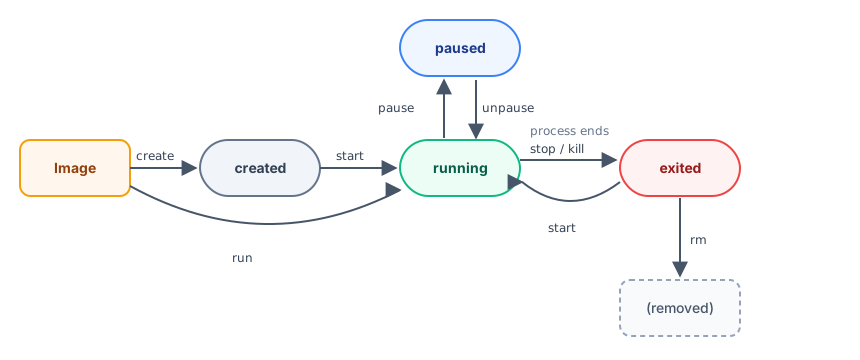
| State | Meaning | STATUS in docker ps -a |
|---|---|---|
created | Created but never started | Created |
running | The main process is running | Up 3 minutes |
paused | All processes are frozen | Up 3 minutes (Paused) |
exited | The main process has ended; the container still exists | Exited (0) 10 seconds ago |
restarting | Restarting according to the restart policy | Restarting (1) 2 seconds ago |
The number in parentheses after Exited is the main process's exit code. 0 means it exited successfully; we'll explain more below.
When does a container stop?
A container's life = the life of its main process (PID 1). When the main process ends, the container stops.
This explains a common point of confusion:
$ docker run ubuntu:26.04

$ docker ps
CONTAINER ID   IMAGE     COMMAND   CREATED   STATUS    PORTS     NAMES

$ docker ps -a
CONTAINER ID   IMAGE          COMMAND       CREATED                  STATUS                              PORTS     NAMES
66e6f85c66e0   ubuntu:26.04   "/bin/bash"   Less than a second ago   Exited (0) Less than a second ago             dreamy_solomon
docker run ubuntu:26.04 exits without printing anything, and you can't see it with docker ps. Use docker ps -a to find it: its main process is /bin/bash, but without -it, bash has no input to read, so it exits immediately after starting and the container stops (Exited (0)).
Add -it to give it an interactive terminal, so bash keeps waiting for your input:
docker run -it ubuntu:26.04For service images such as nginx and PostgreSQL, the main process keeps running in the foreground, so the container keeps running.
Create and start
docker run is actually docker create (create) plus docker start (start). You can run them separately:
$ docker create --name web nginx:1.30
ad99713ea5acddf70d854365e882fd0a3b6d4508d50da25993b94c9878f1c3bc

$ docker ps -a --filter name=web
CONTAINER ID   IMAGE        COMMAND                  CREATED                  STATUS    PORTS     NAMES
ad99713ea5ac   nginx:1.30   "/docker-entrypoint.…"   Less than a second ago   Created             web

$ docker start web
web

$ docker ps --filter name=web
CONTAINER ID   IMAGE        COMMAND                  CREATED                  STATUS                  PORTS     NAMES
ad99713ea5ac   nginx:1.30   "/docker-entrypoint.…"   Less than a second ago   Up Less than a second   80/tcp    web
After creation, the state is Created; after starting, it becomes Up. --filter name=web lists only containers whose names contain web.
Names must be unique
Every docker run creates a new container. If a container's name is already in use, you'll get an error even if that container has stopped:
$ docker run -d --name web nginx:1.30
docker: Error response from daemon: Conflict. The container name "/web" is already in use by container "ad99713ea5acddf70d854365e882fd0a3b6d4508d50da25993b94c9878f1c3bc". You have to remove (or rename) that container to be able to reuse that name.

Run 'docker run --help' for more information
To start the existing container again, use docker start web. To recreate it with new settings, run docker rm -f web first, then docker run.
Stop: the difference between stop and kill
| Command | Behavior |
|---|---|
docker stop | Sends SIGTERM first so the program can shut down cleanly. If it hasn't exited after 10 seconds, sends SIGKILL to force it to exit. |
docker kill | Sends SIGKILL directly to end the process immediately. |
stop gives the program a chance to "shut down cleanly," such as a database writing data to disk or a web server finishing in-flight requests. Use stop in general, and use kill only when a program is stuck.
$ docker start web
web

$ docker kill web
web

$ docker ps -a --filter name=web
CONTAINER ID   IMAGE        COMMAND                  CREATED          STATUS                                PORTS     NAMES
ad99713ea5ac   nginx:1.30   "/docker-entrypoint.…"   14 seconds ago   Exited (137) Less than a second ago             web
A container stopped with kill has exit code 137 (128 + 9, where 9 is the signal number for SIGKILL).
Why does docker stop sometimes take 10 seconds?
Here's a comparison of how long it takes to stop three containers:
$ time docker stop web
web
real	0m 0.10s
user	0m 0.01s
sys	0m 0.00s

$ docker run -d --name slow alpine:3.23 sh -c "sleep 300"
Unable to find image 'alpine:3.23' locally
3.23: Pulling from library/alpine
d0c1d894c237: Pull complete
Digest: sha256:85fe1e81d6758c208f3e1eed4338a1997e19d4be002d4dd32d3100c9a8c010a0
Status: Downloaded newer image for alpine:3.23
170d08a64bb8ec1519d183f8c20508d669358eea4d5a978fa4f4675ffcec41ab

$ time docker stop slow
slow
real	0m 10.17s
user	0m 0.00s
sys	0m 0.01s

$ docker run -d --name slow2 --init alpine:3.23 sh -c "sleep 300"
d1854be4790b5fc9375004e05708d27a27d56c2c540a8159424351985db20ef9

$ time docker stop slow2
slow2
real	0m 0.13s
user	0m 0.00s
sys 0m 0.01s| Container | Stop time | Reason |
|---|---|---|
| nginx | 0.10 seconds | nginx shuts down cleanly as soon as it receives SIGTERM |
sh -c "sleep 300" | 10.17 seconds | The main process is sh. When it runs as PID 1, it ignores SIGTERM, so Docker waits the full 10 seconds before using SIGKILL to force it to exit. |
Same as above, with --init | 0.13 seconds | --init uses a small init process as PID 1, which forwards the signal to the child process. |
Linux has a special rule for PID 1: if PID 1 doesn't handle SIGTERM itself, the signal is ignored. So if docker stop takes 10 seconds every time for an image you wrote, the main process is usually running as PID 1 and the program doesn't handle SIGTERM. For example, a Node.js program that runs node server.js directly as its main process also takes 10 seconds in testing. See the comparison in Dockerfile instructions. To fix this, handle SIGTERM in the program or add --init.
Exit codes
$ docker run --name exit3 alpine:3.23 sh -c "exit 3"

$ docker ps -a --filter name=exit3
CONTAINER ID   IMAGE         COMMAND            CREATED        STATUS                              PORTS     NAMES
84996cca5ec5   alpine:3.23   "sh -c 'exit 3'"   1 second ago   Exited (3) Less than a second ago             exit3

$ docker inspect --format '{{.State.ExitCode}}' exit3
3
Exited (...) shows the code with which the main process exited. Common codes include:
| Code | Common cause |
|---|---|
0 | Successful exit |
1 or another number | An error reported by the program itself; check docker logs |
137 | Stopped by SIGKILL: docker kill, a docker stop timeout, or the system stopping it due to low memory (OOM) |
143 | Exited normally after receiving SIGTERM (128 + 15) |
Pause and resume
$ docker start web
web

$ docker pause web
web

$ docker ps --filter name=web
CONTAINER ID   IMAGE        COMMAND                  CREATED          STATUS                           PORTS     NAMES
ad99713ea5ac   nginx:1.30   "/docker-entrypoint.…"   15 seconds ago   Up Less than a second (Paused)   80/tcp    web

$ docker unpause web
web
pause freezes all processes in the container without ending them, and the status shows (Paused). It's rarely used, but can temporarily free up CPU while preserving the in-memory state.
Remove containers
$ docker rm web
Error response from daemon: cannot remove container "web": container is running: stop the container before removing or force remove

$ docker rm -f web
web
You can't remove a running container directly. Stop it first, or use -f to force removal (equivalent to kill followed by rm).
Remove all stopped containers at once
After practicing for a while, docker ps -a can accumulate many stopped containers:
$ docker ps -a
CONTAINER ID   IMAGE          COMMAND                  CREATED          STATUS                        PORTS     NAMES
75ee00dc4081   nginx:1.30     "/docker-entrypoint.…"   1 second ago     Up Less than a second         80/tcp    web
5dfb843c0b40   alpine:3.23    "sh -c 'echo startin…"   26 seconds ago   Exited (1) 24 seconds ago               flaky
84996cca5ec5   alpine:3.23    "sh -c 'exit 3'"         27 seconds ago   Exited (3) 26 seconds ago               exit3
d1854be4790b   alpine:3.23    "sh -c 'sleep 300'"      29 seconds ago   Exited (143) 28 seconds ago             slow2
170d08a64bb8   alpine:3.23    "sh -c 'sleep 300'"      39 seconds ago   Exited (137) 29 seconds ago             slow
66e6f85c66e0   ubuntu:26.04   "/bin/bash"              43 seconds ago   Exited (0) 42 seconds ago               dreamy_solomon

$ docker container prune -f
Deleted Containers:
5dfb843c0b400146827fe138890ee4d62a24104cad5531aff4100fc471b0727f
84996cca5ec5bfe7ca51c6365b60ef89e49055cf06a3f0dd3a49f9e50e08d6f4
d1854be4790b5fc9375004e05708d27a27d56c2c540a8159424351985db20ef9
170d08a64bb8ec1519d183f8c20508d669358eea4d5a978fa4f4675ffcec41ab
66e6f85c66e0f2b586c5919a900a0e16d6f0fc49535d35fa7d30f77747f1ce0e

Total reclaimed space: 24.58kB
container prune removes only stopped containers; the running web is unaffected. Also compare the exit codes above: slow was forcibly stopped with 137, while slow2, which used --init, received SIGTERM and exited normally with 143.
To automatically remove a one-off container when it exits, add --rm when you run it:
docker run --rm alpine:3.23 echo "Throw it away when you're done"Restart policies: --restart
Should a container restart automatically when the server reboots or the program crashes? Set this with --restart:
| Value | Behavior |
|---|---|
no | Default; don't restart automatically |
on-failure[:count] | Restart only if the exit code is nonzero; you can limit the number of retries |
always | Always restart. After a manual stop, it will still restart when Docker itself restarts. |
unless-stopped | Similar to always, but a container you stopped manually won't start automatically again. |
See on-failure in action
This container prints starting each time it starts, then exits with code 1, simulating a program that keeps crashing:
$ docker run -d --name flaky --restart on-failure:3 alpine:3.23 sh -c "echo starting; exit 1"
5dfb843c0b400146827fe138890ee4d62a24104cad5531aff4100fc471b0727f

$ docker ps -a --filter name=flaky
CONTAINER ID   IMAGE         COMMAND                  CREATED          STATUS                      PORTS     NAMES
5dfb843c0b40   alpine:3.23   "sh -c 'echo startin…"   25 seconds ago   Exited (1) 23 seconds ago             flaky

$ docker inspect --format '{{.RestartCount}} {{.State.Status}} {{.State.ExitCode}}' flaky
3 exited 1

$ docker logs flaky
starting
starting
starting
starting
The logs show starting four times: the initial start plus three restarts (RestartCount is 3). After reaching the limit, the container stays at Exited (1). Docker gradually increases the wait between restarts to avoid overwhelming the host with rapid restarts.
Change the restart policy of an existing container
For long-running services, unless-stopped is generally recommended. You can also change the policy of a container that's already running:
$ docker run -d --name web --restart unless-stopped nginx:1.30
75ee00dc4081f4c2849562fbd89edfdd9386839a161ea9d66956eaa41257d4cf

$ docker inspect --format '{{.HostConfig.RestartPolicy.Name}}' web
unless-stopped

$ docker update --restart always web
web

$ docker inspect --format '{{.HostConfig.RestartPolicy.Name}}' web
always
On Linux, for containers to start at boot, Docker itself must also start automatically:
sudo systemctl enable docker. In Docker Desktop, enable "Start Docker Desktop when you sign in" in settings.
Command reference
| Command | Purpose |
|---|---|
docker run | Create and start a new container |
docker create | Create only |
docker start / stop / restart | Start / stop / restart an existing container |
docker kill | Force a process to exit (SIGKILL) |
docker pause / unpause | Pause / resume |
docker rm [-f] | Remove a container |
docker container prune | Remove all stopped containers |
docker ps [-a] | List containers (-a includes stopped containers) |
docker update --restart | Change the restart policy |
The next section covers commonly used docker run options in detail.
Recap
- Container states: created, running, paused, exited, and restarting.
- A container stops when its main process ends.
docker stopsends SIGTERM first, then SIGKILL after 10 seconds. - If the main process is PID 1 and doesn't handle SIGTERM, stop waits the full 10 seconds. You can fix this with
--init. - Add
--restart unless-stoppedto long-running services.
Exercises
Exercise 1: Start a container with docker run -d --name t1 alpine:3.23 sh -c "exit 3". What are its state and exit code?
Answer
docker ps -a shows Exited (3). You can also get exit code 3 with docker inspect -f "{{.State.ExitCode}}" t1.
Exercise 2: Start docker run -d --name t2 alpine:3.23 sleep 300, then compare how long it takes to stop with time docker stop t2 (remember to recreate the container first) and with the version that adds --init.
Hint
Without --init, sleep is PID 1 and ignores SIGTERM, so it's forcibly stopped after about 10 seconds. With --init, the init process forwards the signal to sleep, which stops almost immediately.
FAQ
What does Exited (137) mean?
137 = 128 + 9, which means the container was forcibly stopped with SIGKILL. This can happen because of docker kill, a docker stop timeout, or the system stopping it due to low memory.
Will containers start automatically after a server reboot?
You need to set a restart policy (such as --restart unless-stopped), and Docker itself must start automatically at boot (on Linux, run sudo systemctl enable docker).
What's the difference between pausing and stopping a container?
pause freezes all processes in the container and preserves their memory. When resumed, they continue from where they left off. stop ends the processes, so their in-memory state is lost.
Updated October 14, 2026