Contents
Python Docker Tutorial: Deploy Flask, FastAPI, and Django Apps
This chapter uses Flask as its main example and walks through the project structure, Dockerfile, build, run, and development workflow. It then covers how FastAPI, Django, and uv differ. All examples use the python:3.14-slim base image.
Flask: project structure
flask-app/
├── app.py
├── requirements.txt
├── Dockerfile
├── .dockerignore
└── compose.yaml ← used only in developmentapp.py:
from flask import Flask

app = Flask(__name__)


@app.get("/")
def index():
return {"message": "Hello from Flask in Docker"}requirements.txt:
flask==3.1.*
gunicorn==23.*
The 3.1.* version specifier accepts patch releases in the 3.1 series but does not automatically upgrade to 3.2. For production projects, use pip freeze or uv (covered later) to pin exact versions.
Flask: Dockerfile
FROM python:3.14-slim

ENV PYTHONDONTWRITEBYTECODE=1 \
    PYTHONUNBUFFERED=1 \
    PIP_NO_CACHE_DIR=1

WORKDIR /app

COPY requirements.txt .
RUN pip install -r requirements.txt

COPY . .

RUN useradd --system --no-create-home app
USER app

EXPOSE 8000
CMD ["gunicorn", "--bind", "0.0.0.0:8000", "--workers", "2", "app:app"]
Here is what each line does:
| Setting | Purpose |
|---|---|
python:3.14-slim | A slim Debian-based image with glibc. Most packages have prebuilt wheels you can install directly. |
PYTHONUNBUFFERED=1 | Disables output buffering so you can see logs immediately with docker logs. |
PYTHONDONTWRITEBYTECODE=1 | Prevents .pyc files from being created. |
PIP_NO_CACHE_DIR=1 | Prevents pip from keeping its download cache, which makes the image smaller. |
COPY requirements.txt before pip install | If you only change application code, Docker can reuse the package installation layer from cache. See Build cache. |
useradd + USER app | Runs as a non-root user. See Docker security. |
gunicorn ... app:app | Uses gunicorn in production instead of flask run (the development server). app:app means "the app variable in the app.py module." |
--bind 0.0.0.0:8000 | You must bind to 0.0.0.0. If you bind to 127.0.0.1, connections from outside the container cannot reach the app. |
CMD uses exec form (a JSON array), so gunicorn runs as PID 1. It receives the SIGTERM sent by docker stop directly and shuts down gracefully. It will not wait 10 seconds before being force-stopped, as in the example in Dockerfile instructions explained.
.dockerignore:
__pycache__
*.pyc
.venv
.env
.git
Always exclude .venv. A local virtual environment is built for your host operating system. Copying it into a container is useless and makes the build context larger.
Flask: build and run
$ ls -a
.
..
.dockerignore
Dockerfile
app.py
compose.yaml
requirements.txt

$ docker build -t flask-app .

[+] Building 6.0s (11/11) FINISHED                                                                                                     docker:default
 => [internal] load build definition from Dockerfile                                                                                             0.0s
 => => transferring dockerfile: 364B                                                                                                             0.0s
 => [internal] load metadata for docker.io/library/python:3.14-slim                                                                              0.0s
 => [internal] load .dockerignore                                                                                                                0.0s
 => => transferring context: 74B                                                                                                                 0.0s
 => [1/6] FROM docker.io/library/python:3.14-slim@sha256:a2b82f3c48559aa0a8446d9af49826b6e2b2016f4cd2afabfe6013ec53729170                        0.8s
 => => resolve docker.io/library/python:3.14-slim@sha256:a2b82f3c48559aa0a8446d9af49826b6e2b2016f4cd2afabfe6013ec53729170                        0.0s
 => => extracting sha256:a5883d972f3b60387a858b212a0a24115f143c826e40fdef3270e8474a8f42d6                                                        0.1s
 => => extracting sha256:6aaf5b0aae75c38277901ef64362f50475b879e0ff3ed6610eb2a9f69bcf3295                                                        0.7s
 => => extracting sha256:bb8166eb34e6e8ea17f8c73a7eec8438693d91ebf29eda1d9d3c0dba36b579de                                                        0.0s
 => [internal] load build context                                                                                                                0.1s
 => => transferring context: 907B                                                                                                                0.0s
 => [2/6] WORKDIR /app                                                                                                                           0.1s
 => [3/6] COPY requirements.txt .                                                                                                                0.0s
 => [4/6] RUN pip install -r requirements.txt                                                                                                    3.9s
 => [5/6] COPY . .                                                                                                                               0.0s
 => [6/6] RUN useradd --system --no-create-home app                                                                                              0.3s
 => exporting to image                                                                                                                           0.7s
 => => exporting layers                                                                                                                          0.5s
 => => exporting manifest sha256:7189a55c270e8f9c73535044b6bd76d012e11017d9fb01e26f8da841870a0c0d                                                0.0s
 => => exporting config sha256:d34e60a2d4bdc7b72f16e2673fd83a3f058e8d73a3a12c5b368a250170caeb43                                                  0.0s
 => => exporting attestation manifest sha256:171f89e1a4fd243b116baac7aa4798fa03b80160a5dad67f360f825635782aa5                                    0.0s
 => => exporting manifest list sha256:e38ff17f0c938ac71cb8683d8b2527ece5278ac450b1b989173178502d20ee47                                           0.0s
 => => naming to docker.io/library/flask-app:latest                                                                                              0.0s
 => => unpacking to docker.io/library/flask-app:latest                                                                                           0.2s
[4/6] RUN pip install took 3.9 seconds, making it the longest build step. Build again without changing requirements.txt, and this step will show CACHED.
Run it in the background and test it:
$ docker run -d --name flask -p 8000:8000 flask-app
4d1e3914573d0ef92e9b11840475100237868cb8aaaddefc8f3765a2b5a7c8ce

$ curl -s http://localhost:8000
{"message":"Hello from Flask in Docker"}

$ docker logs flask
[2026-10-13 00:26:21 +0000] [1] [INFO] Starting gunicorn 23.0.0
[2026-10-13 00:26:21 +0000] [1] [INFO] Listening at: http://0.0.0.0:8000 (1)
[2026-10-13 00:26:21 +0000] [1] [INFO] Using worker: sync
[2026-10-13 00:26:21 +0000] [6] [INFO] Booting worker with pid: 6
[2026-10-13 00:26:21 +0000] [7] [INFO] Booting worker with pid: 7

$ docker exec flask whoami
appcurlreturned JSON, which means the service is working. You can also openhttp://localhost:8000in a browser to see the same response.docker logsshows the gunicorn master process (pid 1) and two workers (--workers 2).whoamidisplaysapp, confirming the process is not running as root.
As a general guideline, set the number of workers to about 2 to 4 times the number of CPU cores. gunicorn can also read the worker count from the WEB_CONCURRENCY environment variable, but this only works when the command does not include --workers. This Dockerfile's CMD already specifies --workers 2, so setting WEB_CONCURRENCY has no effect (testing still showed two workers).
Development mode: automatically reload code changes
Rebuilding the image after every code change is too slow during development. Use Compose to mount the code directory into the container and switch to Flask's development server (--debug automatically reloads when files change):
compose.yaml:
services:
  web:
    build: .
    ports:
      - "8000:8000"
    volumes:
      - .:/app
    command: ["flask", "--app", "app", "run", "--host", "0.0.0.0", "--port", "8000", "--debug"]
command overrides the Dockerfile's CMD, so the same Dockerfile runs gunicorn in production and Flask's development server during development.
$ docker compose up -d

[+] Building 0.6s (13/13) FINISHED
 => [internal] load local bake definitions                                                                                                       0.0s
 => => reading from stdin 468B                                                                                                                   0.0s
 => [internal] load build definition from Dockerfile                                                                                             0.0s
 => => transferring dockerfile: 364B                                                                                                             0.0s
 => [internal] load metadata for docker.io/library/python:3.14-slim                                                                              0.0s
 => [internal] load .dockerignore                                                                                                                0.0s
 => => transferring context: 74B                                                                                                                 0.0s
 => [1/6] FROM docker.io/library/python:3.14-slim@sha256:a2b82f3c48559aa0a8446d9af49826b6e2b2016f4cd2afabfe6013ec53729170                        0.0s
 => => resolve docker.io/library/python:3.14-slim@sha256:a2b82f3c48559aa0a8446d9af49826b6e2b2016f4cd2afabfe6013ec53729170                        0.0s
 => [internal] load build context                                                                                                                0.0s
 => => transferring context: 297B                                                                                                                0.0s
 => CACHED [2/6] WORKDIR /app                                                                                                                    0.0s
 => CACHED [3/6] COPY requirements.txt .                                                                                                         0.0s
 => CACHED [4/6] RUN pip install -r requirements.txt                                                                                             0.0s
 => CACHED [5/6] COPY . .                                                                                                                        0.0s
 => CACHED [6/6] RUN useradd --system --no-create-home app                                                                                       0.0s
 => exporting to image                                                                                                                           0.3s
 => => exporting layers                                                                                                                          0.0s
 => => exporting manifest sha256:b30dc1eb5dd7e3ae2b911558671243f8e2aeb4eb916b88ba0f4a1b6f59612147                                                0.0s
 => => exporting config sha256:5f7347cc4514246282f5be1a4e1eb3c7cfe90b0ee36c9adeaed934c91bcb2311                                                  0.0s
 => => exporting attestation manifest sha256:2498fb10cf0b98b8be07e54464eaa656528a1fa9324d15544ab7beb474766027                                    0.0s
 => => exporting manifest list sha256:34a36fcb4d656d04ad0e8f86740d02d314d5c68b67b1ff4fb1b897f053bdb39e                                           0.0s
 => => naming to docker.io/library/flask-web:latest                                                                                              0.0s
 => => unpacking to docker.io/library/flask-web:latest                                                                                           0.2s
 => resolving provenance for metadata file                                                                                                       0.0s
[+] up 3/3
 ✔ Image flask-web       Built                                                                                                                    0.7s
 ✔ Network flask_default Created                                                                                                                  0.0s
 ✔ Container flask-web-1 Started                                                                                                                  0.3s

$ curl -s http://localhost:8000
{
  "message": "Hello from Flask in Docker"
}

$ docker compose logs web
web-1  |  * Serving Flask app 'app'
web-1  |  * Debug mode: on
web-1  | WARNING: This is a development server. Do not use it in a production deployment. Use a production WSGI server instead.
web-1  |  * Running on all addresses (0.0.0.0)
web-1  |  * Running on http://127.0.0.1:8000
web-1  |  * Running on http://172.19.0.2:8000
web-1  | Press CTRL+C to quit
web-1  |  * Restarting with stat
web-1  |  * Debugger is active!
web-1  |  * Debugger PIN: 127-885-458
web-1  | 172.19.0.1 - - [13/Oct/2026 00:27:50] "GET / HTTP/1.1" 200 -
The WARNING: This is a development server log message is expected. It reminds you to use this server only during development. When Debug mode: on, Flask automatically formats returned JSON across multiple lines.
Now change the message in app.py to Hello again, reloaded! in your editor and save the file. Do not rebuild the image or restart the container. Make another request:
$ curl -s http://localhost:8000
{
  "message": "Hello again, reloaded!"
}

$ docker compose logs --tail 6 web
web-1  | 172.19.0.1 - - [13/Oct/2026 00:26:34] "GET / HTTP/1.1" 200 -
web-1  |  * Detected change in '/app/app.py', reloading
web-1  |  * Restarting with stat
web-1  |  * Debugger is active!
web-1  |  * Debugger PIN: 202-909-220
web-1  | 172.19.0.1 - - [13/Oct/2026 00:26:37] "GET / HTTP/1.1" 200 -
The Detected change in '/app/app.py', reloading log message means Flask detected a file change and reloaded. The .:/app mount maps your local directory to /app in the container, so the container sees the file you are editing.
When you are done developing, run docker compose down to stop and remove the container.
Windows and macOS note: In some cases, Docker Desktop file sharing does not pass file change notifications through. If automatic reloading does not work, put the project in the WSL 2 file system (on Windows) or use Compose's
develop.watchfeature.
FastAPI
FastAPI uses the ASGI server uvicorn. requirements.txt:
fastapi[standard]>=0.115fastapi[standard] also installs commonly used packages such as uvicorn. main.py:
from fastapi import FastAPI

app = FastAPI(title="Todo API")


@app.get("/")
def index():
    return {"message": "Hello from FastAPI"}


@app.get("/items/{item_id}")
def read_item(item_id: int, q: str | None = None):
    return {"item_id": item_id, "q": q}
The Dockerfile is almost identical to Flask's; only the final startup command differs:
FROM python:3.14-slim
ENV PYTHONDONTWRITEBYTECODE=1 PYTHONUNBUFFERED=1 PIP_NO_CACHE_DIR=1
WORKDIR /app
COPY requirements.txt .
RUN pip install -r requirements.txt
COPY . .
EXPOSE 8000
CMD ["uvicorn", "main:app", "--host", "0.0.0.0", "--port", "8000"]
Build and run (-q prints only the image ID):
$ docker build -q -t fastapi-app .
sha256:cd8e9d2a7b6db3a54ecab866c502794cc91f11af78efbcb862eeac962566d2ac

$ docker run -d --name fastapi -p 8000:8000 fastapi-app
b40cf8583a166c85dae4560f6356f201de8eb67c919f3fb709964cd635f0b934

$ curl -s "http://localhost:8000/items/42?q=docker"
{"item_id":42,"q":"docker"}

$ docker exec fastapi pip list 2>/dev/null | grep -iE "^(fastapi|uvicorn|pydantic) "
fastapi                                  0.143.0
pydantic                                 2.14.1
uvicorn                                  0.54.0
/items/42?q=docker returns {"item_id":42,"q":"docker"}. The path parameter 42 is automatically converted to an integer. Use pip list to confirm the versions actually installed in the container.
FastAPI automatically generates API documentation. Open http://localhost:8000/docs:
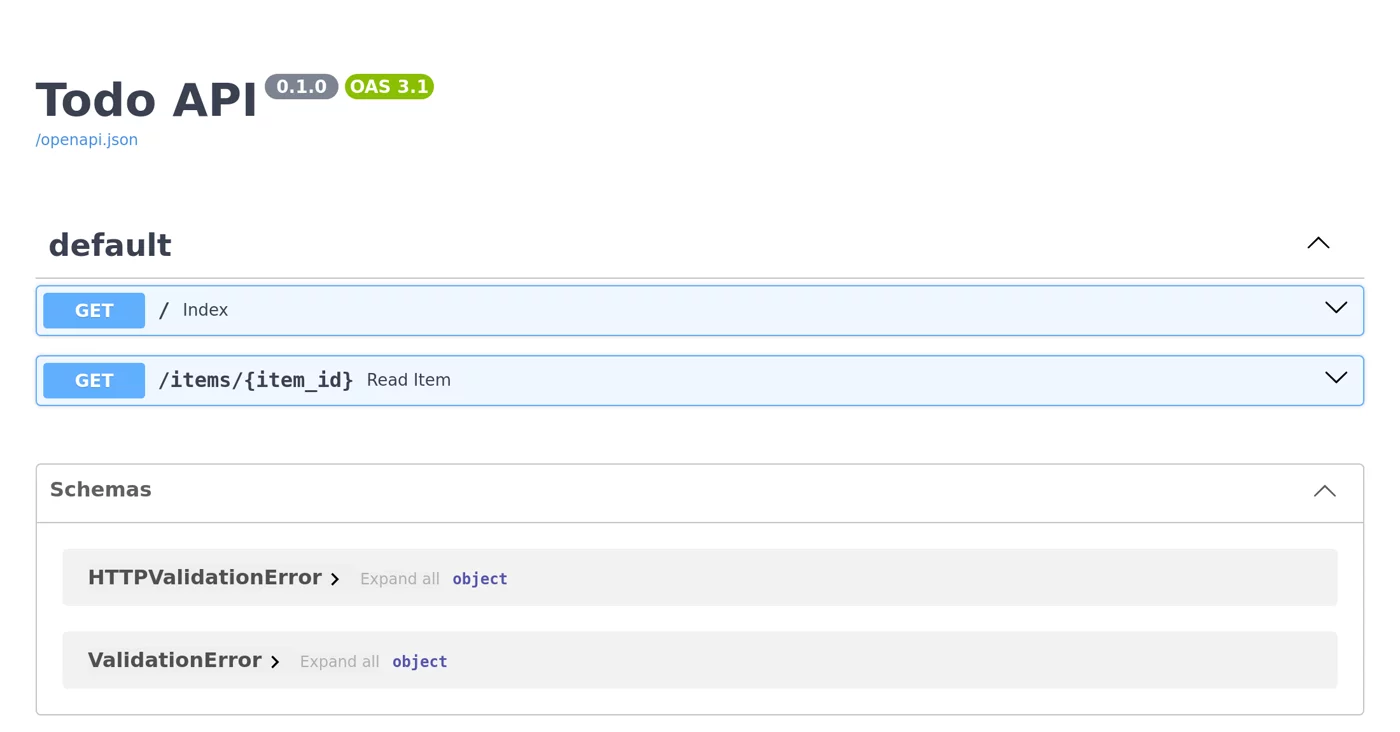
FastAPI(title="Todo API")During development, add --reload to the uvicorn command and mount the code directory, just as in the Flask development workflow above. To run multiple workers in production, add --workers 4.
Django
Create a Django project in a container
You do not need to install Python or Django locally. You can create the project in a container. First, prepare requirements.txt:
django==6.*
gunicorn==23.*
and a development Dockerfile:
FROM python:3.14-slim
ENV PYTHONDONTWRITEBYTECODE=1 PYTHONUNBUFFERED=1 PIP_NO_CACHE_DIR=1
WORKDIR /app
COPY requirements.txt .
RUN pip install -r requirements.txt
COPY . .
EXPOSE 8000
CMD ["python", "manage.py", "runserver", "0.0.0.0:8000"]
Build once (there is no Django project yet), then use this image to run django-admin startproject. The mount writes the generated files back to the current directory. Build again to include the project files in the image:
$ docker build -q -t django-app .
sha256:1ed89110a11971cd5fdec6e565d389a88ffb106c4fe0093274a4923b8d2fc954

$ docker run --rm -v "$(pwd):/app" -w /app django-app django-admin startproject mysite .

$ ls
Dockerfile
manage.py
mysite
requirements.txt

$ docker build -q -t django-app .
sha256:4f6c035057a7507b0a1a6009c6a67506e58c8c90684e4ec7a5df9300e02ff628

$ docker run -d --name django -p 8000:8000 django-app
a4b4df39bd719fb6bee85a6c4f90cc912586b4c80efce9aa43fc1b76522a9c6f

$ docker exec django python -m django --version
6.1.2

$ docker run --rm django-app python manage.py migrate | tail -n 3
  Applying auth.0011_update_proxy_permissions... OK
  Applying auth.0012_alter_user_first_name_max_length... OK
  Applying sessions.0001_initial... OK
Windows equivalents (select a tab to switch):
docker run --rm -v "$(pwd):/app" -w /app django-app django-admin startproject mysite .docker run --rm -v "${PWD}:/app" -w /app django-app django-admin startproject mysite .docker run --rm -v "%cd%:/app" -w /app django-app django-admin startproject mysite .lsshows the newmanage.pyandmysite/files created bydjango-adminin the container. On Linux, these files are owned by root. Add--user "$(id -u):$(id -g)"to make them belong to you.python -m django --versiondisplays6.1.2.migrateruns in a temporary container withdocker run --rm. This example uses Django's default SQLite database. Its file is inside the temporary container and disappears when the container is removed. For a real project, use PostgreSQL as shown below.
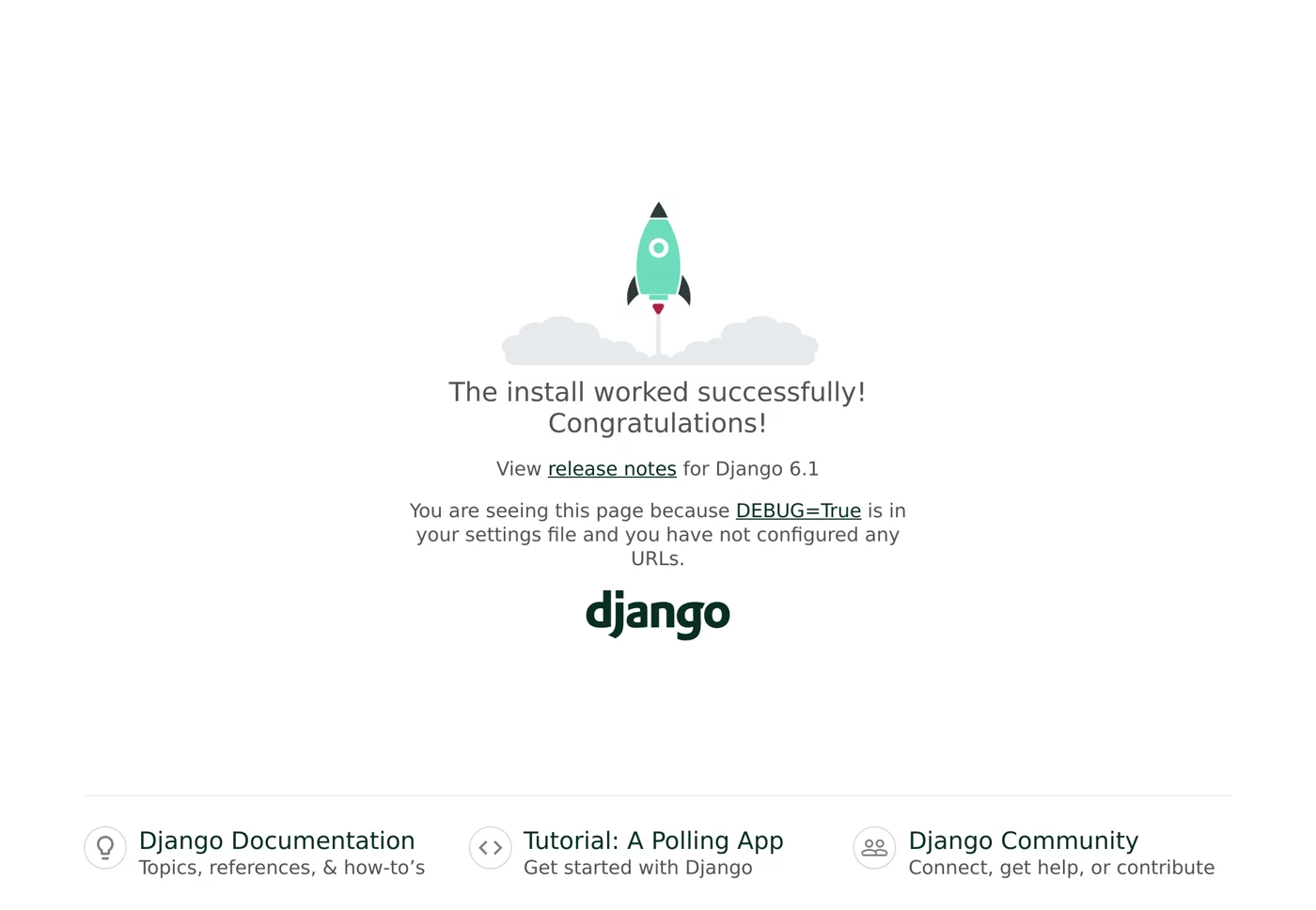
Open http://localhost:8000 to see the Django welcome page:
Production: collectstatic and gunicorn
In production, use gunicorn instead of runserver. First use collectstatic to gather static files (CSS, JS, and admin images) in one directory, then serve them with Nginx or WhiteNoise. Create Dockerfile.prod:
FROM python:3.14-slim
ENV PYTHONDONTWRITEBYTECODE=1 PYTHONUNBUFFERED=1 PIP_NO_CACHE_DIR=1
WORKDIR /app
COPY requirements.txt .
RUN pip install -r requirements.txt
COPY . .
RUN python manage.py collectstatic --noinput
EXPOSE 8000
CMD ["gunicorn", "--bind", "0.0.0.0:8000", "mysite.wsgi:application"]
Building it as is fails:
$ docker build -f Dockerfile.prod -t django-prod .
... (Traceback omitted)
1.787 django.core.exceptions.ImproperlyConfigured: You're using the staticfiles app without having set the STATIC_ROOT setting to a filesystem path.
------
Dockerfile.prod:7
--------------------
   5 |     RUN pip install -r requirements.txt
   6 |     COPY . .
   7 | >>> RUN python manage.py collectstatic --noinput
   8 |     EXPOSE 8000
   9 |     CMD ["gunicorn", "--bind", "0.0.0.0:8000", "mysite.wsgi:application"]
--------------------
ERROR: failed to build: failed to solve: process "/bin/sh -c python manage.py collectstatic --noinput" did not complete successfully: exit code: 1
The error message explains the problem: settings.py generated by startproject does not set STATIC_ROOT, so collectstatic does not know where to gather the files. Add this to the end of mysite/settings.py:
STATIC_ROOT = BASE_DIR / "staticfiles"Build again, and it succeeds:
$ docker build -f Dockerfile.prod -t django-prod .

[+] Building 3.7s (11/11) FINISHED                                                                                                     docker:default
 => [internal] load build definition from Dockerfile.prod                                                                                        0.0s
 => => transferring dockerfile: 343B                                                                                                             0.0s
 => [internal] load metadata for docker.io/library/python:3.14-slim                                                                              0.0s
 => [internal] load .dockerignore                                                                                                                0.0s
 => => transferring context: 2B                                                                                                                  0.0s
 => [1/6] FROM docker.io/library/python:3.14-slim@sha256:a2b82f3c48559aa0a8446d9af49826b6e2b2016f4cd2afabfe6013ec53729170                        0.0s
 => => resolve docker.io/library/python:3.14-slim@sha256:a2b82f3c48559aa0a8446d9af49826b6e2b2016f4cd2afabfe6013ec53729170                        0.0s
 => [internal] load build context                                                                                                                0.0s
 => => transferring context: 3.58kB                                                                                                              0.0s
 => CACHED [2/6] WORKDIR /app                                                                                                                    0.0s
 => CACHED [3/6] COPY requirements.txt .                                                                                                         0.0s
 => CACHED [4/6] RUN pip install -r requirements.txt                                                                                             0.0s
 => [5/6] COPY . .                                                                                                                               0.0s
 => [6/6] RUN python manage.py collectstatic --noinput                                                                                           1.5s
 => exporting to image                                                                                                                           2.1s
 => => exporting layers                                                                                                                          0.1s
 => => exporting manifest sha256:961f8d60c4ec63f3e3e5c41acbdef0b9df6a967dbd806f9d4d178865a5722dd4                                                0.0s
 => => exporting config sha256:8a741faf7acfcad1032b73ec67edbe2717396c8db8fe80c969a3b87903cf0c11                                                  0.0s
 => => exporting attestation manifest sha256:651df3cadbdeb850b8ca4ec2c4cd5a30b77e67f1789ba5bb2ab05c42d17fc717                                    0.0s
 => => exporting manifest list sha256:0e28a34c1ea5ce9838ea3c7204938979ab6a43e7b16d121c059946d6e7a0df01                                           0.0s
 => => naming to docker.io/library/django-prod:latest                                                                                            0.0s
 => => unpacking to docker.io/library/django-prod:latest                                                                                         1.9s

$ docker run -d --name django -p 8000:8000 django-prod
e23efa1aa481b13393faf41f4fb4ff842dee0db8053908846442824dbed97625

$ docker logs django
[2026-10-13 00:28:24 +0000] [1] [INFO] Starting gunicorn 23.0.0
[2026-10-13 00:28:24 +0000] [1] [INFO] Listening at: http://0.0.0.0:8000 (1)
[2026-10-13 00:28:24 +0000] [1] [INFO] Using worker: sync
[2026-10-13 00:28:24 +0000] [6] [INFO] Booting worker with pid: 6

$ curl -sI http://localhost:8000/ | head -n 1
HTTP/1.1 200 OK

$ docker exec django ls staticfiles
admin
The logs show that gunicorn started, and staticfiles/ contains the collected admin static files.
Before deploying to production, update settings.py: set DEBUG = False, configure ALLOWED_HOSTS, and read SECRET_KEY from an environment variable (see Environment variables).
Database migrations
Do not put migrate in CMD to run automatically on every startup. Multiple containers could try to migrate at the same time. Instead, run it once as a separate deployment step:
docker compose run --rm web python manage.py migrateFor a Compose configuration with PostgreSQL, see Run PostgreSQL with Docker.
Manage packages with uv
uv is a fast Python package manager. Declare dependencies in pyproject.toml, and use uv.lock to pin the exact versions of all packages, including transitive dependencies. Convert the Flask example above to use uv:
pyproject.toml:
[project]
name = "flask-uv"
version = "0.1.0"
requires-python = ">=3.14"
dependencies = [
    "flask>=3.1",
    "gunicorn>=23",
]Dockerfile:
FROM python:3.14-slim
COPY --from=ghcr.io/astral-sh/uv:0.11 /uv /usr/local/bin/uv

WORKDIR /app
ENV UV_COMPILE_BYTECODE=1 UV_LINK_MODE=copy

COPY pyproject.toml uv.lock ./
RUN --mount=type=cache,target=/root/.cache/uv \
    uv sync --locked --no-dev --no-install-project

COPY . .
RUN --mount=type=cache,target=/root/.cache/uv \
    uv sync --locked --no-dev

ENV PATH="/app/.venv/bin:$PATH"
EXPOSE 8000
CMD ["gunicorn", "--bind", "0.0.0.0:8000", "app:app"]| Setting | Purpose |
|---|---|
COPY --from=ghcr.io/astral-sh/uv:0.11 | Copies the uv executable directly from the official uv image without installing it with pip. |
--mount=type=cache | A BuildKit cache mount. Packages downloaded by uv are shared between builds but are not kept in the image. |
--locked | Fails if uv.lock and pyproject.toml do not match, ensuring that installed versions exactly match the lockfile. |
First sync --no-install-project | Installs only dependencies first, so this layer can be cached. The second sync adds the project itself. |
UV_COMPILE_BYTECODE=1 | Precompiles .pyc files during installation to speed up container startup. |
ENV PATH=... | Lets commands such as gunicorn use the version in .venv directly. |
Generate uv.lock and commit it to Git. If you have uv locally, just run uv lock. Otherwise, you can generate it in a container. Note that the ghcr.io/astral-sh/uv image contains only the uv executable, not Python. Running uv lock in that image produces Failed to discover managed Python installations, so use a Python image instead:
$ docker run --rm -v "$PWD:/app" -w /app python:3.14-slim sh -c "pip install -q --root-user-action=ignore uv && uv lock"
Using CPython 3.14.8 interpreter at: /usr/local/bin/python3
Resolved 9 packages in 96ms

$ ls -a
.
..
.dockerignore
Dockerfile
app.py
pyproject.toml
uv.lock

$ docker build -t flask-uv .

[+] Building 8.3s (14/14) FINISHED                                                                                                     docker:default
 => [internal] load build definition from Dockerfile                                                                                             0.0s
 => => transferring dockerfile: 497B                                                                                                             0.0s
 => [internal] load metadata for ghcr.io/astral-sh/uv:0.11                                                                                       0.0s
 => [internal] load metadata for docker.io/library/python:3.14-slim                                                                              0.0s
 => [internal] load .dockerignore                                                                                                                0.0s
 => => transferring context: 63B                                                                                                                 0.0s
 => FROM ghcr.io/astral-sh/uv:0.11@sha256:77280f2f771df71f90786c314fe1bbc1e023feac652969bbf139c280babf2eb7                                       0.7s
 => => resolve ghcr.io/astral-sh/uv:0.11@sha256:77280f2f771df71f90786c314fe1bbc1e023feac652969bbf139c280babf2eb7                                 0.0s
 => => extracting sha256:42b502055136e736d5e1d3f5be28fa847276dafc7a55e3fc6bbee14532b41021                                                        0.6s
 => => extracting sha256:95d48f9d48ecf28dfaf61ee94d6692294fd1c4c0527f9d926d6906744b6e3a1d                                                        0.0s
 => [internal] load build context                                                                                                                0.0s
 => => transferring context: 28.88kB                                                                                                             0.0s
 => CACHED [stage-0 1/7] FROM docker.io/library/python:3.14-slim@sha256:a2b82f3c48559aa0a8446d9af49826b6e2b2016f4cd2afabfe6013ec53729170         0.0s
 => => resolve docker.io/library/python:3.14-slim@sha256:a2b82f3c48559aa0a8446d9af49826b6e2b2016f4cd2afabfe6013ec53729170                        0.0s
 => [stage-0 2/7] COPY --from=ghcr.io/astral-sh/uv:0.11 /uv /usr/local/bin/uv                                                                    0.1s
 => [stage-0 3/7] WORKDIR /app                                                                                                                   0.0s
 => [stage-0 4/7] COPY pyproject.toml uv.lock ./                                                                                                 0.0s
 => [stage-0 5/7] RUN --mount=type=cache,target=/root/.cache/uv     uv sync --locked --no-dev --no-install-project                               2.3s
 => [stage-0 6/7] COPY . .                                                                                                                       0.1s
 => [stage-0 7/7] RUN --mount=type=cache,target=/root/.cache/uv     uv sync --locked --no-dev                                                    0.6s
 => exporting to image                                                                                                                           4.2s
 => => exporting layers                                                                                                                          3.3s
 => => exporting manifest sha256:08d48ef913a933c9b86dfde0768976f21c10d0a39e77e87f14221c2379fa7231                                                0.0s
 => => exporting config sha256:b7444ccd0f3b14cf614f33f8e0e50b47798a97685e3d8fc8afa400731bde86ae                                                  0.0s
 => => exporting attestation manifest sha256:752398dc502698e4bf24a28a5fbfb7fff9940084c5ae815f7687822c96d0cbc5                                    0.0s
 => => exporting manifest list sha256:08accafba065f4996215355e6b25a29c024354ea5853bd31cd1eadc0cb15efb7                                           0.0s
 => => naming to docker.io/library/flask-uv:latest                                                                                               0.0s
 => => unpacking to docker.io/library/flask-uv:latest                                                                                            0.8s

$ docker run -d --name flaskuv -p 8000:8000 flask-uv
6a6fcaf04c1005467f010e1016981c1309fc59f6ed363c29dda8c4f5bd657eed

$ curl -s http://localhost:8000
{"message":"Hello from Flask in Docker"}

$ docker exec flaskuv which gunicorn
/app/.venv/bin/gunicorn

$ docker images flask-uv
IMAGE             ID             DISK USAGE   CONTENT SIZE   EXTRA
flask-uv:latest   08accafba065        266MB         67.8MB   U
Windows equivalents (select a tab to switch):
docker run --rm -v "$PWD:/app" -w /app python:3.14-slim sh -c "pip install -q --root-user-action=ignore uv && uv lock"docker run --rm -v "${PWD}:/app" -w /app python:3.14-slim sh -c "pip install -q --root-user-action=ignore uv && uv lock"docker run --rm -v "%cd%:/app" -w /app python:3.14-slim sh -c "pip install -q --root-user-action=ignore uv && uv lock"which gunicorn displays /app/.venv/bin/gunicorn, which means it is using the virtual environment created by uv.
Compare image sizes
$ docker images --filter reference=flask-app --filter reference=fastapi-app --filter reference=django-app --filter reference=python:3.14-slim
IMAGE                ID             DISK USAGE   CONTENT SIZE   EXTRA
django-app:latest    4f6c035057a7        243MB         52.7MB
fastapi-app:latest   cd8e9d2a7b6d        300MB         68.9MB
flask-app:latest     e38ff17f0c93        189MB         45.8MB
python:3.14-slim a2b82f3c4855 180MB 45.7MB| Image | Size increase over base image | Main reason |
|---|---|---|
flask-app | About 9 MB | Flask and gunicorn are small. |
django-app | About 63 MB | Django itself is larger. |
fastapi-app | About 120 MB | fastapi[standard] includes several packages, such as uvicorn, pydantic-core, httptools, and uvloop. |
The flask-uv image built with uv is 266 MB, larger than flask-app because it includes the uv executable and .pyc files generated by UV_COMPILE_BYTECODE. If image size matters, use a multi-stage build: install packages with uv in the first stage, then copy only .venv in the second stage so the final image does not include uv.
Packages that need compiling
The slim image does not include a compiler. If pip install reports an error such as gcc: not found or error: command 'gcc' failed, a package does not have a compatible prebuilt wheel and must be compiled from source. You have two options:
-
Install build tools (the image will be larger):
RUN apt-get update && apt-get install -y --no-install-recommends build-essential \ && rm -rf /var/lib/apt/lists/* -
Use a multi-stage build. Install build tools and compile wheels in the first stage, then install only the wheels in the second stage. The final image will not include a compiler.
Most popular packages (such as numpy, pandas, and psycopg) provide prebuilt Linux wheels that install directly on slim. Alpine uses musl libc and requires a different type of wheel (musllinux). When a package does not provide one, you must compile it yourself, which increases build time and the chance of failure. This is why Python projects usually recommend slim over alpine.
Recap
- Use gunicorn (WSGI) or uvicorn (ASGI) in production, not a development server.
- Copy requirements.txt before installing packages to make good use of the build cache.
- During development, mount the code directory so the framework can reload automatically.
- Set
STATIC_ROOTbefore running Django's collectstatic.
Exercises
Exercise 1: Change the number of gunicorn workers in the Flask example to 4 without modifying the Dockerfile.
Answer
Write the full command after the image name to override CMD:
docker run -d -p 8000:8000 flask-app gunicorn --bind 0.0.0.0:8000 --workers 4 app:appUse docker logs to confirm that four Booting worker lines appear. Setting only -e WEB_CONCURRENCY=4 has no effect because CMD already specifies --workers 2.
Exercise 2: What is the URL for the API documentation in the FastAPI example?
Answer
http://localhost:8000/docs, generated automatically by FastAPI.
FAQ
Should I use slim or alpine for a Python image?
We recommend slim. Alpine uses musl libc, and some packages do not have prebuilt wheels, so you must compile them yourself. Builds are slower and more likely to fail.
Is print output delayed in docker logs?
Set PYTHONUNBUFFERED=1 so output is not buffered.
Should I use pip or uv?
Either works. uv is fast and uses uv.lock to pin every package version. This chapter tests both approaches.
Updated October 14, 2026